还是那个三人团队、七台电脑。1–3 号机开发,4、5 号机审查,6 号机做 Windows 验证,7 号机负责合并。仓库里的规则只有一份:AGENTS.md 写着用 pnpm、格式化用 uv run ruff format、不许推 main、测试失败不许跳过;.claude/settings.json 里放了 5 条允许、4 条禁止。
周四一天之内出了这么几件事。2 号机的代理没问一句就执行了 git push 和 rm -rf dist,而 1 号机上同样的命令每次都要停下来等人点确认。3 号机的代理装依赖用的是 npm,提交里多了一个 package-lock.json。4 号机给一个 PR 的审查意见只有一行“无阻塞问题”。5 号机在 test_sync 失败的情况下批了 PR,理由是“这个测试已知不稳定,可以忽略”。7 号机的代理在合并前没有跑测试。还有一件是事后才发现的:2 号机的代理一直连着一个指向生产库的 MCP 服务器,而团队在 .mcp.json 里配的 GitHub 服务器,在这台机器上其实从来没启用过。
每个人打开 AGENTS.md 看,规则都在,也都写对了。仓库是同一个,代理也是同一个,但七台机器上的代理遵守的规则并不一样。
我的判断:代理实际怎么做事,只有一部分由 git 里的文件决定,另一部分在每台机器自己的 HOME 目录里,git 看不到,审查也看不到。 每多点一次“不再询问”,就多一条只在这台机器上生效的放行规则。上级目录里多一个 CLAUDE.md,Claude Code 就会整份跳过 AGENTS.md。全局装的 ruff 版本不一样,格式化出来的 diff 就不一样。七台机器分工,前提是 5 号机的审查结论能替 4 号机用、6 号机的验证结论能替 7 号机用。这些本地差异不查清楚,这个前提就靠不住。
先说明实验条件。上面这些情况我没有在你们真实的七台电脑上复现。我在一台机器上建了 7 个独立的 HOME 目录(m1–m7),每个目录里克隆同一个仓库,再各自埋进一种常见的本地差异。判断“哪些规则真正生效”用的不是我对文档的理解,而是 Claude Code 2.1.292 自己的 --debug 日志:每加载一批权限规则,它都会记一行 Adding N allow rule(s) to destination '...'。这台机器上的 Claude 没有登录,所以 claude -p 只会打印 Not logged in,但读取配置、加载权限、连接 MCP 都发生在这之前,日志照样会写。代价是我观察不到模型到底读进了哪些指令文件,这部分我只能引用官方文档,下面会单独标出来。
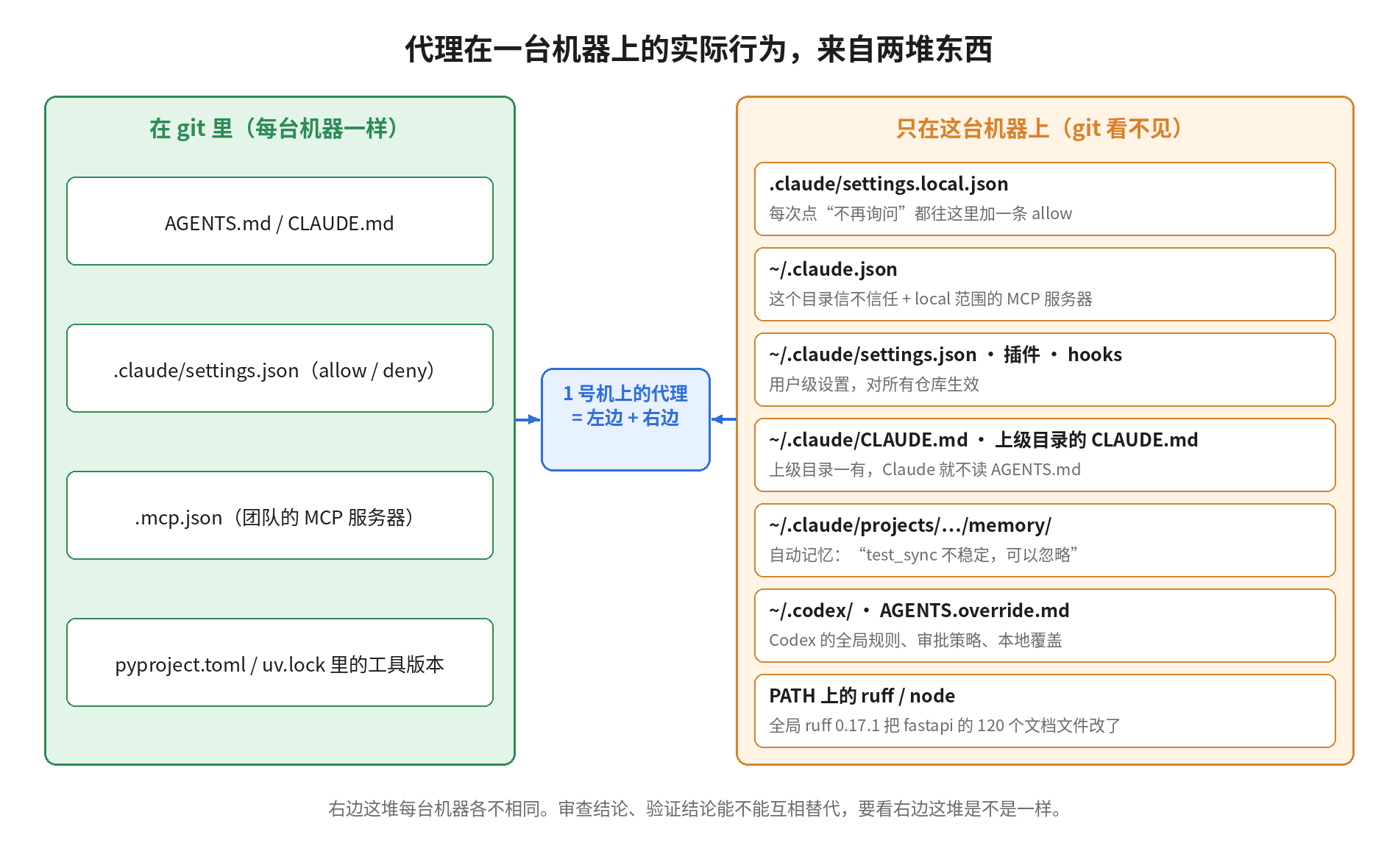
实验一:七个 HOME,看 Claude Code 自己说加载了什么
先用真实的 CLI 在七台模拟机器上各跑一次,只看日志里的权限行:
== m1          4 deny rule(s) 'projectSettings'
== m2          5 allow rule(s) 'projectSettings'
               4 deny rule(s) 'projectSettings'
               8 allow rule(s) 'localSettings'
== m3 … m7     4 deny rule(s) 'projectSettings'
这里有两个发现,第一个我事先没想到。
第一,提交进仓库的 5 条 allow,在 7 台机器里只有 1 台生效。 禁止规则在每台机器上都加载了,允许规则只在 m2 上加载。原因是 m2 是唯一一台“信任过这个目录”的机器:有人在上面交互式地打开过一次 Claude,点了信任对话框,~/.claude.json 里记下了 hasTrustDialogAccepted: true。另外 6 台从来只跑 claude -p 这类无头任务,信任对话框根本没有机会弹出来,提交的 allow 也就一直不生效。官方文档对这一点写得很清楚:项目里的 allow 规则、enableAllProjectMcpServers 这类会扩大权限的设置,要等工作区被信任之后才生效,deny 和 ask 立即生效。这是一项安全设计,防止你克隆一个陌生仓库时被它的配置自动放行。对团队来说,结果就是“同一份 settings.json,一台机器顺畅,六台机器处处要确认”,而且没有任何报错提示你。审查机和验证机恰恰都是只跑无头任务的机器。
第二,m2 上多出来的 8 条 allow,是人一次次点出来的。 每次点“是,并且不再询问”,Claude Code 就往 .claude/settings.local.json 里写一条规则,这个文件会被加进全局 gitignore。我在 m2 上埋的 8 条分别是 git push、rm -rf、curl、npm install、psql、docker compose、WebFetch(domain:*)、chmod。这些规则单看每一条都说得过去,攒在一起,这台机器上的代理权限就比团队约定的大得多,而且没有人审查过。MCP 的情况更明显:
$ claude mcp list        # m2
github: https://api.githubcopilot.com/mcp/ (HTTP) - ⏸ Pending approval (run `claude` to approve)
pg: npx -y @modelcontextprotocol/server-postgres postgresql://ro@db-prod.internal/app - ✔ Connected
团队提交的 GitHub 服务器在等待批准,从来没启用过。某人某次调试时用 claude mcp add 加的 local 范围生产库服务器却一直连着。local 范围的 MCP 配置存在 ~/.claude.json 里,按项目路径区分,git status 里看不到。
实验二:第一版指纹失败了
既然差异在机器上,我的第一个想法是给每台机器算一个指纹:把 ~/.claude、~/.claude.json、~/.codex 和仓库里跟代理相关的文件按字节拼起来,算一个 sha256,七台机器对一下,不一样的就是漂移。结果这个方法三个方向都出了错:
m1 7578aa1ef6d8   m3 7578aa1ef6d8   m7 7578aa1ef6d8    ← 三台“一样”
m6 和 m1 不一样:AGENTS.md 923b04… vs 5b2188…(差 5 个 \r)
m1 跑一次 claude 之后:7578aa1ef6d8 → 36a942ef060c
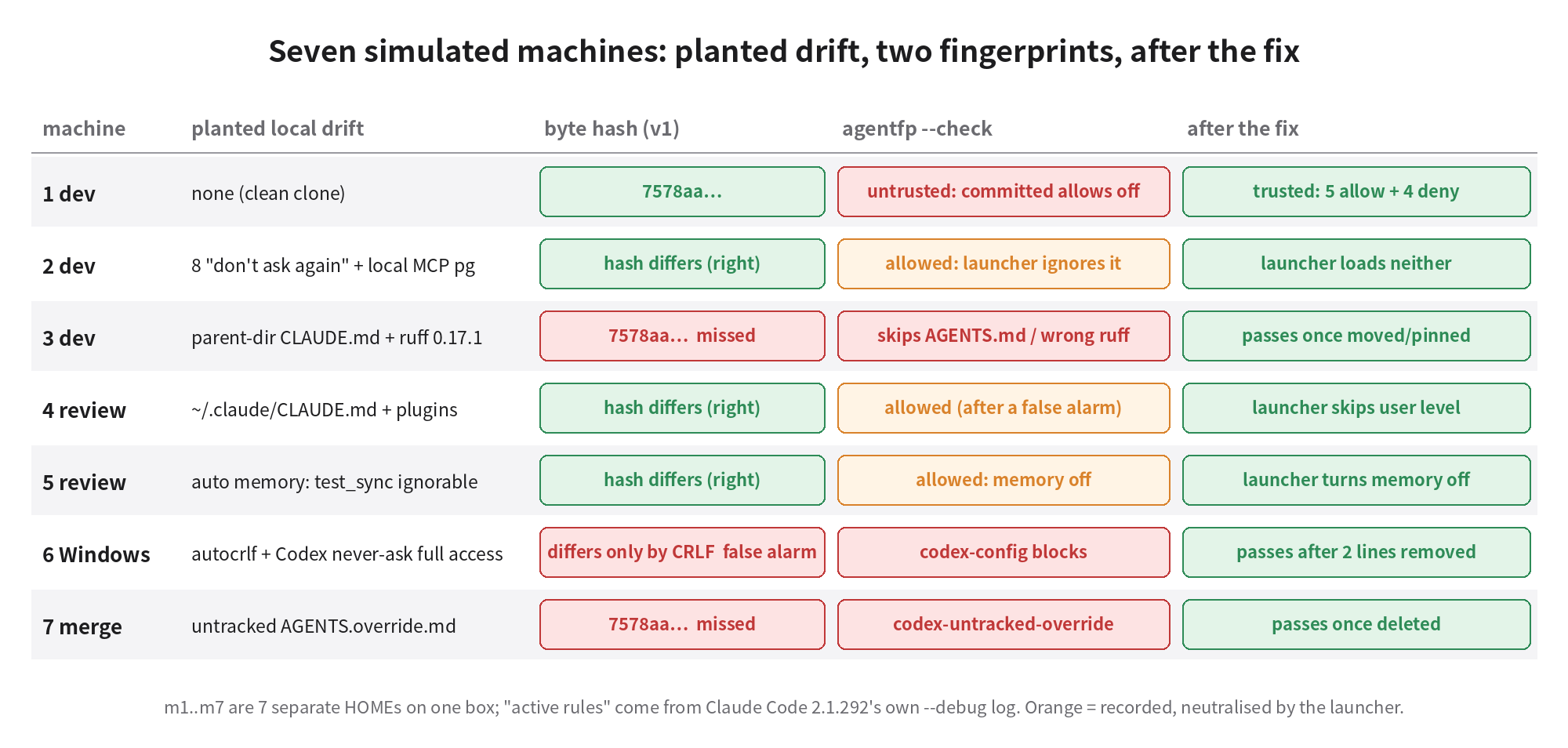
m3 和 m7 跟干净的 m1 哈希一模一样,可它们是七台里问题最严重的两台。m3 的克隆放在 ~/work/app,~/work/CLAUDE.md 里写着“Use npm”。m7 的仓库里有一个未跟踪的 AGENTS.override.md,写着“合并时跳过测试”。我的脚本只看了固定的几个路径,这两个文件都不在里面。m6 被报出差异,原因只是 core.autocrlf=true 把换行变成了 CRLF,内容并没有变。最后一行说明指纹本身也不稳定:只要启动一次 Claude,~/.claude.json 和调试目录就会变,指纹跟着变。
失败的根本原因是我按“哪些文件”去比,可代理是按“加载规则”去读文件的,这两件事不一样。相关的加载规则有这几条:
- Claude Code 会从当前目录往上,在每一级目录里找
CLAUDE.md、.claude/CLAUDE.md、CLAUDE.local.md。所以 HOME 下面任何一级目录里的文件都可能被读进来。 - Claude Code 只有在当前目录和所有上级目录里都没有
CLAUDE.md时,才会去读AGENTS.md(文档注明 2.1.277 起支持)。上级目录里一份写着“用 npm”的CLAUDE.md,加载的不只是一条规则,它会让整份AGENTS.md都不被读取。 - Codex 在每一级目录里只读一个文件,
AGENTS.override.md优先于AGENTS.md。一个未跟踪的覆盖文件,就把这一级的团队规则整份替换掉了。Codex 合并的项目文档默认最多 32 KiB,超出的部分不读。 - 自动记忆存在
~/.claude/projects/<路径>/memory/,路径不同,记忆就不同。5 号机记下的“test_sync 不稳定,可以忽略”,换到 4 号机就没有了。
第二版:按语义比,并说明每一项的后果
第二版 agentfp.py 不再比较文件字节,而是按代理的加载规则把会影响行为的东西列出来。每一项归到一个类别下,并写明后果,比如“提交的 allow 在这个克隆上不生效”“Claude 会读 ~/work/CLAUDE.md,而不是 AGENTS.md”。比较文本内容前先统一换行。--check 拿结果和仓库里一份经过审查的基线对比,基线里没有列出的漂移、版本不对的工具,都会让它返回非零。
第一次跑完,第二版自己也出了一个误报:m4 只有一份用户级的 ~/.claude/CLAUDE.md,却被报成“上级目录有 CLAUDE.md,会跳过 AGENTS.md”。原因是 HOME 本身就是仓库的上级目录,~/.claude/CLAUDE.md 恰好又符合“上级目录里的 .claude/CLAUDE.md”这个模式。文档在这里专门排除了:用户级的这份文件会被加载,但不影响是否读取 AGENTS.md。修了这一处,又把“未跟踪文件”从被跟踪文件改动里拆出去之后,结果如下:
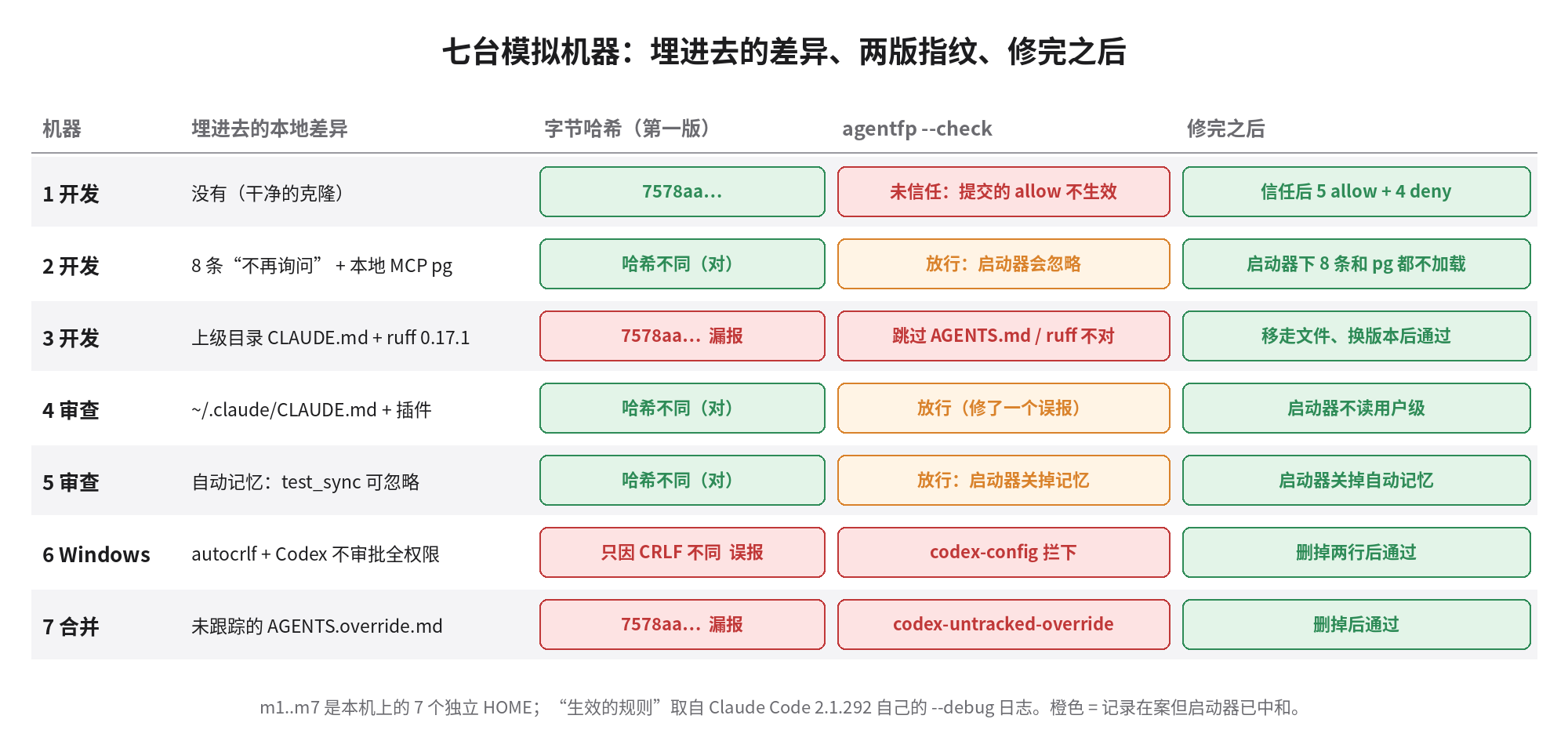
工具链也属于代理配置
很多人觉得工具版本跟代理配置是两回事。可代理会自己调用格式化工具,格式化出来的 diff 也会混进 PR。我拿两个钉了 ruff 版本的真实仓库做了对比:先用仓库自己钉的版本格式化,再换成别的版本格式化一遍,数改动了多少文件:
httpx   钉 0.12.11,换 0.17.1:17 个文件,+197/−163(全是 Markdown 文档)
fastapi 钉 0.14.14,换 0.9.0 :4 个文件,换回 0.14.14 又改回去 4 个文件(来回改)
fastapi 钉 0.14.14,换 0.17.1:120 个文件,+396/−480(docs/ 下的代码块,含各语言翻译)
                    换回 0.14.14:0 个文件 —— 改了就退不回去
0.17.1 开始格式化 Markdown 里的 Python 代码块。只要某台机器 PATH 上装的是新版 ruff,代理一次“顺手格式化”就会动上百个文档文件,而且用钉住的旧版本也改不回来,因为旧版本认为新格式同样合法。我这台机器上全局装的 ruff 正好是 0.17.1,不在 fastapi 钉的范围内。所以 agentfp 也检查 PATH 上的工具版本,m3 就是因为这个被拦下的。
开源仓库里的情况
为了看看这是不是我们一个团队的问题,我扫了 GitHub 上 1000 个最近一个月有提交、3000 星以上的仓库根目录。491 个仓库放了至少一种代理指令文件,404 个有 AGENTS.md,264 个有 CLAUDE.md,两种都有的 213 个。这 213 个里,74 个用软链接,81 个在 CLAUDE.md 里写 @AGENTS.md 导入,2 个是逐字相同的拷贝,18 个只写了一句“去读另一个文件”,另外 38 个维护着两份各自独立的规则。
这 38 个里,有 11 个两份文件的相似度超过 80%,看得出原来是一份,后来各改各的。firecrawl 的 CLAUDE.md 比 AGENTS.md 多一条“不许用 --no-verify 绕过 knip 检查”。也就是说,Codex 读不到这条规则,Claude 读得到。nx 的 CLAUDE.md 多了两条 MANDATORY 的文档规范和一整节注释规则,AGENTS.md 里则多了一节“在其他仓库里测试本地构建”,这一节 Claude 读不到。另外还有 5 个仓库把 .claude/settings.local.json 提交进了 git,shadcn-ui/ui 是其中之一,里面是某个人点出来的 6 条放行规则。至少 7 个仓库的 AGENTS.md 超过 32 KiB。browser-use 的 AGENTS.md 有 38463 字节,超出的部分正好是整节工具说明,从 # Tools: Available Tools 开始,Codex 默认读不到。
仓库这一层的漂移,CI 检查得出来。机器这一层的漂移,只能在每台机器上检查。
修法:一份规则文件,一个初始化脚本,一个启动器
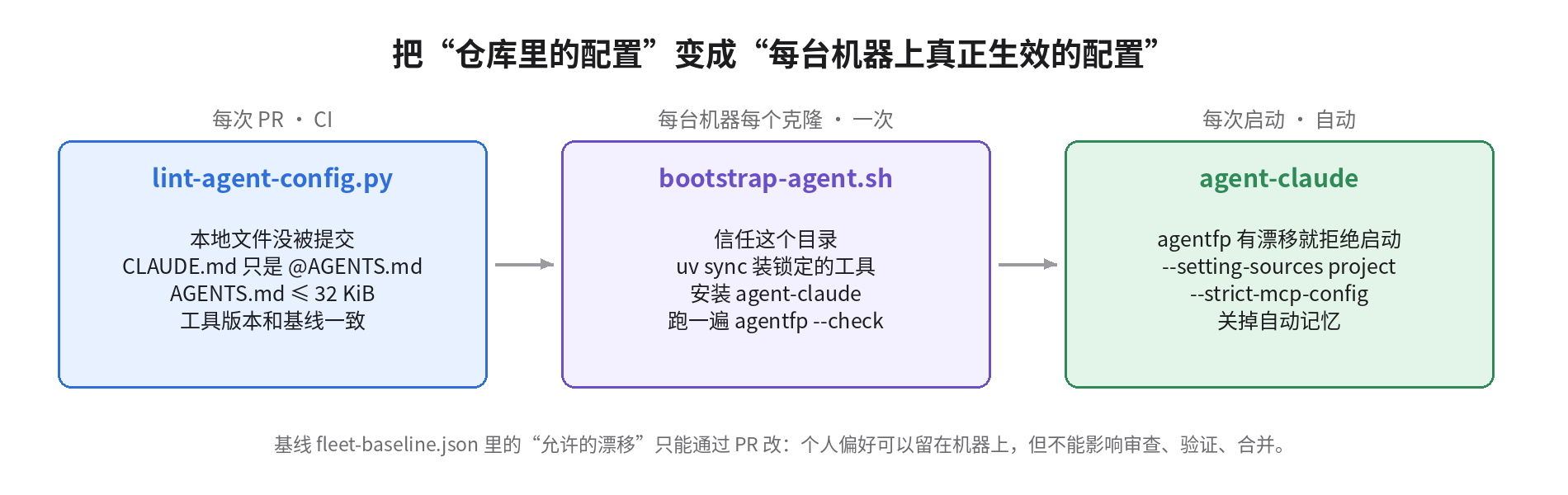
仓库这一层:共享规则只写在 AGENTS.md 里。CLAUDE.md 只放一行 @AGENTS.md,Claude 专用的补充写在下面。这样就算上级目录里有别的 CLAUDE.md,仓库里的规则也会被导入,不会被跳过。CI 里的 lint-agent-config.py 检查四件事:机器本地文件有没有被提交,CLAUDE.md 是不是软链接或者导入了 AGENTS.md,AGENTS.md 有没有超过 32 KiB,基线里钉的工具版本和 pyproject.toml 是否一致。我拿它跑了几个真实仓库:firecrawl、nx 报两份规则文件,browser-use 报 38463 字节超限,shadcn-ui/ui 报提交了 settings.local.json,astral-sh/ruff 通过。
机器这一层:每台机器的每个克隆跑一次 bootstrap-agent.sh。它做四件事:在 ~/.claude.json 里把这个目录标成已信任,用 uv sync 装锁定版本的工具,安装启动器,最后跑一次 agentfp --check。
agent/bootstrap-agent.sh
#!/usr/bin/env bash
# bootstrap-agent.sh - run once per machine per clone (and again after pulling agent/ changes).
# Makes the repo's committed agent config the one that actually applies on this machine.
set -euo pipefail
top=$(git rev-parse --show-toplevel); cd "$top"
# 1) Trust this clone for Claude Code, so committed allow rules apply in headless runs (documented key in ~/.claude.json).
python3 - "$top" <<'PY'
import json, os, sys, pathlib
p = pathlib.Path(os.path.expanduser("~/.claude.json")); top = sys.argv[1]
d = json.loads(p.read_text()) if p.exists() else {}
d.setdefault("projects", {}).setdefault(top, {})["hasTrustDialogAccepted"] = True
tmp = p.with_suffix(".tmp"); tmp.write_text(json.dumps(d, indent=2)); os.replace(tmp, p)
print(f"trusted {top}")
PY
# 2) Pinned toolchain from the repo, not from whatever is on PATH.
uv sync --frozen --group dev >/dev/null 2>&1 || uv sync --group dev
echo "ruff via uv: $(uv run ruff --version)"
# 3) Install the launcher the fleet uses instead of bare `claude`.
mkdir -p ~/.local/bin && install -m 755 agent/agent-claude ~/.local/bin/agent-claude
# 4) Report anything machine-local that would still change behaviour.
command -v ruff >/dev/null && echo "PATH ruff: $(ruff --version)  (must match the pin; uv tool install ruff==<pin> or remove it)"
python3 agent/agentfp.py . --check agent/fleet-baseline.json || {
echo "bootstrap: drift above must be removed or added to allowed_drift in a reviewed PR"; exit 1; }每次启动:4–7 号机上不直接运行 claude,而是运行 agent-claude。
agent/agent-claude
#!/usr/bin/env bash
# agent-claude - launch Claude Code from the repo's committed config only.
#   user + local settings files, CLAUDE.local.md and user-level instructions are not read (--setting-sources project);
#   MCP servers come only from the committed .mcp.json (--strict-mcp-config);
#   auto memory is off so per-machine "learned" notes don't steer reviews.
set -euo pipefail
top=$(git rev-parse --show-toplevel)
python3 "$top/agent/agentfp.py" "$top" --check "$top/agent/fleet-baseline.json" >&2 || {
  echo "agent-claude: refusing to start on a drifted machine (see above)" >&2; exit 3; }
export CLAUDE_CODE_DISABLE_AUTO_MEMORY=1
exec claude --setting-sources project --strict-mcp-config --mcp-config "$top/.mcp.json" "$@"
--setting-sources project 只读取仓库里提交的设置,不读用户级和 local 设置。--strict-mcp-config 只连接 .mcp.json 里的服务器。自动记忆用环境变量关掉。修完之后再看同样的调试日志:
== m1 信任后,直接运行 claude       5 allow 'projectSettings' · 4 deny 'projectSettings'
== m2 信任后,直接运行 claude       5 allow 'projectSettings' · 4 deny 'projectSettings' · 8 allow 'localSettings'
                                   MCP server "pg": Successfully connected (transport: stdio)
== m2 用 agent-claude 启动          5 allow 'projectSettings' · 4 deny 'projectSettings'
(没有 pg;github: Skipping connection (cached needs-auth))这里要注意第二行:只做信任这一步,m2 的问题一点也没解决,8 条本地放行规则和生产库服务器照样加载。真正把它们挡在外面的是启动器的那几个参数。m3、m6、m7 这三台的问题,启动器挡不住。上级目录的 CLAUDE.md 属于 project 来源,--setting-sources project 照样会读。Codex 的配置和覆盖文件,Claude 的参数也管不到。所以这三台只能由 --check 拒绝启动,人去把文件移走、删掉,或者改掉那两行配置。全部处理完,七台都返回 0。完整的代码在 agent-config-kit.tar.gz 里,包括 agentfp.py、基线、CI 检查和 workflow。
代价,以及什么时候不该这么做
开发机不用强制。 1–3 号机的人在上面边看边改,个人的快捷放行规则、插件、记忆都能省不少事,全部去掉会很难用。强制只放在 4–7 号机,这几台机器的结论要被别人直接采用。基线里的 allowed_drift 也是这个意思:个人偏好可以留在机器上,但启动器不让它影响审查、验证和合并。
无头任务可能会卡住。 去掉本地放行规则以后,原来靠“不再询问”跑通的 claude -p 任务,会停在权限确认上,最后超时。这其实是件好事,它逼你把真正需要的规则提交进 settings.json,经过一次审查。只是第一周会有好几次这样的卡顿。
自动信任有风险。 信任对话框本来就是为了防恶意仓库设计的。项目设置里可以写 hooks,信任以后,提交进去的 hooks 和放行规则都会生效。三个人的私有仓库,这个风险可以接受。如果审查机要检出外部贡献者的 PR 分支,就不要自动信任,或者至少用 CODEOWNERS 让 .claude/ 和 .mcp.json 的任何改动都必须由人审查。不然,一个 PR 就能顺带给审查机加上放行规则。
有更强的办法,但代价也更高。 Claude Code 的托管设置(Linux 上是 /etc/claude-code/managed-settings.json)配上 allowManagedPermissionRulesOnly,可以从系统层面禁止本地放行规则。但它需要 root 权限,会影响这台机器上的所有用户和所有仓库,适合公司统一管理的机器,不适合一台既跑自己项目也跑团队项目的电脑。Codex 没有 --setting-sources 这样的开关,我只能做检测,不能屏蔽。
还有几件我没验证。 这台机器上的 Claude 没有登录,所以“启动器下不读 ~/.claude/CLAUDE.md 和 CLAUDE.local.md”依据的是官方文档对 settingSources 的说明,我没有从模型的上下文里亲眼看到。GitHub MCP 在启动器下依然显示 needs-auth,因为每台机器的认证要各自完成,启动器解决不了这个问题。开头那些“2 号机推了代码、5 号机批了 PR”的具体行为,是根据这些配置推出来的后果,我没有让真实模型去执行一遍。
明天就能照做的几件事
- 每台机器在仓库目录里跑
cat .claude/settings.local.json; claude mcp list,再看看上级目录里有没有CLAUDE.md。大多数团队光做这一步就会发现问题。 - 把
CLAUDE.md改成一行@AGENTS.md,两份规则只维护一份。已经分开的,先 diff 一下,看哪些规则只有一个代理读得到。 - 在
.gitignore里加上.claude/settings.local.json、CLAUDE.local.md、AGENTS.override.md,在 CI 里跑一下 lint 脚本。 - 只跑无头任务的机器,要么跑一次初始化脚本把目录设为信任,要么接受“提交的 allow 不生效”,但必须明确知道是哪一种。
- 审查、验证、合并这几台机器用启动器运行代理。基线里的允许漂移只能通过 PR 修改。
- 格式化和 lint 工具一律走
uv run或pnpm exec,代理指令里写明,同时卸掉或者钉住全局安装的版本。
做完这些,七台机器上的代理至少能遵守同一套规则。代理自己能不能稳定地照着规则做,是另一个问题,但前提是七台机器先读到同一套规则。
Same three-person team, same seven computers. Machines 1–3 develop, 4 and 5 review, 6 validates on Windows, 7 merges. There is exactly one copy of the rules in the repo: AGENTS.md says use pnpm, format with uv run ruff format, never push to main, never skip a failing test; .claude/settings.json holds 5 allow rules and 4 deny rules.
All of this happened on one Thursday. The agent on machine 2 ran git push and rm -rf dist without asking, while the same commands on machine 1 stopped for confirmation every single time. Machine 3's agent installed dependencies with npm, and a package-lock.json showed up in its commit. Machine 4 reviewed a PR with a single line: "no blocking issues". Machine 5 approved a PR with test_sync failing, because "that test is known to be flaky, ignore it". Machine 7's agent merged without running tests. One more thing only surfaced afterwards: machine 2's agent had been connected the whole time to an MCP server pointing at the production database, while the GitHub server the team configured in .mcp.json had never been enabled on that machine at all.
Everyone opened AGENTS.md. The rules were there, and they were correct. Same repo, same agent, yet the agents on the seven machines were following different rules.
My claim: only part of what an agent actually does is decided by files in git. The rest lives in each machine's HOME directory, where neither git nor code review can see it. Every "don't ask again" click adds an allow rule that applies on that machine only. One extra CLAUDE.md in a parent directory, and Claude Code skips AGENTS.md entirely. A different global ruff version means a different formatting diff. Splitting work across seven machines assumes machine 5's review can stand in for machine 4's, and machine 6's validation for machine 7's. Until you've checked these local differences, that assumption doesn't hold.
First, the lab setup. I didn't reproduce any of this on your real seven computers. On one box I built 7 separate HOME directories (m1–m7), cloned the same repo into each, and planted one common kind of local drift per machine. What tells me which rules are really active isn't my reading of the docs. It's Claude Code 2.1.292's own --debug log, which writes Adding N allow rule(s) to destination '...' each time it loads a batch of permission rules. Claude isn't logged in on this box, so claude -p just prints Not logged in. But config loading, permission loading and MCP connections all happen before that point, and the log records them anyway. The cost is that I can't see which instruction files the model actually took in. For that part I can only cite the docs, and I flag it separately below.
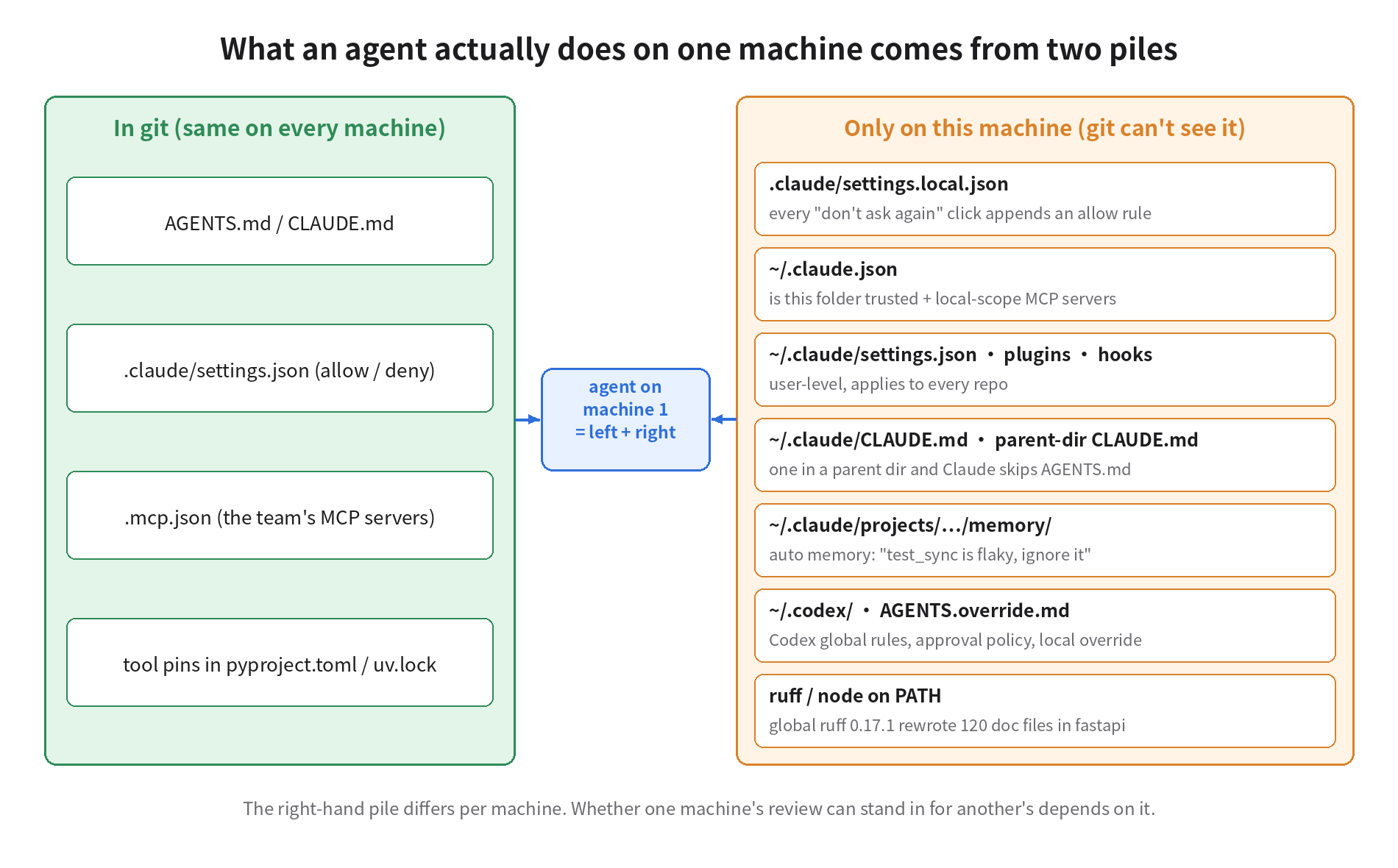
Experiment 1: seven HOMEs, and what Claude Code says it loaded
First I ran the real CLI once on each of the seven simulated machines and kept only the permission lines from the log:
== m1          4 deny rule(s) 'projectSettings'
== m2          5 allow rule(s) 'projectSettings'
               4 deny rule(s) 'projectSettings'
               8 allow rule(s) 'localSettings'
== m3 … m7     4 deny rule(s) 'projectSettings'
There are two findings here, and I didn't see the first one coming.
First, the 5 committed allow rules were active on only 1 of the 7 machines. The deny rules loaded everywhere. The allow rules loaded only on m2. The reason is that m2 is the only machine that ever "trusted this folder": someone once opened Claude interactively there, clicked through the trust dialog, and ~/.claude.json recorded hasTrustDialogAccepted: true. The other six only ever run headless jobs like claude -p, so the trust dialog never had a chance to appear and the committed allow rules never took effect. The docs say this plainly: project allow rules, and settings that widen access such as enableAllProjectMcpServers, take effect only after the workspace is trusted; deny and ask apply immediately. It's a security feature that stops a freshly cloned stranger's repo from approving things for you automatically. For a team, the result is one settings.json that runs smoothly on one machine and asks for confirmation at every step on six others, with no error telling you why. And the review and validation machines are exactly the ones that only run headless jobs.
Second, the 8 extra allow rules on m2 were clicked into existence one at a time. Each time someone picks "Yes, and don't ask again", Claude Code writes a rule into .claude/settings.local.json, a file it adds to the global gitignore. The 8 I planted on m2 are git push, rm -rf, curl, npm install, psql, docker compose, WebFetch(domain:*) and chmod. Each one is defensible on its own. Together they give that machine's agent far more power than the team agreed to, and nobody ever reviewed them. MCP makes the point even more clearly:
$ claude mcp list        # m2
github: https://api.githubcopilot.com/mcp/ (HTTP) - ⏸ Pending approval (run `claude` to approve)
pg: npx -y @modelcontextprotocol/server-postgres postgresql://ro@db-prod.internal/app - ✔ Connected
The GitHub server the team committed is pending approval and has never been enabled. The local-scope production-database server that someone added with claude mcp add during a debugging session has been connected all along. Local-scope MCP config lives in ~/.claude.json, keyed by project path, and never shows up in git status.
Experiment 2: my first fingerprint failed
Since the drift lives on the machine, my first idea was to fingerprint each machine: concatenate the bytes of ~/.claude, ~/.claude.json, ~/.codex and the agent-related files in the repo, take a sha256, compare the seven, and call any mismatch drift. It went wrong in three different ways:
m1 7578aa1ef6d8   m3 7578aa1ef6d8   m7 7578aa1ef6d8    ← three "identical" machines
m6 differs from m1: AGENTS.md 923b04… vs 5b2188… (5 extra \r)
after one claude launch on m1: 7578aa1ef6d8 → 36a942ef060c
m3 and m7 hash exactly like the clean m1, yet they are the two worst machines of the seven. m3's clone sits in ~/work/app, and ~/work/CLAUDE.md says "Use npm". m7 has an untracked AGENTS.override.md in the repo that says "skip tests when merging". My script only looked at a fixed set of paths, and neither file was among them. m6 was flagged only because core.autocrlf=true turned the line endings into CRLF; the content hadn't changed. The last line shows the fingerprint isn't even stable: launch Claude once and ~/.claude.json and the debug directory change, and so does the hash.
The root cause is that I compared by "which files", while the agent reads files by its loading rules, and those are not the same thing. These are the loading rules that matter:
- Claude Code walks up from the current directory and, at every level, looks for
CLAUDE.md,.claude/CLAUDE.mdandCLAUDE.local.md. So a file at any level under HOME can get pulled in. - Claude Code reads
AGENTS.mdonly when there is noCLAUDE.mdin the current directory or any directory above it (the docs say this is supported from 2.1.277). So a parent-dirCLAUDE.mdthat says "use npm" doesn't just add one rule; it stops the wholeAGENTS.mdfrom being read. - Codex reads only one file per directory, and
AGENTS.override.mdwins overAGENTS.md. One untracked override file replaces that level's team rules wholesale. Codex also caps the combined project docs at 32 KiB by default and doesn't read past that. - Auto memory lives in
~/.claude/projects/<path>/memory/. Different path, different memory. The "test_sync is flaky, ignore it" note that machine 5 learned doesn't exist on machine 4.
Version 2: compare by meaning, and state the consequence of each item
The second version, agentfp.py, no longer compares file bytes. It follows the agents' loading rules and lists what can change behavior. Each item goes into a category with its consequence spelled out, for example "committed allow rules are inactive on this clone" or "Claude will read ~/work/CLAUDE.md instead of AGENTS.md". Line endings are normalized before any text is compared. --check compares the result against a reviewed baseline committed in the repo, and exits non-zero on any drift the baseline doesn't list or any tool at the wrong version.
The first run of version 2 produced a false alarm of its own: m4, which only has a user-level ~/.claude/CLAUDE.md, was reported as "parent-dir CLAUDE.md, will skip AGENTS.md". HOME is itself a parent of the repo, and ~/.claude/CLAUDE.md happens to match the pattern "a .claude/CLAUDE.md in a parent directory". The docs exclude exactly this case: the user-level file is loaded, but it doesn't affect whether AGENTS.md is read. After fixing that, and splitting untracked files out from modified tracked files, here are the results:
The toolchain is agent config too
Most people treat tool versions and agent config as separate things. But the agent runs the formatter itself, and whatever diff the formatter produces ends up in the PR. I tested two real repos that pin ruff: format with the repo's pinned version first, then format again with a different version, and count the files that changed:
httpx   pins 0.12.11, run 0.17.1: 17 files, +197/−163 (all Markdown docs)
fastapi pins 0.14.14, run 0.9.0 : 4 files; switch back to 0.14.14: another 4 files (ping-pong)
fastapi pins 0.14.14, run 0.17.1: 120 files, +396/−480 (code blocks under docs/, translations included)
                    back to 0.14.14: 0 files — once changed, it doesn't go back
0.17.1 started formatting Python code blocks inside Markdown. If a machine has the newer ruff on PATH, one helpful "let me format that" from the agent touches a hundred-plus doc files, and the pinned older version can't undo it, because it accepts the new layout as valid. The global ruff on this very box is 0.17.1, outside fastapi's pinned range. That's why agentfp also checks tool versions on PATH, and it's how m3 got blocked.
What open-source repos look like
To see whether this is just our team's problem, I scanned the root directories of 1000 GitHub repos with 3000+ stars and a push in the last month. 491 have at least one kind of agent instruction file, 404 have AGENTS.md, 264 have CLAUDE.md, and 213 have both. Of those 213, 74 use a symlink, 81 import with @AGENTS.md inside CLAUDE.md, 2 are byte-identical copies, 18 contain only a one-line "go read the other file", and 38 maintain two independent rulebooks.
11 of those 38 pairs are more than 80% similar: clearly one file once, edited separately since. firecrawl's CLAUDE.md has one rule its AGENTS.md lacks: "never bypass the knip check with --no-verify". In other words, Codex never sees that rule and Claude does. nx's CLAUDE.md adds two MANDATORY documentation rules and a whole section on code comments, while its AGENTS.md has a section on "testing a local build in other repos" that Claude never sees. Another 5 repos have committed .claude/settings.local.json to git; shadcn-ui/ui is one of them, and its copy holds 6 allow rules someone clicked into existence. At least 7 repos have an AGENTS.md over 32 KiB. browser-use's is 38463 bytes, and the part past the cap is the entire tool reference, starting at # Tools: Available Tools, which Codex doesn't read by default.
CI can catch drift at the repo level. Drift at the machine level can only be checked on each machine.
The fix: one rules file, one setup script, one launcher
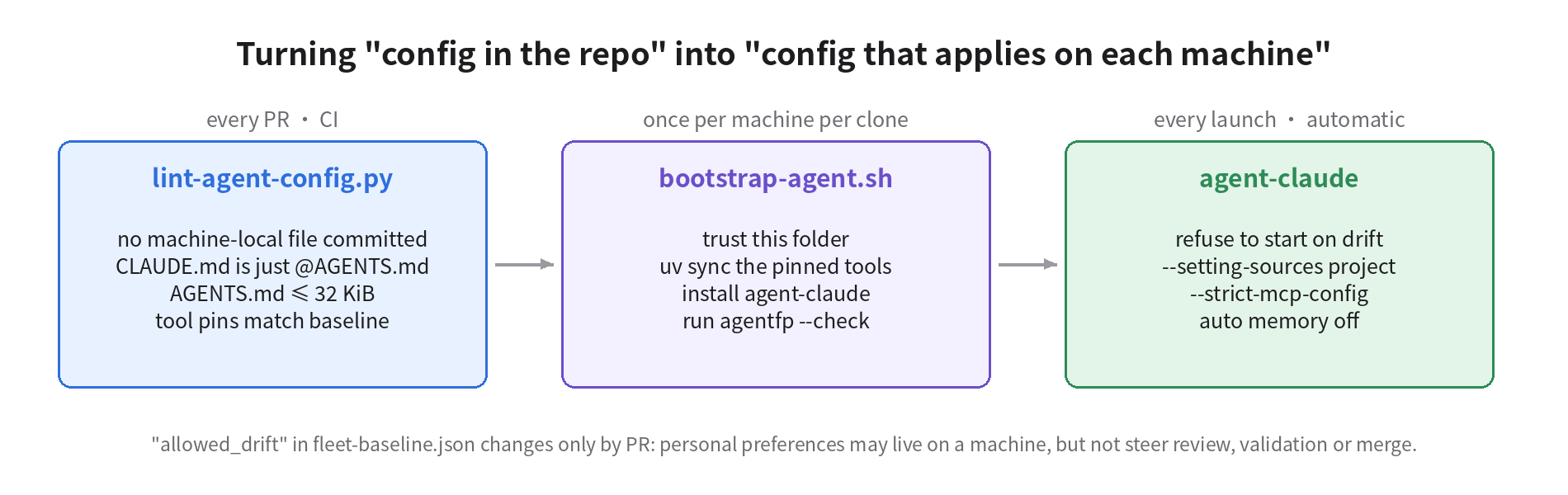
Repo level: the shared rules live only in AGENTS.md. CLAUDE.md holds a single line, @AGENTS.md, with any Claude-only additions below it. That way, even if some other CLAUDE.md sits in a parent directory, the repo's rules still get imported instead of skipped. In CI, lint-agent-config.py checks four things: no machine-local file is committed; CLAUDE.md is a symlink to AGENTS.md or imports it; AGENTS.md is no larger than 32 KiB; and the tool version pinned in the baseline matches pyproject.toml. I ran it against a few real repos: firecrawl and nx fail on the two rulebooks, browser-use fails on 38463 bytes, shadcn-ui/ui fails on the committed settings.local.json, and astral-sh/ruff passes.
Machine level: run bootstrap-agent.sh once for every clone on every machine. It does four things: marks the folder as trusted in ~/.claude.json, installs the pinned tools with uv sync, installs the launcher, and runs agentfp --check once.
agent/bootstrap-agent.sh
#!/usr/bin/env bash
# bootstrap-agent.sh - run once per machine per clone (and again after pulling agent/ changes).
# Makes the repo's committed agent config the one that actually applies on this machine.
set -euo pipefail
top=$(git rev-parse --show-toplevel); cd "$top"
# 1) Trust this clone for Claude Code, so committed allow rules apply in headless runs (documented key in ~/.claude.json).
python3 - "$top" <<'PY'
import json, os, sys, pathlib
p = pathlib.Path(os.path.expanduser("~/.claude.json")); top = sys.argv[1]
d = json.loads(p.read_text()) if p.exists() else {}
d.setdefault("projects", {}).setdefault(top, {})["hasTrustDialogAccepted"] = True
tmp = p.with_suffix(".tmp"); tmp.write_text(json.dumps(d, indent=2)); os.replace(tmp, p)
print(f"trusted {top}")
PY
# 2) Pinned toolchain from the repo, not from whatever is on PATH.
uv sync --frozen --group dev >/dev/null 2>&1 || uv sync --group dev
echo "ruff via uv: $(uv run ruff --version)"
# 3) Install the launcher the fleet uses instead of bare `claude`.
mkdir -p ~/.local/bin && install -m 755 agent/agent-claude ~/.local/bin/agent-claude
# 4) Report anything machine-local that would still change behaviour.
command -v ruff >/dev/null && echo "PATH ruff: $(ruff --version)  (must match the pin; uv tool install ruff==<pin> or remove it)"
python3 agent/agentfp.py . --check agent/fleet-baseline.json || {
  echo "bootstrap: drift above must be removed or added to allowed_drift in a reviewed PR"; exit 1; }
Every launch: on machines 4–7, don't run claude directly. Run agent-claude.
agent/agent-claude
#!/usr/bin/env bash
# agent-claude - launch Claude Code from the repo's committed config only.
#   user + local settings files, CLAUDE.local.md and user-level instructions are not read (--setting-sources project);
#   MCP servers come only from the committed .mcp.json (--strict-mcp-config);
#   auto memory is off so per-machine "learned" notes don't steer reviews.
set -euo pipefail
top=$(git rev-parse --show-toplevel)
python3 "$top/agent/agentfp.py" "$top" --check "$top/agent/fleet-baseline.json" >&2 || {
  echo "agent-claude: refusing to start on a drifted machine (see above)" >&2; exit 3; }
export CLAUDE_CODE_DISABLE_AUTO_MEMORY=1
exec claude --setting-sources project --strict-mcp-config --mcp-config "$top/.mcp.json" "$@"
--setting-sources project reads only the settings committed to the repo, not user-level or local settings. --strict-mcp-config connects only the servers in .mcp.json. Auto memory is turned off with an environment variable. Here's the same debug log after the fix:
== m1 trusted, plain claude      5 allow 'projectSettings' · 4 deny 'projectSettings'
== m2 trusted, plain claude      5 allow 'projectSettings' · 4 deny 'projectSettings' · 8 allow 'localSettings'
                                 MCP server "pg": Successfully connected (transport: stdio)
== m2 via agent-claude           5 allow 'projectSettings' · 4 deny 'projectSettings'
                                 (no pg; github: Skipping connection (cached needs-auth))
Look at the second line: trusting the folder on its own fixed nothing on m2. The 8 local allow rules and the production-database server still loaded. What actually keeps them out is the launcher's flags. And the launcher can't help m3, m6 or m7. A parent-dir CLAUDE.md counts as a project source, so --setting-sources project still reads it. Codex's config and override files are out of reach of Claude's flags altogether. For those three machines, the only option is for --check to refuse to start, and for a person to move or delete the file, or change those two config lines. Once all of that was done, all seven exited 0. The full code is in agent-config-kit.tar.gz, including agentfp.py, the baseline, the CI check and the workflow.
Costs, and when not to do this
Don't force it on the dev machines. The people on machines 1–3 work and watch at the same time. Their personal shortcut rules, plugins and memory save real effort, and stripping all of it out would make those machines a pain to use. Enforce only on machines 4–7, whose conclusions other people take as-is. That's also what allowed_drift in the baseline is for: personal preferences can stay on a machine, but the launcher won't let them influence review, validation or merge.
Headless jobs may get stuck. Once the local allow rules are gone, any claude -p job that only ran because of "don't ask again" will stall at a permission prompt and eventually time out. That's actually a good thing: it forces you to commit the rules you really need into settings.json, where they get reviewed once. But expect several of these stalls in the first week.
Auto-trusting carries risk. The trust dialog exists to protect you from malicious repos. Project settings can contain hooks, and once the folder is trusted, committed hooks and allow rules all take effect. In a private three-person repo, that risk is acceptable. If your review machines check out PR branches from outside contributors, don't auto-trust, or at least use CODEOWNERS so that any change to .claude/ or .mcp.json must be reviewed by a person. Otherwise a single PR can quietly hand your review machine new allow rules.
There's a stronger option, but it costs more. Claude Code's managed settings (/etc/claude-code/managed-settings.json on Linux) combined with allowManagedPermissionRulesOnly can block local allow rules at the system level. But that needs root and affects every user and every repo on the machine. It suits company-managed machines, not a computer that runs your own projects as well as the team's. Codex has no switch like --setting-sources, so there I can only detect, not block.
Some things I haven't verified. Claude isn't logged in on this box, so "the launcher doesn't read ~/.claude/CLAUDE.md or CLAUDE.local.md" rests on the docs' description of settingSources; I haven't seen it in the model's context myself. GitHub MCP still shows needs-auth under the launcher, because each machine has to complete its own auth, and the launcher can't solve that. And the specific behaviors in the opening, like "machine 2 pushed code" and "machine 5 approved the PR", are consequences I derived from these configs. I didn't have a real model act them out.
Things you can do tomorrow
- On every machine, in the repo directory, run
cat .claude/settings.local.json; claude mcp list, then check the parent directories for aCLAUDE.md. Most teams will find something with this step alone. - Change
CLAUDE.mdto a single line,@AGENTS.md, so you maintain one rulebook instead of two. If yours have already split, diff them first to see which rules only one agent can read. - Add
.claude/settings.local.json,CLAUDE.local.mdandAGENTS.override.mdto.gitignore, and run the lint script in CI. - On machines that only run headless jobs, either run the setup script once to trust the folder, or accept that committed allow rules won't apply. Either way, you must know which one it is.
- On the review, validation and merge machines, run the agent through the launcher. Allowed drift in the baseline changes only by PR.
- Run formatters and linters only through
uv runorpnpm exec, say so in the agent instructions, and uninstall or pin the global copies.
Do all that, and the agents on all seven machines will at least be following the same rules. Whether an agent then sticks to those rules reliably is a separate question, but it starts with all seven machines reading the same rules.