还是那个三人团队。1、2、3 号机是 Mac 和 Linux,上面的 Claude Code、Codex 一天开十几个 PR;6 号机是团队里唯一一台 Windows,平时没人坐在它前面。
一个很典型的周一:1 号机的代理交了一个 PR:给内部 CLI 加日志轮转,顺手补了一个快照测试,又把 package.json 里的 build 改成 NODE_ENV=production node scripts/build.mjs。本机测试全绿,Linux CI 全绿,4 号机审过,合了。周三,用中文 Windows 的同事更新代码,第一条命令就报 'NODE_ENV' is not recognized as an internal or external command。他手动绕过去,又撞上 UnicodeDecodeError: 'gbk' codec can't decode。去 6 号机复现,日志轮转那一步报 PermissionError: [WinError 32]。三个错,出自同一个 PR,但这时主干上已经又合了二十多个 PR,没人记得是哪个代理、在哪台机器上写的。
我的判断:Windows 验证要做成合并前的硬闸门,分两层。 第一层放在 Linux 上,一分钟以内,用静态检查挡掉那些不用跑也知道会炸的写法;第二层让 6 号机真跑测试,而且要把它配置得像组员和用户的 Windows,别把它调教成一台什么都顺的 CI。两层的结果汇总到一个 gate job,规则集里只把它设成必过检查。
这篇文章的结论都来自一个可复现的实验。我写了一个小项目,故意放进代理常写的十种 Windows 不兼容写法,外加三种 Windows 上检出不了的文件名,在 GitHub Actions 的 ubuntu-latest 和 windows-latest 上各跑一遍,再在 Windows 上换 Python 3.13 和 3.15 各跑一遍。然后写了修复版和一套可以直接放进仓库的检查。哪些是真机跑的、哪些是模拟的,文末逐项说明。
实验:同一份代码,Ubuntu 10 项全过,Windows 挂 8 项
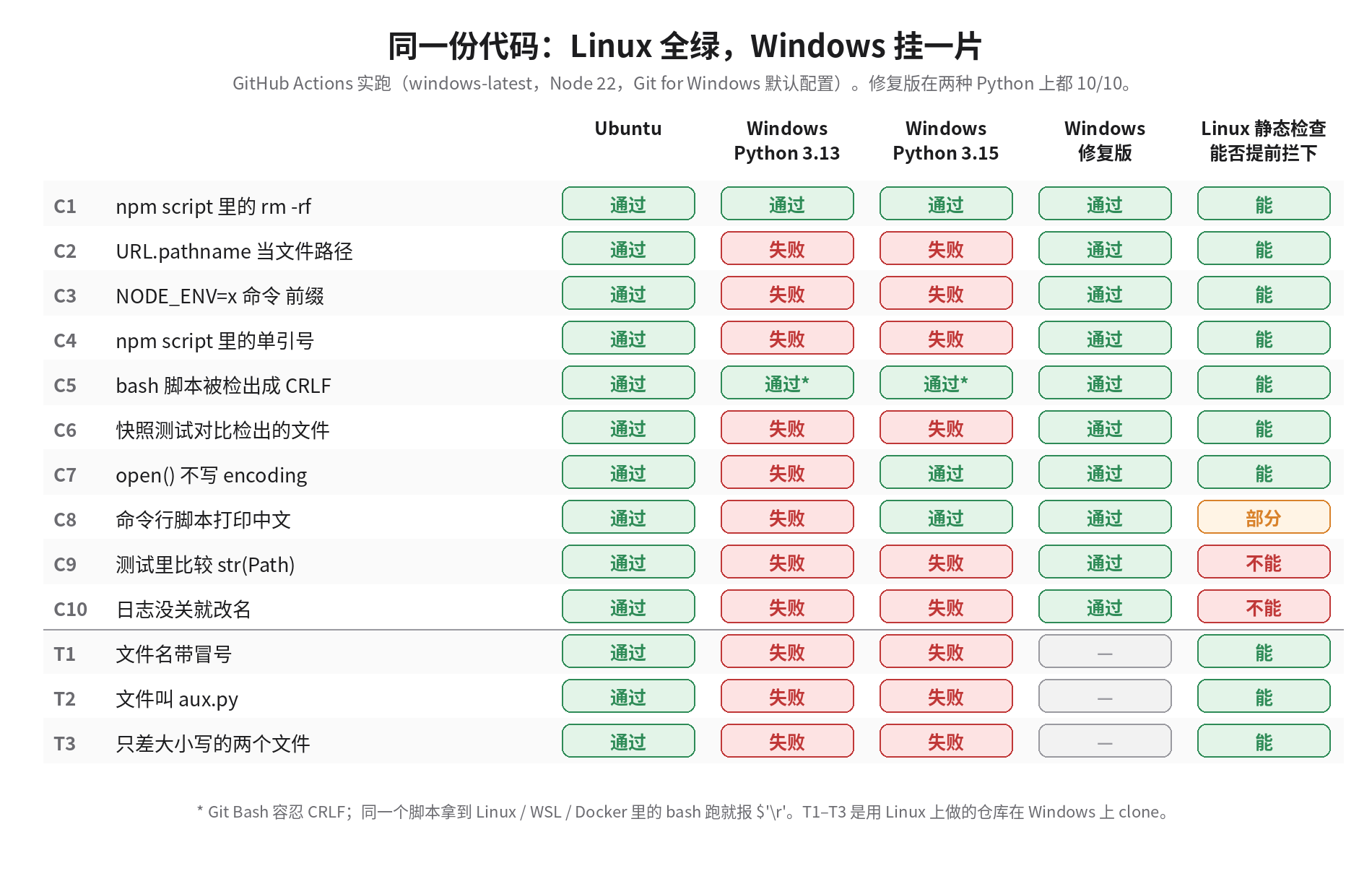
每一项都是一个代理很可能写出来、在 Mac 和 Linux 上又挑不出毛病的写法。挑几条 Windows 上的原始报错:
C2  path: 'D:\\D:\\a\\pages\\pages\\lab\\before\\config.json'
C3  'NODE_ENV' is not recognized as an internal or external command,
C4  pattern arrived with literal quotes: 'src/**/*.js'
C7  UnicodeDecodeError: 'charmap' codec can't decode byte 0x81 in position 34
C9  - dist/index.txt
    + dist\index.txt
C10 PermissionError: [WinError 32] The process cannot access the file because
    it is being used by another process: '...\\agent.log'
T1  error: invalid path 'snapshots/run-2026-10-21T10:00.json'
    fatal: unable to checkout working tree
两个结果和我的预期不一样,比失败的那几项更值得说。
第一,rm -rf dist 在 windows-latest 上通过了。GitHub 的 Windows 镜像把 Git 自带的一组 Unix 工具放进了 PATH,cmd.exe 能找到 rm。组员的 Windows 就未必如此:Git for Windows 安装时默认只把 git 本身加进 PATH。托管 runner 为了方便装了很多东西,于是它比真实用户的机器更宽容。
第二,CRLF 的 bash 脚本在 Windows 上也通过了,因为 Git Bash 会容忍行尾的 \r。可同一份检出的文件,被拷进 Docker 镜像、或者在 WSL 里跑,就是另一回事。我在 Linux 上用 core.autocrlf=true 克隆同一个仓库,脚本当场报 set: pipefail\r: invalid option name;连我自己写的测试脚本 run-checks.sh 也挂了,报 syntax error: unexpected end of file。只看 Windows 原生环境的检查,测不出这种跨环境的问题。
这两条加在一起,就是为什么 6 号机值得留着:托管 runner 能抓住一大半问题,但它的配置和你的用户不一样,剩下那部分正好落在差异里。
为什么会坏:四个根源
十几种症状,归下来只有四个根源。搞清楚根源,才知道哪些能靠静态检查挡,哪些只能真跑。
行尾:每台机器各自决定,仓库没说话
Windows runner 的环境输出里有一行:file:C:/Program Files/Git/etc/gitconfig true。这是 Git for Windows 的系统级默认:core.autocrlf=true,提交时转成 LF,检出时转成 CRLF。仓库里存的 blob 是 LF,到了工作区每行末尾多一个 \r。
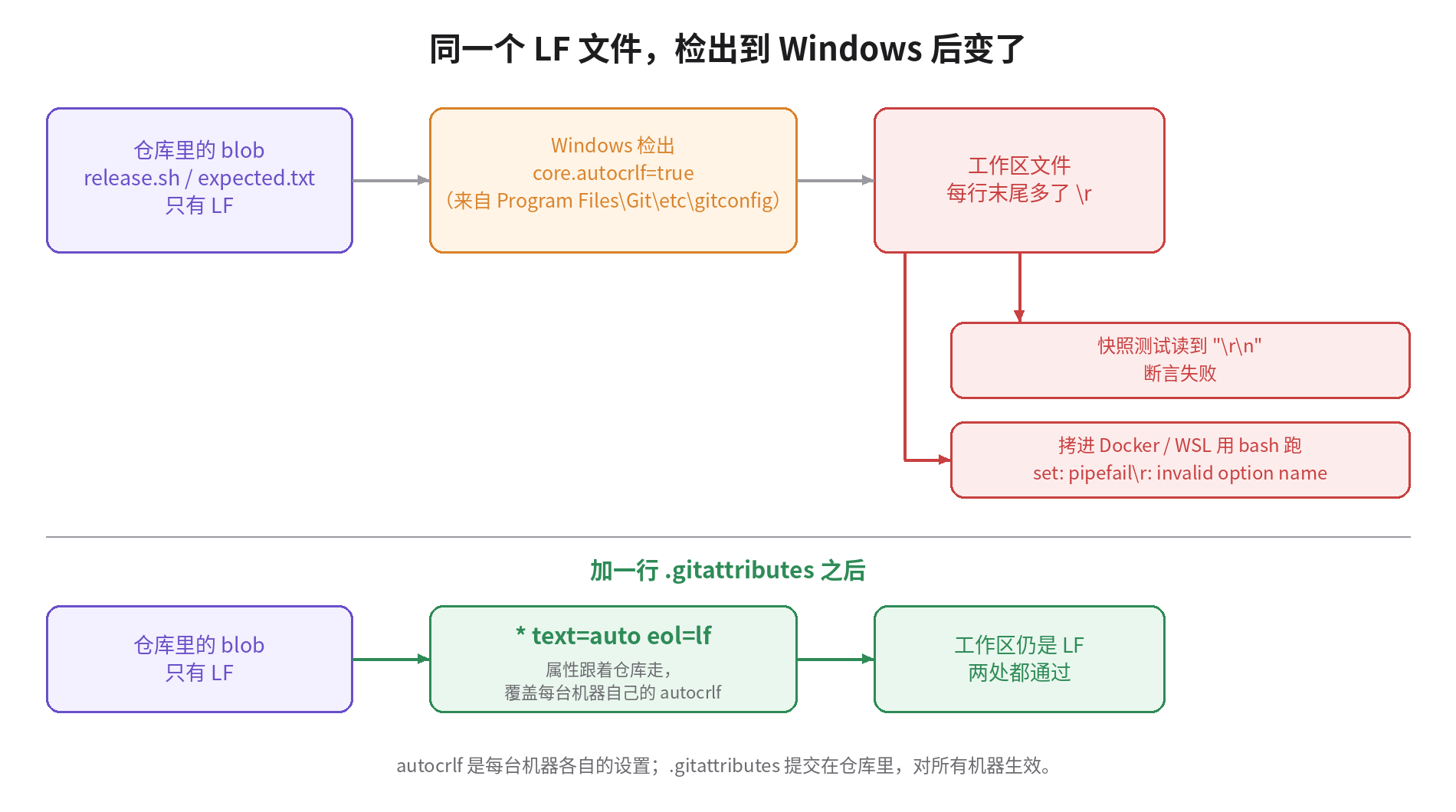
git ls-files --eol 把这件事看得很清楚。同一次检出,修复前后的两个文件:
i/lf    w/crlf  attr/                       lab/before/scripts/release.sh
i/lf    w/lf    attr/text=auto eol=lf       lab/after/scripts/release.sh
i/ 是仓库里的,w/ 是工作区里的,attr/ 是仓库有没有表态。前一个文件仓库没表态,于是由每台机器的 autocrlf 决定;后一个文件仓库说了 eol=lf,哪台机器检出都是 LF。autocrlf 写在每个人的电脑里,.gitattributes 提交在仓库里,后者优先。
AI 代理让这件事更乱。Claude Code 的 issue 区今年有好几条相关报告:Edit 工具在 Windows 上把没改动的行也从 CRLF 改成 LF(#62713),代理用 sed -i 编辑文件时悄悄转换行尾、一个 XML 清单因此坏掉、调了四个小时(#63715)。后一条里报告者还写了一句:平台说明里已经警告过,模型并不总是照做。三台开发机上跑着不同的代理和不同的工具,行尾的规矩只能写进仓库,指望不了每个代理自觉。
修法是一个 .gitattributes,加完之后跑一次 git add --renormalize . 把已有文件规范化:
.gitattributes
# 仓库里一律存 LF;工作区也一律 LF,不管谁的 core.autocrlf 是什么
* text=auto eol=lf
# 只给 Windows 原生脚本 CRLF
*.ps1 text eol=crlf
*.cmd text eol=crlf
*.bat text eol=crlf
# 二进制别碰
*.png binary
*.jpg binary
*.zip binary.ps1、.cmd、.bat 单独设成 CRLF,因为它们本来就只在 Windows 上跑,而 cmd.exe 在 LF 行尾下处理 goto 标签有已知问题。有些 Windows 原生工具链(比如 Delphi 工程文件)也要求 CRLF,同样按扩展名单列。
编码:Python 3.15 之前,open() 跟着系统走
open(path) 不写 encoding,Python 用系统的区域编码。Linux 和 Mac 几乎都是 UTF-8,所以开发机上永远没事。windows-latest 是英文系统,代码页 1252,我的实验里报 'charmap' codec can't decode byte 0x81。中文 Windows 是代码页 936,也就是 GBK。手边没有中文 Windows,我在 Linux 上生成 zh_CN.GBK 区域重现了同一个机制,报的是开头那位同事看到的 'gbk' codec can't decode。
有一个新变化。Python 3.15 在 10 月 9 日发布,按 PEP 686 把 UTF-8 设成了默认编码。实验里同一份有问题的代码,在 Windows 上换成 3.15,C7、C8 两项就通过了。这不代表问题消失:你的用户和组员什么时候升到 3.15,你说了不算。它真正的含义是,同一个 bug 出不出现,取决于用户机器上的 Python 版本。6 号机要跑用户实际在用的版本,代码里照样要写 encoding="utf-8"。
静态检查能抓住大部分这类写法:ruff 的 PLW1514 规则专门查没写 encoding 的 open()。我实际跑的时候踩了个坑:直接 --select PLW1514,ruff 0.17 只打印一句 Selection PLW1514 has no effect because preview is not enabled,然后报告全部通过。要加 --preview 它才真的检查。
路径和 shell:npm 在 Windows 上用 cmd.exe
后面三条是 Node 项目里最常见的。npm 在 Windows 上默认用 cmd.exe 执行 scripts,实验里 npm config get script-shell 输出的是 null,也就是默认值。cmd.exe 不认 VAR=值 命令 这种前缀,也不把单引号当引号,'src/**/*.js' 会连引号一起传给程序。
new URL('../config.json', import.meta.url).pathname 在 Linux 上得到 /home/.../config.json,在 Windows 上得到 /D:/a/.../config.json,Node 再把它解析成 D:\D:\a\...。正确的写法是 fileURLToPath()。Python 那边对应的是在测试里比较 str(path):Windows 上 str(Path("dist") / "index.txt") 是 dist\index.txt。
文件系统:锁、保留名、大小写
剩下的几项和代码写法无关,是文件系统本身的语义不同。
Windows 上,一个文件被打开着就不能改名或删除。实验里的日志轮转函数在 FileHandler 还开着的时候调用 os.replace,Linux 上没事,Windows 上报 WinError 32。这类错误静态检查基本抓不到,只能真跑。
文件名有三种情况,在 Linux 上随便提交,到了 Windows 就出事。我在 Linux 上造了一个仓库,里面有 snapshots/run-2026-10-21T10:00.json(代理很爱用 ISO 时间戳给快照命名)、tools/aux.py、以及只差大小写的 docs/README.md 和 docs/readme.md,然后在 Windows 上 clone。结果是冒号那个文件让整个检出失败:fatal: unable to checkout working tree,clone 返回 128,工作区一个文件都没有,git status 里四个文件全显示删除。大小写那一对在单独的测试里检出成功,但只留下一个文件,git status 从此永远显示 M docs/README.md。Mac 默认的 APFS 也不区分大小写,所以这一条连 Mac 开发机都会中招。
为什么代理写的代码更容易这样坏
人写代码也会犯这些错,但代理有三个特点把概率放大了。
代理在哪台机器上跑,就按哪台机器验证。它在 Mac 上写完代码跑测试,测试全绿,它就认为完成了。它没有理由去想 Windows,除非有一个检查在 PR 上把它拦下来。
代理的训练数据里,POSIX 的写法占绝对多数。rm -rf、VAR=value cmd、open(path) 是它最顺手的写法,也是在 Linux 上永远测不出问题的写法。
速度放大了发现太晚的代价。三个人一天合二三十个 PR,Windows 问题两天后才被发现,要在四五十个提交里二分查找。合并前拦下来,代价是那个代理再改一轮;合并后才发现,代价是一个人半天。
在 AGENTS.md 里写一段 Windows 规则当然有用,套件里也附了一份,但上面那条 issue 已经说明了,规则写了不等于每次都照做。规则只能降低出错率,真正拦住的还得是检查。
方案:两层检查,一个闸门
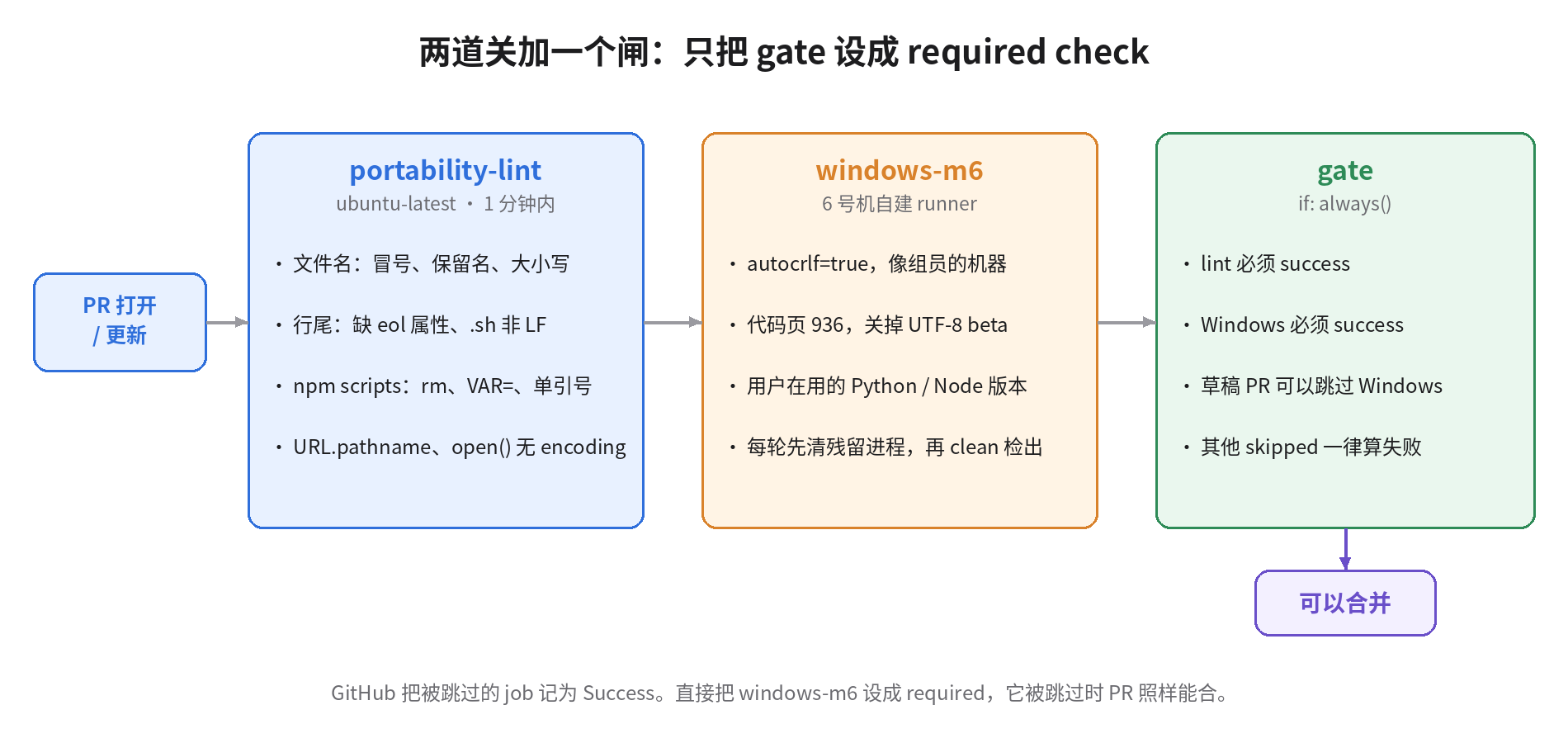
第一层:Linux 上的可移植性检查
scripts/win-portability-check.py 只看 git 里已跟踪的文件,不需要 Windows,一秒内跑完。它查五类问题:文件名(保留名、非法字符、结尾的点和空格、过长的路径)、只差大小写的路径、行尾属性、package.json 里只能在 POSIX shell 下跑的 scripts、JS 里的 URL.pathname 和字符串拼路径。输出是 GitHub Actions 的注解格式,问题会直接标在 PR 的文件上。对修复前的项目跑一遍,真实输出是:
::error file=config.json::没有 eol 属性:检出时的行尾取决于每台机器的 core.autocrlf。在 .gitattributes 里加 '* text=auto eol=lf'
::error file=scripts/release.sh::shell 脚本没有 eol=lf;Windows 检出成 CRLF 后 bash 会报 $'\r': command not found
::error file=package.json::scripts.clean = 'rm -rf dist && mkdir dist':POSIX 命令,npm 在 Windows 上用 cmd.exe 跑脚本
::error file=package.json::scripts.stamp = 'NODE_ENV=production node scripts/stamp.mjs':VAR=值 前缀是 sh 语法,cmd.exe 不认
::error file=package.json::scripts.lint = "node scripts/count.mjs 'src/**/*.js'":单引号在 cmd.exe 里不是引号,会原样传给程序
::error file=scripts/build.mjs,line=3::URL.pathname 在 Windows 上是 /C:/...,用 fileURLToPath()
对修复版输出 win-portability-check: OK。对那个含冒号、aux.py 和大小写冲突的仓库,三条全部报出来。加上 ruff 的 PLW1514,十三种问题里静态检查能提前拦下十种。拦不下的是 str(Path) 的比较、文件锁和控制台输出编码,这些只有在 Windows 上跑起来才看得到。
这一层的价值在于便宜和快。它在 Linux 上跑,不占 6 号机;它把问题标在具体的行上,代理读到注解就能自己改,不用等人。
第二层:把 6 号机配置得像用户的电脑
6 号机注册成仓库的自建 runner,标签 m6。下面这个脚本在 6 号机上用管理员 PowerShell 跑一次:
scripts/setup-m6-runner.ps1
<#
在 6 号机(Windows)上用管理员 PowerShell 跑一次,把它注册成本仓库的自建 runner。
Token 在 仓库 Settings → Actions → Runners → New self-hosted runner 页面里拿,一小时内有效。
用法:.\setup-m6-runner.ps1 -Repo https://github.com/OWNER/REPO -Token XXXXX
#>
param(
  [Parameter(Mandatory)][string]$Repo,
  [Parameter(Mandatory)][string]$Token,
  [string]$Dir = 'C:\actions-runner'   # 短路径:工作目录越深,越早撞上 260 字符
)
$ErrorActionPreference = 'Stop'

# 1. 让 git 的行为和组员的 Windows 一样。Git for Windows 安装器默认 autocrlf=true;
#    用 --system 是因为服务账户读不到你个人的 ~/.gitconfig。
git config --system core.autocrlf true
# 长路径保持默认(关):组员的机器没开,6 号机开了就会把问题藏起来。
Write-Host "core.longpaths =" (git config --system --get core.longpaths)

# 2. 代码页:中文 Windows 是 936(GBK)。65001 说明开了"Beta: 使用 UTF-8 提供全球语言支持",
#    那样 open() 不写 encoding 的 bug 在这台机器上就测不出来。
$acp = (Get-ItemProperty 'HKLM:\SYSTEM\CurrentControlSet\Control\Nls\CodePage').ACP
Write-Host "ANSI code page = $acp"
if ($acp -ne '936') { Write-Warning "ACP 不是 936。若你的用户主要是中文 Windows,请在 区域 → 管理 → 更改系统区域设置 里改成中文(简体),并取消 UTF-8 beta。" }

# 3. 下载并注册 runner(标签 m6、win-verify,以服务方式运行)
$tag = (Invoke-RestMethod https://api.github.com/repos/actions/runner/releases/latest).tag_name
$ver = $tag.TrimStart('v')
New-Item -ItemType Directory -Force -Path $Dir | Out-Null
Set-Location $Dir
$zip = "actions-runner-win-x64-$ver.zip"
Invoke-WebRequest "https://github.com/actions/runner/releases/download/$tag/$zip" -OutFile $zip
Expand-Archive $zip -DestinationPath . -Force
.\config.cmd --unattended --url $Repo --token $Token --name m6 --labels 'm6,win-verify' --work _work --runasservice
Write-Host "完成。去仓库 Settings → Actions → Runners 确认 m6 显示为 Idle。"
脚本里每一项设置都在回答同一个问题:这台机器和用户的机器有什么不同,会把哪类 bug 藏起来。
core.autocrlf 设成 true,因为组员的 Git for Windows 默认就是这个值,6 号机要用同样的方式检出。用 --system 写,是因为 runner 以服务账户运行,读不到你个人的 ~/.gitconfig。长路径支持保持关闭,理由相同:组员的机器上没开,6 号机开了,路径超过 260 字符的问题就测不出来。
代码页要是 936。Windows 有一个「Beta:使用 Unicode UTF-8 提供全球语言支持」的选项,打开后代码页变成 65001,open() 不写编码的 bug 在这台机器上就消失了。用户大多不会开这个选项。
runner 装在 C:\actions-runner,路径短一些,给工作目录省出字符。
workflow 如下,三个 job,只有最后一个是必过检查。它假设仓库里有 .nvmrc、.python-version 和 requirements-dev.txt,用来钉住用户实际在用的 Node 和 Python 版本;没有的话,换成具体的版本号即可。
.github/workflows/win-verify.yml
name: win-verify
on:
  pull_request:
    types: [opened, synchronize, reopened, ready_for_review]
  merge_group:
permissions:
  contents: read
concurrency:
  group: win-verify-${{ github.event.pull_request.number || github.ref }}
  cancel-in-progress: true
jobs:
  # 第一道:Linux 上 1 分钟以内,挡掉不用跑也知道会炸的
  portability-lint:
    runs-on: ubuntu-latest
    timeout-minutes: 5
    steps:
      - uses: actions/checkout@v4
      - run: python3 scripts/win-portability-check.py
      - name: open() 没写 encoding(PLW1514 目前要 --preview 才生效)
        run: pipx run ruff check --preview --select PLW1514 --output-format github .

  # 第二道:6 号机真跑。草稿 PR 不占 6 号机
  windows-m6:
    needs: portability-lint
    if: github.event_name == 'merge_group' || github.event.pull_request.draft == false
    runs-on: [self-hosted, Windows, m6]
    timeout-minutes: 30
    defaults:
      run:
        shell: pwsh
    steps:
      - name: 清掉上一轮残留的进程(它们会锁住工作区里的文件)
        run: |
          $work = Split-Path $env:GITHUB_WORKSPACE -Parent
          Get-CimInstance Win32_Process -Filter "Name='node.exe' OR Name='python.exe'" |
            Where-Object { $_.CommandLine -like "*$work*" } |
            ForEach-Object { Stop-Process -Id $_.ProcessId -Force -ErrorAction SilentlyContinue }
      - uses: actions/checkout@v4
        with:
          clean: true
      - name: 记录这台机器的真实环境(排查时第一眼要看的)
        run: |
          git config --show-origin --get-all core.autocrlf
          python -c "import locale,sys; print(sys.version.split()[0], locale.getencoding(), sys.stdout.encoding)"
          node -p "process.version"
          git ls-files --eol | Select-String 'w/crlf' | Select-Object -First 20
      - uses: actions/setup-node@v4
        with:
          node-version-file: .nvmrc
      - uses: actions/setup-python@v5
        with:
          python-version-file: .python-version
      - run: npm ci
      - run: npm test
      # 故意不设 PYTHONUTF8:6 号机要像用户的电脑,不像一台被调教过的 CI
      - run: python -m pip install -r requirements-dev.txt
      - run: python -m pytest -q

  # 规则集里只把这一个设成 required check
  gate:
    if: always()
    needs: [portability-lint, windows-m6]
    runs-on: ubuntu-latest
    steps:
      - env:
          LINT: ${{ needs.portability-lint.result }}
          WIN: ${{ needs.windows-m6.result }}
          DRAFT: ${{ github.event.pull_request.draft }}
        run: |
          echo "portability-lint=$LINT windows-m6=$WIN draft=$DRAFT"
          [ "$LINT" = success ] || exit 1
          # 草稿 PR 允许跳过 Windows;其余情况 skipped 一律当失败
          if [ "$WIN" = success ]; then exit 0; fi
          if [ "$WIN" = skipped ] && [ "$DRAFT" = true ]; then exit 0; fi
          exit 1
有三处细节,是我在设计时专门处理的。
gate 是唯一的必过检查。 GitHub 的文档写得很明白:被条件跳过的 job 会报告为 Success,即使它是必过检查,也不会阻止合并。如果直接把 windows-m6 设成必过,它因为某个 if 条件被跳过,PR 照样能合;第一层失败时,依赖它的 windows-m6 也会被跳过。gate 用 if: always() 保证每次都运行,把 skipped 当失败处理,只有草稿 PR 例外。我在本地把五种组合都跑了一遍:lint 和 Windows 都成功时放行,Windows 被跳过但 PR 不是草稿时拦下,草稿时放行,lint 失败时拦下,Windows 失败时拦下。
不要给这个 workflow 加 paths 过滤。 整个 workflow 因为路径过滤没有触发时,必过检查会一直停在「等待状态上报」,PR 永远合不了。这和上一条是相反的坑,两个都得避开。
每轮先清掉残留进程。 托管 runner 每次都是新虚拟机,自建 runner 不是。上一轮测试留下一个没退出的 node.exe,它锁着的文件会让下一轮的 checkout 清理工作区时失败,然后你会看到一个和代码毫无关系的红叉。workflow 第一步按命令行里的工作区路径找到这些进程并结束掉。
最后,在规则集里把 gate 设为必过检查。套件里的 ruleset-require-gate.json 可以直接用 gh api repos/OWNER/REPO/rulesets -X POST --input ruleset-require-gate.json 创建;integration_id: 15368 是 GitHub Actions 应用的 ID,用来保证这个状态只能由 Actions 上报。
第三层:给代理的规则
套件里的 AGENTS.windows.md 是一段可以贴进 AGENTS.md 或 CLAUDE.md 的规则,对应上面的每一种失败。它的作用是让代理第一次就写对,少被打回一轮。它不能代替前两层。
代价和不适合的情况
6 号机只有一台,会排队。 三个人一天二三十个 PR,测试五分钟以内,一台机器够用。测试要半小时的话,6 号机会变成新的瓶颈。这时可以把 windows-m6 改成只在 PR 被批准后跑,或者把快速测试放到托管的 windows-latest 上,6 号机只跑完整测试。
托管 Windows runner 更干净,但要花钱,也不像你的用户。 公开仓库的托管 runner 免费;私有仓库超出免费额度后按分钟计费,按 GitHub 现在的价目表,Windows 每分钟 0.010 美元,Linux 0.006 美元。它每次都是新机器,不会有残留进程和锁住的文件,可它是英文系统,PATH 里有 rm,Python 编码是 cp1252。如果你的用户主要在中文 Windows 上,测不出 GBK 问题这一条就足够让你留着 6 号机。
公开仓库别让 fork 的 PR 跑在 6 号机上。 自建 runner 会执行 PR 里的任意代码。私有仓库、三个成员,这个风险可控;仓库一旦公开,fork 来的 PR 不能进 6 号机。
静态检查有误报。 单引号规则会把一些合法写法也标出来,比如传给 node 的 -e 参数。规则表是我按常见情况写的,对你的项目不合适就改。它是一个 100 行出头的脚本,改起来很容易。
如果没人在 Windows 上用你的代码,就别搭 6 号机。 只在 Docker 里运行、用户全在 Linux 服务器上的服务,.gitattributes 那一行仍然值得加,因为 Windows 上的组员把 CRLF 的脚本拷进镜像,一样会坏。6 号机和这整套 workflow 就是多余的。
明天就可以做的五件事
- 在仓库根目录加
.gitattributes(上面那份),然后git add --renormalize . && git commit -m "normalize line endings"。这一步十分钟,收益最大。 - 把
scripts/win-portability-check.py放进仓库,在主干上跑一次,看看已经存在多少问题。再跑ruff check --preview --select PLW1514 .,记得加--preview。 - 在 6 号机上跑
setup-m6-runner.ps1。跑之前先看脚本打印的代码页,不是 936 就先去改系统区域设置。 - 加上
win-verify.yml,在规则集里只把gate设为必过。开一个故意写错的 PR,确认它真的被拦住;再开一个草稿 PR,确认它不占 6 号机。 - 把
AGENTS.windows.md贴进代理的规则文件。
整套文件(检查脚本、workflow、runner 安装脚本、规则集、代理规则,以及实验用的修复前后两个项目和测试脚本)打包在这里:win-verify-kit.tar.gz。
哪些跑过,哪些没跑过
真机跑过的:修复前后两个项目在 GitHub Actions 的 ubuntu-latest 和 windows-latest 上各跑了一遍,Windows 上又分别用 Python 3.13 和 3.15 跑了一遍;含冒号、保留名和大小写冲突的仓库在 Windows 上真的 clone 过。文中所有 Windows 报错都是从这几次运行的日志里原样摘出来的。
在 Linux 上模拟的:CRLF 脚本在 bash 下失败,是用 core.autocrlf=true 克隆后在 Linux 上跑出来的;GBK 解码失败,是在 Linux 上生成 zh_CN.GBK 区域跑出来的,机制和中文 Windows 相同,但不是在中文 Windows 上跑的。
只做了静态校验、没有在真实 6 号机上跑的:win-verify.yml 过了 actionlint,gate 的判断逻辑在本地跑了五种组合;setup-m6-runner.ps1 用 PowerShell 7.6 解析器检查过语法,没有在真实 Windows 上注册过 runner;清理残留进程那一步没有在真实的锁文件场景下验证过。检查脚本和测试脚本过了 shellcheck。
我的判断不变:Windows 问题要在合并前拦住,因为合并后再找,每一个问题都要在几十个代理提交里倒查。最便宜的一步是那行 .gitattributes,今天就可以加;最值钱的一步是把 6 号机配置得和用户的机器一样,再让 gate 替你守住合并按钮。
Same three-person team as before. Machines 1, 2 and 3 are Macs and Linux boxes whose Claude Code and Codex sessions open a dozen-plus PRs a day. Machine 6 is the team's only Windows box, and most days nobody sits in front of it.
Picture a typical Monday. An agent on machine 1 submits a PR: log rotation for the internal CLI, a snapshot test on the side, and a change to the build script in package.json to NODE_ENV=production node scripts/build.mjs. Green locally, green on Linux CI, reviewed on machine 4, merged. On Wednesday a teammate on Chinese-locale Windows pulls, and the very first command fails with 'NODE_ENV' is not recognized as an internal or external command. He works around it and hits UnicodeDecodeError: 'gbk' codec can't decode. Reproducing on machine 6, the log-rotation step throws PermissionError: [WinError 32]. Three errors, one PR, but by now twenty-odd more PRs have landed on main, and nobody remembers which agent on which machine wrote it.
My position: Windows validation has to be a hard gate before merge, in two layers. The first runs on Linux in under a minute and uses static checks to reject code that will obviously break. The second has machine 6 actually run the tests, and machine 6 must be configured like your teammates' and users' Windows, rather than tuned into a CI box where everything goes smoothly. Both results feed one gate job, and the ruleset requires only that one.
Every conclusion here comes from a reproducible experiment. I wrote a small project seeded with ten Windows-incompatible patterns agents commonly produce, plus three file names Windows cannot check out. I ran it on GitHub Actions on ubuntu-latest and windows-latest, then again on Windows with Python 3.13 and 3.15. Then I wrote a fixed version and a set of checks you can drop into a repo. What ran on real machines and what was simulated is itemized at the end.
The experiment: same code, 10/10 on Ubuntu, 8 failures on Windows
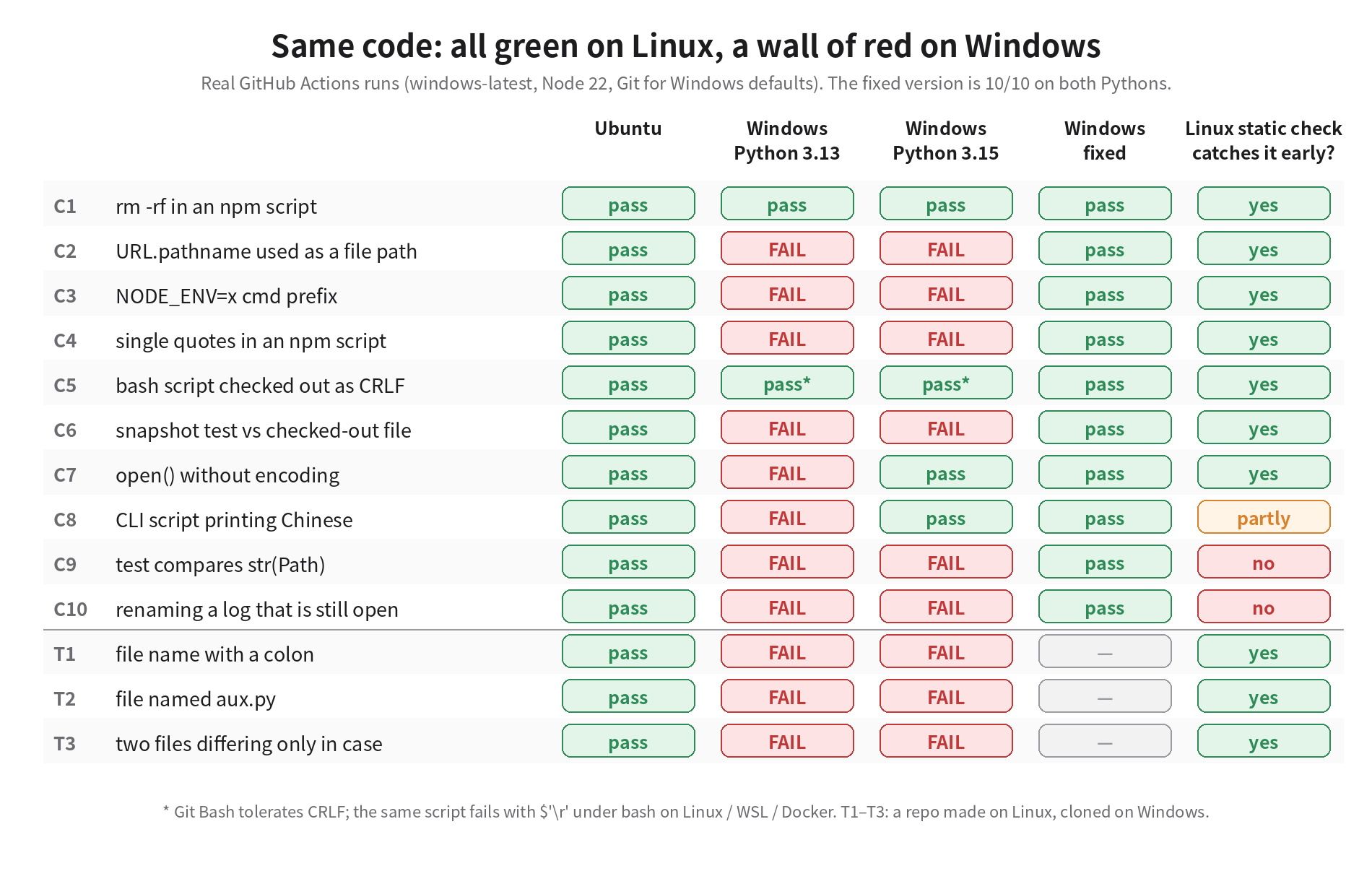
Each row is something an agent will plausibly write, and that looks flawless on Mac and Linux. Some of the raw errors from Windows:
C2  path: 'D:\\D:\\a\\pages\\pages\\lab\\before\\config.json'
C3  'NODE_ENV' is not recognized as an internal or external command,
C4  pattern arrived with literal quotes: 'src/**/*.js'
C7  UnicodeDecodeError: 'charmap' codec can't decode byte 0x81 in position 34
C9  - dist/index.txt
    + dist\index.txt
C10 PermissionError: [WinError 32] The process cannot access the file because
    it is being used by another process: '...\\agent.log'
T1  error: invalid path 'snapshots/run-2026-10-21T10:00.json'
    fatal: unable to checkout working tree
Two results did not match my expectations, and they matter more than the failures.
First, rm -rf dist passed on windows-latest. GitHub's Windows image puts Git's bundled Unix tools on PATH, so cmd.exe finds rm. Your teammates' Windows may not: by default the Git for Windows installer only adds git itself to PATH. The hosted runner installs a lot for convenience, which makes it more forgiving than a real user's machine.
Second, the CRLF bash script also passed on Windows, because Git Bash tolerates a trailing \r. The same checked-out file copied into a Docker image or run under WSL is another story. On Linux I cloned the same repo with core.autocrlf=true and the script died on the spot with set: pipefail\r: invalid option name; even my own test harness run-checks.sh died with syntax error: unexpected end of file. A check that only looks at native Windows cannot see cross-environment breakage like this.
Together these two are why machine 6 is worth keeping: the hosted runner catches most of the problems, but its configuration differs from your users', and the rest fall exactly into those differences.
Why it breaks: four root causes
A dozen symptoms come down to four root causes. Knowing the cause tells you which ones static checks can stop and which only show up when the code runs.
Line endings: each machine decides, because the repo said nothing
The Windows runner's environment output contains this line: file:C:/Program Files/Git/etc/gitconfig true. That is Git for Windows' system-level default, core.autocrlf=true: convert to LF on commit, to CRLF on checkout. The blob in the repo is LF; in the working tree every line gains a \r.
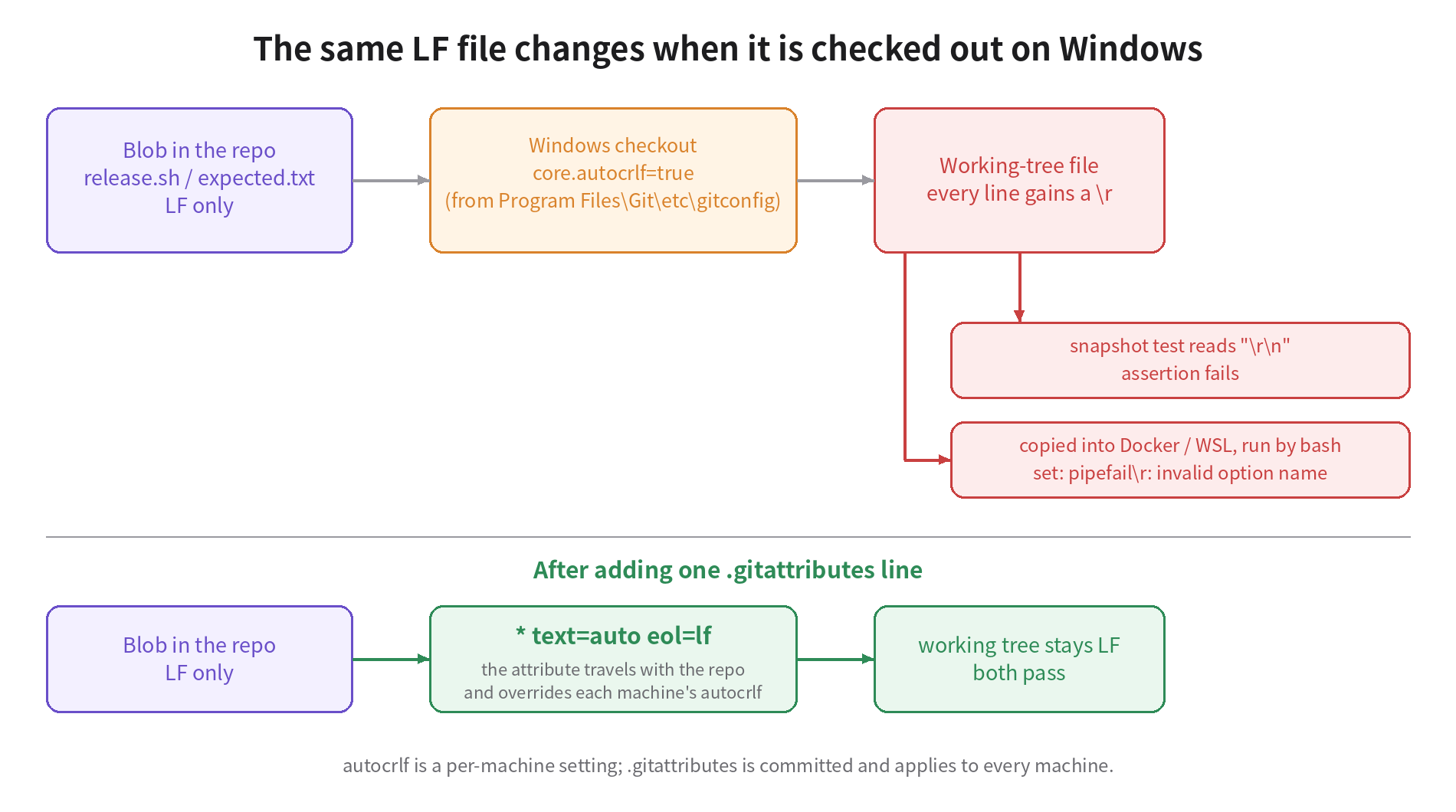
git ls-files --eol shows it plainly. Same checkout, the file before and after the fix:
i/lf    w/crlf  attr/                       lab/before/scripts/release.sh
i/lf    w/lf    attr/text=auto eol=lf       lab/after/scripts/release.sh
i/ is the repo, w/ is the working tree, attr/ is whether the repo expressed an opinion. For the first file the repo said nothing, so each machine's autocrlf decides. For the second the repo says eol=lf, and every machine checks it out as LF. autocrlf lives on each person's computer; .gitattributes is committed to the repo and wins.
AI agents make this messier. Claude Code's issue tracker has several reports this year: the Edit tool on Windows converting untouched lines from CRLF to LF (#62713), and an agent using sed -i that silently changed line endings, broke an XML manifest and cost four hours of debugging (#63715). The second reporter also noted that the platform instructions already warn about this and the model does not consistently follow them. With different agents and different tools on three dev machines, line-ending rules have to live in the repo; you cannot count on each agent to behave.
The fix is a .gitattributes, followed once by git add --renormalize . to normalize existing files:
.gitattributes
# 仓库里一律存 LF;工作区也一律 LF,不管谁的 core.autocrlf 是什么
* text=auto eol=lf
# 只给 Windows 原生脚本 CRLF
*.ps1 text eol=crlf
*.cmd text eol=crlf
*.bat text eol=crlf
# 二进制别碰
*.png binary
*.jpg binary
*.zip binary.ps1, .cmd and .bat get CRLF on their own lines because they only run on Windows anyway, and cmd.exe has known problems with goto labels under LF. Some Windows-native toolchains (Delphi project files, for example) also require CRLF; list them by extension the same way.
Encoding: before Python 3.15, open() follows the system
open(path) without encoding uses the system locale encoding. Linux and Mac are nearly always UTF-8, so the dev machines never notice. windows-latest is an English system with code page 1252, and in my experiment it raised 'charmap' codec can't decode byte 0x81. Chinese Windows uses code page 936, which is GBK. I had no Chinese Windows at hand, so I generated a zh_CN.GBK locale on Linux and reproduced the same mechanism; it raised the 'gbk' codec can't decode the teammate in the opening saw.
There is one new development. Python 3.15 shipped on October 9 and, per PEP 686, made UTF-8 the default encoding. In the experiment, the same broken code on Windows under 3.15 passed C7 and C8. That does not make the problem go away: you do not decide when your users and teammates upgrade to 3.15. What it really means is that whether the same bug shows up depends on the Python version on the user's machine. Machine 6 has to run the version users actually run, and the code still needs encoding="utf-8".
Static checks catch most of these: ruff's PLW1514 rule flags open() calls without encoding. I hit a trap running it: with plain --select PLW1514, ruff 0.17 printed Selection PLW1514 has no effect because preview is not enabled and then reported that everything passed. It only actually checks with --preview.
Paths and the shell: npm uses cmd.exe on Windows
The next three are the most common in Node projects. On Windows npm runs scripts with cmd.exe by default; in the experiment npm config get script-shell printed null, the default. cmd.exe does not understand the VAR=value command prefix and does not treat single quotes as quotes, so 'src/**/*.js' reaches the program with the quotes attached.
new URL('../config.json', import.meta.url).pathname gives /home/.../config.json on Linux and /D:/a/.../config.json on Windows, which Node then resolves to D:\D:\a\.... The correct call is fileURLToPath(). The Python counterpart is comparing str(path) in tests: on Windows str(Path("dist") / "index.txt") is dist\index.txt.
The file system: locks, reserved names, case
The remaining items have nothing to do with code style; the file system itself behaves differently.
On Windows a file that is open cannot be renamed or deleted. The experiment's log-rotation function calls os.replace while its FileHandler is still open: fine on Linux, WinError 32 on Windows. Static checks basically cannot catch this; only running the code can.
Three kinds of file names can be committed freely on Linux and cause trouble on Windows. I built a repo on Linux containing snapshots/run-2026-10-21T10:00.json (agents love naming snapshots with ISO timestamps), tools/aux.py, and docs/README.md alongside docs/readme.md, then cloned it on Windows. The colon file made the whole checkout fail: fatal: unable to checkout working tree, clone exited 128, not a single file in the working tree, and git status showed all four files as deleted. In a separate test, the case pair checked out, but only one file survived, and git status permanently shows M docs/README.md. Mac's default APFS is case-insensitive too, so this one bites Mac dev machines as well.
Why agent-written code breaks this way more often
People make these mistakes too, but three traits of agents raise the odds.
An agent validates on whatever machine it runs on. It writes code on a Mac, runs the tests, sees green, and considers itself done. It has no reason to think about Windows unless a check on the PR stops it.
POSIX idioms dominate agents' training data. rm -rf, VAR=value cmd and open(path) are what come most naturally, and they are exactly what never fails on Linux.
Speed amplifies the cost of finding out late. Three people merging twenty or thirty PRs a day who discover a Windows problem two days later have to bisect through forty or fifty commits. Caught before merge, the cost is one more round for that agent; caught after, it is half a day of a person's time.
Writing Windows rules into AGENTS.md does help, and the kit includes a version, but the issue above already shows that a written rule is not a rule followed every time. Rules lower the error rate; the check is what actually stops the PR.
The solution: two layers of checks, one gate
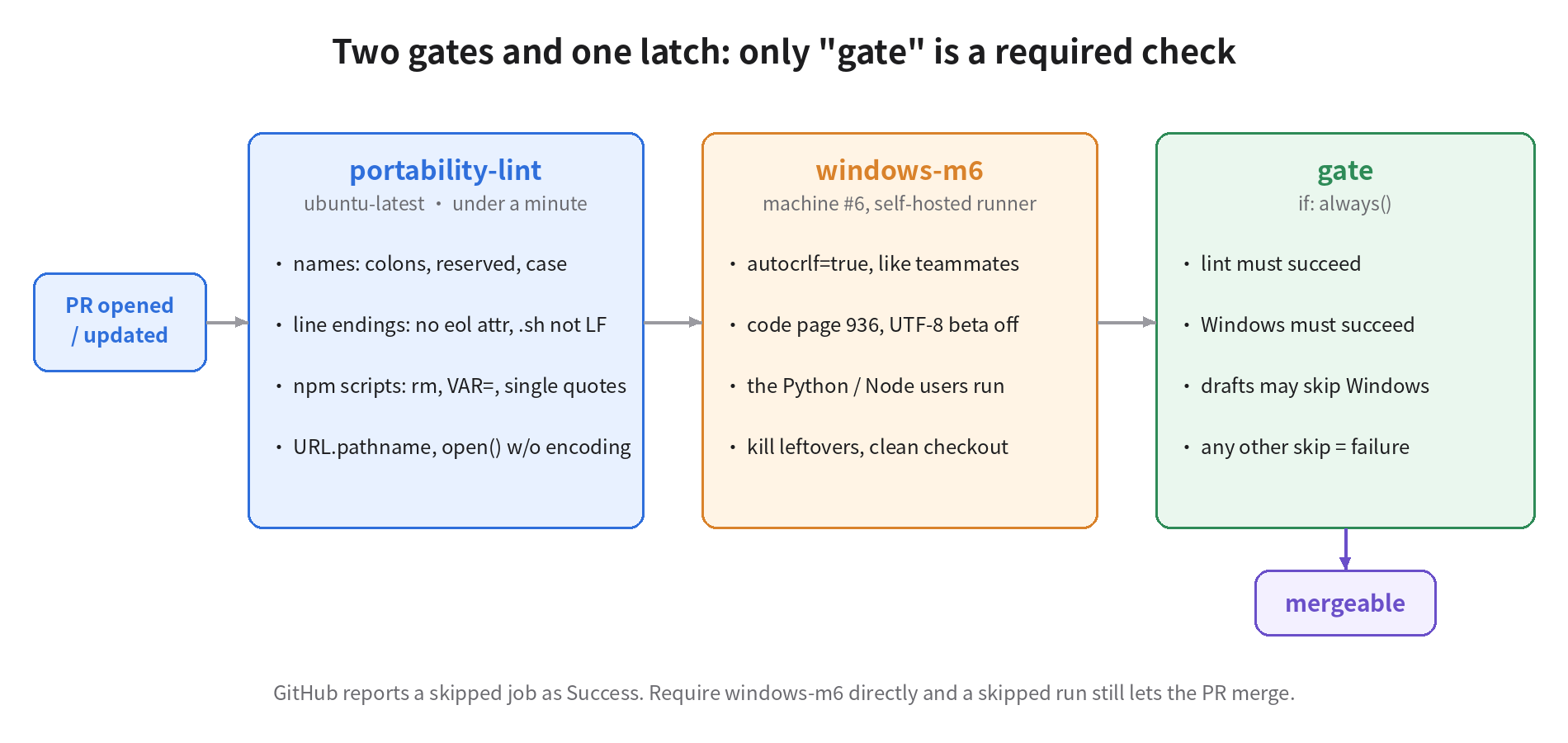
Layer one: a portability check on Linux
scripts/win-portability-check.py looks only at files tracked by git, needs no Windows, and finishes in under a second. It checks five kinds of problems: file names (reserved names, illegal characters, trailing dots and spaces, over-long paths), paths differing only in case, line-ending attributes, package.json scripts that only work under a POSIX shell, and URL.pathname and string-concatenated paths in JS. It prints GitHub Actions annotations, so problems are marked directly on the PR's files. Run against the unfixed project, the real output is (the script prints Chinese; translated here):
::error file=config.json::no eol attribute: line endings on checkout depend on each machine's core.autocrlf. Add '* text=auto eol=lf' to .gitattributes
::error file=scripts/release.sh::shell script lacks eol=lf; checked out as CRLF on Windows, bash fails with $'\r': command not found
::error file=package.json::scripts.clean = 'rm -rf dist && mkdir dist': POSIX commands; npm runs scripts with cmd.exe on Windows
::error file=package.json::scripts.stamp = 'NODE_ENV=production node scripts/stamp.mjs': the VAR=value prefix is sh syntax; cmd.exe does not understand it
::error file=package.json::scripts.lint = "node scripts/count.mjs 'src/**/*.js'": single quotes are not quotes in cmd.exe and reach the program verbatim
::error file=scripts/build.mjs,line=3::URL.pathname is /C:/... on Windows; use fileURLToPath()
On the fixed version it prints win-portability-check: OK. On the repo with the colon, aux.py and the case collision, it reports all three. Together with ruff's PLW1514, static checks catch ten of the thirteen problems early. What they miss are the str(Path) comparison, the file lock and console output encoding, which only show up when the code runs on Windows.
The value of this layer is that it is cheap and fast. It runs on Linux and does not occupy machine 6; it marks the exact line, so an agent can read the annotation and fix it without waiting for a person.
Layer two: configure machine 6 like your users' computers
Register machine 6 as a self-hosted runner for the repo with the label m6. Run this script once on machine 6 in an elevated PowerShell:
scripts/setup-m6-runner.ps1
<#
在 6 号机(Windows)上用管理员 PowerShell 跑一次,把它注册成本仓库的自建 runner。
Token 在 仓库 Settings → Actions → Runners → New self-hosted runner 页面里拿,一小时内有效。
用法:.\setup-m6-runner.ps1 -Repo https://github.com/OWNER/REPO -Token XXXXX
#>
param(
  [Parameter(Mandatory)][string]$Repo,
  [Parameter(Mandatory)][string]$Token,
  [string]$Dir = 'C:\actions-runner'   # 短路径:工作目录越深,越早撞上 260 字符
)
$ErrorActionPreference = 'Stop'

# 1. 让 git 的行为和组员的 Windows 一样。Git for Windows 安装器默认 autocrlf=true;
#    用 --system 是因为服务账户读不到你个人的 ~/.gitconfig。
git config --system core.autocrlf true
# 长路径保持默认(关):组员的机器没开,6 号机开了就会把问题藏起来。
Write-Host "core.longpaths =" (git config --system --get core.longpaths)

# 2. 代码页:中文 Windows 是 936(GBK)。65001 说明开了"Beta: 使用 UTF-8 提供全球语言支持",
#    那样 open() 不写 encoding 的 bug 在这台机器上就测不出来。
$acp = (Get-ItemProperty 'HKLM:\SYSTEM\CurrentControlSet\Control\Nls\CodePage').ACP
Write-Host "ANSI code page = $acp"
if ($acp -ne '936') { Write-Warning "ACP 不是 936。若你的用户主要是中文 Windows,请在 区域 → 管理 → 更改系统区域设置 里改成中文(简体),并取消 UTF-8 beta。" }

# 3. 下载并注册 runner(标签 m6、win-verify,以服务方式运行)
$tag = (Invoke-RestMethod https://api.github.com/repos/actions/runner/releases/latest).tag_name
$ver = $tag.TrimStart('v')
New-Item -ItemType Directory -Force -Path $Dir | Out-Null
Set-Location $Dir
$zip = "actions-runner-win-x64-$ver.zip"
Invoke-WebRequest "https://github.com/actions/runner/releases/download/$tag/$zip" -OutFile $zip
Expand-Archive $zip -DestinationPath . -Force
.\config.cmd --unattended --url $Repo --token $Token --name m6 --labels 'm6,win-verify' --work _work --runasservice
Write-Host "完成。去仓库 Settings → Actions → Runners 确认 m6 显示为 Idle。"
Every setting in the script answers the same question: how does this machine differ from users' machines, and which class of bug would that difference hide?
core.autocrlf is set to true because that is the Git for Windows default your teammates have, and machine 6 should check out the same way. It is written with --system because the runner runs as a service account and cannot read your personal ~/.gitconfig. Long-path support stays off for the same reason: your teammates do not have it enabled, and if machine 6 did, paths over 260 characters would go untested.
The code page should be 936. Windows has a "Beta: Use Unicode UTF-8 for worldwide language support" option; turn it on and the code page becomes 65001, and the open()-without-encoding bug disappears on that machine. Most users do not turn that option on.
The runner lives in C:\actions-runner, a short path that leaves characters to spare for the working directory.
Here is the workflow: three jobs, and only the last one is required. It assumes the repo has .nvmrc, .python-version and requirements-dev.txt to pin the Node and Python versions users actually run; if not, put concrete version numbers in.
.github/workflows/win-verify.yml
name: win-verify
on:
  pull_request:
    types: [opened, synchronize, reopened, ready_for_review]
  merge_group:
permissions:
  contents: read
concurrency:
  group: win-verify-${{ github.event.pull_request.number || github.ref }}
  cancel-in-progress: true
jobs:
  # 第一道:Linux 上 1 分钟以内,挡掉不用跑也知道会炸的
  portability-lint:
    runs-on: ubuntu-latest
    timeout-minutes: 5
    steps:
      - uses: actions/checkout@v4
      - run: python3 scripts/win-portability-check.py
      - name: open() 没写 encoding(PLW1514 目前要 --preview 才生效)
        run: pipx run ruff check --preview --select PLW1514 --output-format github .

  # 第二道:6 号机真跑。草稿 PR 不占 6 号机
  windows-m6:
    needs: portability-lint
    if: github.event_name == 'merge_group' || github.event.pull_request.draft == false
    runs-on: [self-hosted, Windows, m6]
    timeout-minutes: 30
    defaults:
      run:
        shell: pwsh
    steps:
      - name: 清掉上一轮残留的进程(它们会锁住工作区里的文件)
        run: |
          $work = Split-Path $env:GITHUB_WORKSPACE -Parent
          Get-CimInstance Win32_Process -Filter "Name='node.exe' OR Name='python.exe'" |
            Where-Object { $_.CommandLine -like "*$work*" } |
            ForEach-Object { Stop-Process -Id $_.ProcessId -Force -ErrorAction SilentlyContinue }
      - uses: actions/checkout@v4
        with:
          clean: true
      - name: 记录这台机器的真实环境(排查时第一眼要看的)
        run: |
          git config --show-origin --get-all core.autocrlf
          python -c "import locale,sys; print(sys.version.split()[0], locale.getencoding(), sys.stdout.encoding)"
          node -p "process.version"
          git ls-files --eol | Select-String 'w/crlf' | Select-Object -First 20
      - uses: actions/setup-node@v4
        with:
          node-version-file: .nvmrc
      - uses: actions/setup-python@v5
        with:
          python-version-file: .python-version
      - run: npm ci
      - run: npm test
      # 故意不设 PYTHONUTF8:6 号机要像用户的电脑,不像一台被调教过的 CI
      - run: python -m pip install -r requirements-dev.txt
      - run: python -m pytest -q

  # 规则集里只把这一个设成 required check
  gate:
    if: always()
    needs: [portability-lint, windows-m6]
    runs-on: ubuntu-latest
    steps:
      - env:
          LINT: ${{ needs.portability-lint.result }}
          WIN: ${{ needs.windows-m6.result }}
          DRAFT: ${{ github.event.pull_request.draft }}
        run: |
          echo "portability-lint=$LINT windows-m6=$WIN draft=$DRAFT"
          [ "$LINT" = success ] || exit 1
          # 草稿 PR 允许跳过 Windows;其余情况 skipped 一律当失败
          if [ "$WIN" = success ]; then exit 0; fi
          if [ "$WIN" = skipped ] && [ "$DRAFT" = true ]; then exit 0; fi
          exit 1
Three details are there on purpose.
gate is the only required check. GitHub's documentation is explicit: a job skipped by a condition reports Success and does not block merging even if it is a required check. If you required windows-m6 directly and an if condition skipped it, the PR could still merge; and when layer one fails, windows-m6, which depends on it, is skipped too. gate uses if: always() so it always runs, and treats skipped as failure, with draft PRs as the only exception. I ran all five combinations locally: both lint and Windows succeed, it passes; Windows skipped on a non-draft PR, it blocks; on a draft, it passes; lint fails, it blocks; Windows fails, it blocks.
Do not add a paths filter to this workflow. When the whole workflow does not trigger because of a path filter, the required check sits at "Waiting for status to be reported" and the PR can never merge. It is the opposite trap from the previous one, and you have to avoid both.
Kill leftover processes at the start of every run. A hosted runner is a fresh VM each time; a self-hosted one is not. If the previous run left a node.exe behind, the files it locks make the next run's checkout fail while cleaning the workspace, and you get a red X that has nothing to do with the code. The workflow's first step finds those processes by the workspace path in their command line and kills them.
Finally, make gate required in a ruleset. The kit's ruleset-require-gate.json can be created directly with gh api repos/OWNER/REPO/rulesets -X POST --input ruleset-require-gate.json; integration_id: 15368 is the GitHub Actions app ID, which ensures only Actions can report that status.
Layer three: rules for the agents
The kit's AGENTS.windows.md is a block you can paste into AGENTS.md or CLAUDE.md, covering each failure above. Its job is to get the agent to write it right the first time and save one round of bouncing. It does not replace the first two layers.
Costs, and when this does not fit
There is only one machine 6, so it queues. Three people, twenty or thirty PRs a day, tests under five minutes: one machine is enough. If the tests take half an hour, machine 6 becomes the new bottleneck. Then you can run windows-m6 only after a PR is approved, or put the fast tests on hosted windows-latest and keep the full suite for machine 6.
Hosted Windows runners are cleaner, but cost money and do not look like your users. Hosted runners are free on public repos; on private repos you pay per minute beyond the free quota, and on GitHub's current price list Windows is $0.010 a minute against $0.006 for Linux. A hosted runner is a fresh machine every time, with no leftover processes or locked files, but it is an English system with rm on PATH and Python encoding cp1252. If your users are mostly on Chinese Windows, being unable to catch GBK bugs is reason enough to keep machine 6.
On a public repo, never let fork PRs run on machine 6. A self-hosted runner executes whatever code the PR contains. For a private repo with three members the risk is manageable; once the repo goes public, PRs from forks must not reach machine 6.
The static check has false positives. The single-quote rule flags some legitimate cases, such as an argument passed to node's -e. I wrote the rule table for common cases; change it if it does not suit your project. It is a script of just over 100 lines and easy to edit.
If nobody runs your code on Windows, do not build machine 6. For a service that only runs in Docker on Linux servers, the .gitattributes line is still worth adding, because a teammate on Windows copying a CRLF script into the image breaks it just the same. Machine 6 and the rest of this workflow would be superfluous.
Five things you can do tomorrow
- Add
.gitattributes(the one above) at the repo root, thengit add --renormalize . && git commit -m "normalize line endings". Ten minutes, the biggest payoff. - Put
scripts/win-portability-check.pyin the repo and run it once on main to see how many problems already exist. Then runruff check --preview --select PLW1514 ., and remember the--preview. - Run
setup-m6-runner.ps1on machine 6. Look at the code page it prints first; if it is not 936, change the system locale before anything else. - Add
win-verify.ymland make onlygaterequired in the ruleset. Open a deliberately broken PR and confirm it is actually blocked; open a draft PR and confirm it does not occupy machine 6. - Paste
AGENTS.windows.mdinto your agents' rules file.
The whole set (check script, workflow, runner install script, ruleset, agent rules, plus the experiment's before and after projects and test harness) is packed here: win-verify-kit.tar.gz.
What ran and what did not
Ran on real machines: the before and after projects on GitHub Actions ubuntu-latest and windows-latest, and on Windows again with Python 3.13 and 3.15 separately; the repo with the colon, reserved name and case collision was really cloned on Windows. Every Windows error in this post is copied verbatim from those runs' logs.
Simulated on Linux: the CRLF script failing under bash came from cloning with core.autocrlf=true and running on Linux; the GBK decode failure came from a zh_CN.GBK locale generated on Linux. The mechanism is the same as on Chinese Windows, but it did not run on Chinese Windows.
Only statically validated, not run on a real machine 6: win-verify.yml passes actionlint, and the gate decision logic was run locally for five combinations; setup-m6-runner.ps1 was syntax-checked with the PowerShell 7.6 parser but has not registered a runner on real Windows; the leftover-process cleanup step has not been verified against a real locked-file scenario. The check scripts and test harness pass shellcheck.
My position stands: stop Windows problems before merge, because after merge every one of them has to be traced back through dozens of agent commits. The cheapest step is that .gitattributes line, which you can add today; the most valuable one is configuring machine 6 like your users' machines and letting gate guard the merge button for you.