周三下午,1 号机上的代理在给前端加 zustand,2 号机上的代理刚把加 zod 的 PR 合进了 main。1 号机的代理拉 main 做 rebase,停在 package-lock.json 上:几处冲突,一共几十行。它的处理办法和网上最常见的回答一样:删掉锁文件,npm install,重新生成,测试通过,推上去。
这台是 Mac。PR 推上去以后,Linux CI 和 6 号机的 Windows 验证都挂在 vite build 上。CI 的报错是:
Error: Cannot find module @rollup/rollup-linux-x64-gnu. npm has a bug related to optional
dependencies (https://github.com/npm/cli/issues/4828). Please try `npm i` again after
removing both package-lock.json and node_modules directory.
(6 号机上缺的是 @rollup/rollup-win32-x64-msvc。)接手的代理照着报错做:删掉 node_modules 和 package-lock.json,重装,全绿。审查轮到 4 号机,看到的是一个标题叫“修复 CI 构建”的 PR,锁文件改了一千两百多行,axios、vite、react-dom、esbuild、rollup 都换了版本。没人会逐行看这种 diff,审查代理多半写一句“锁文件为重新生成,属正常变化”就过了。
我们三个人、七台电脑,代理一天开十几个 PR,加依赖是其中最普通的一类。我关心的是:两个分支各自加一个依赖、锁文件冲突时,代理到底该怎么解,怎么在 CI 上看出它解错了。
我的判断是:**锁文件不该当成代码去“合并”,它是从 package.json 和主干上那份已经审过的锁算出来的。解冲突就是从主干的锁出发再算一次,只加 package.json 新要的东西;然后让 CI 证明锁里每一处变化都能追到 package.json 的某个变化。**删锁、删 node_modules、选 ours/theirs、拼接两边、交给 npm 自动修,我都实测了,各有各的坏法,有两种坏得很安静。
实验:66 对分支,20 对冲突
玩具仓库 shop-web:React 19、Vite 7、Vitest 3、ESLint 9、axios,锁文件用 npm install --before=2025-09-01 生成,251 个包,3490 行,相当于一个一年多没大动过依赖的真实项目。准备 12 个常见的小依赖(zod、date-fns、@tanstack/react-query、clsx、dayjs、react-router-dom、uuid、nanoid、zustand、immer,开发依赖 msw、@testing-library/react),每个依赖一个分支,用当天的 npm 加进去。
先说一个我猜错的地方。我原以为不同机器上的 npm 版本(9、10、11)会让锁文件格式来回变,单个 PR 就有大片无关 diff。实测没有:npm 9 加 react-query 是 31 行,npm 10 加 zod 是 12 行,npm 11 加 date-fns 也是 11 行新增,lockfileVersion 都是 3,三个分支 git 直接合并没冲突。单个代理单独加依赖,锁文件 diff 很干净。
问题出在两个分支一起来的时候。12 个分支两两组合,66 对,模拟“main 已经合了 A,代理分支 B 来合 main”:
- 46 对 git 自动合并成功,46 对
npm ci全部通过。 - 20 对冲突(约 30%):16 对 package.json 和锁同时冲突,4 对只有锁冲突。冲突几乎都在同一个位置:两个依赖按字母序挨着插进
dependencies,新包条目都追加在packages末尾。
团队里同一天有两三个 PR 加依赖,这个比例就够每周碰上几次。
7 种解法,各自怎么坏
对这 20 对冲突,代理的工作区里已经装好了 node_modules(真实情况就是这样),npm 10.9.8,package.json 统一按“两边新依赖都保留”先解好,然后分别用 7 种方法处理锁文件:
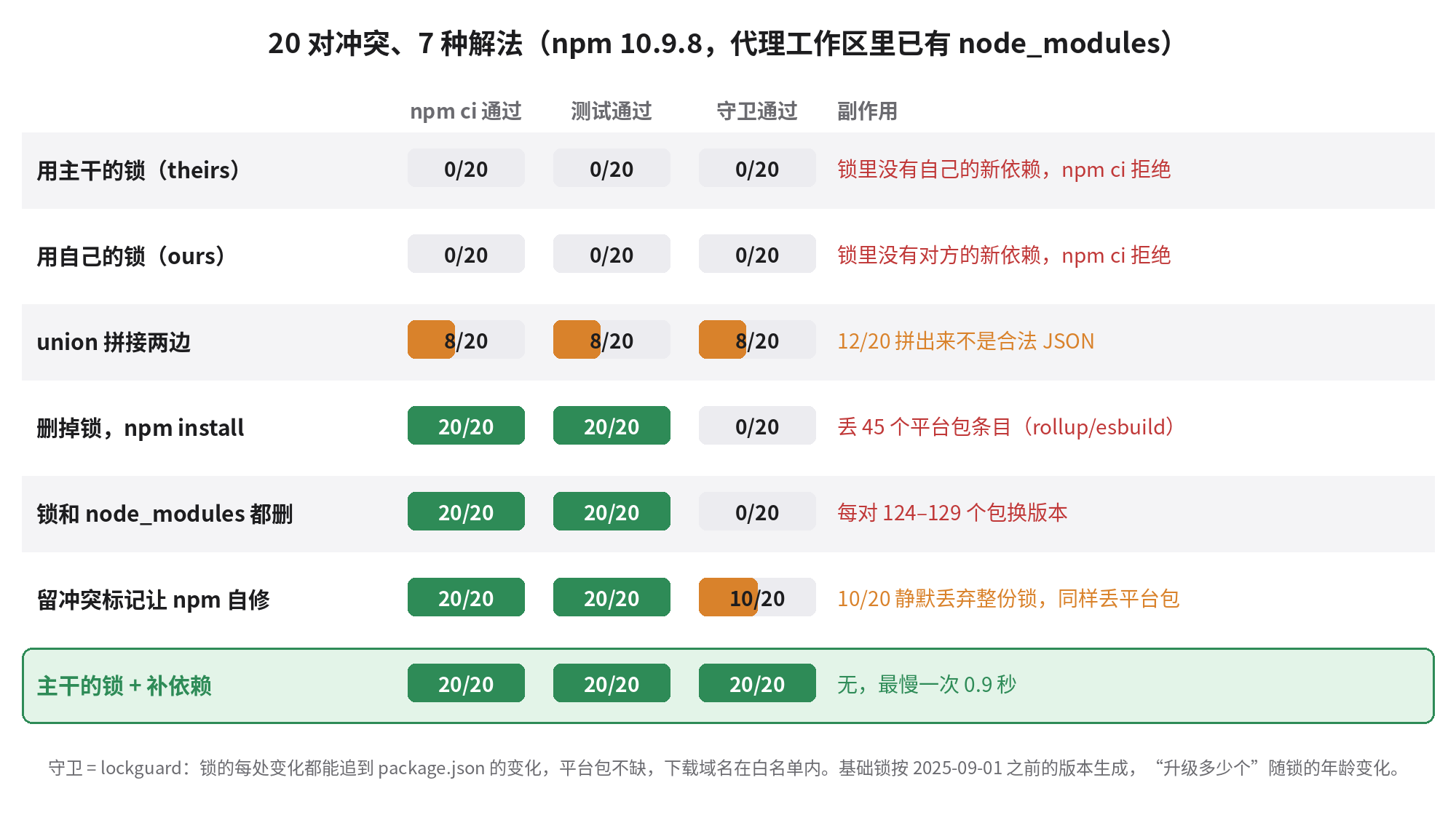
“守卫”是我写的 lockguard.py,后面细说。先看这张表最该注意的地方:**中间三行 npm ci 和测试都是 20/20 全绿。**CI 只跑安装和测试的话,这三种坏法一个都拦不住。
选一边(ours / theirs):0/20。锁里少了另一边的依赖,npm ci 报 EUSAGE,说 package.json 和锁不同步。这种坏法最好,因为它当场就失败。
union 拼接(git merge-file --union,或者代理手工把两边都留下):12/20 拼出来的不是合法 JSON,逗号和括号对不上;8/20 恰好合法,而且结果正确。看起来像能用,其实取决于冲突块切在哪里,靠运气。
删锁重装(保留 node_modules):20/20 通过,但每一对都丢了 45 个平台包条目。rollup 和 esbuild 的原生二进制按平台拆成二十多个可选依赖,正常的锁里全都有(rollup 21 个,esbuild 26 个)。npm 10 在已有 node_modules 的情况下重新生成锁,会照着本机实际装上的那份来写,于是只剩 Linux x64 的。这就是 npm/cli#4828,npm 11.3.0 才修。
我把这条链在两台“机器”上走了一遍:用 --os=darwin --cpu=arm64 装一份 Mac 的 node_modules,删锁、重新 npm install,锁里的 rollup 平台包只剩 rollup-darwin-arm64 一个。拿这份锁到 Linux 上 npm ci:退出码 0,看起来没事;vite build 退出码 1,就是开头那条报错,vitest 也挂。在 Linux 上删锁,再用 --os=win32 --cpu=x64 模拟 6 号机,Windows 的 rollup 和 esbuild 二进制都缺。同一个实验换成 npm 11.21.1,锁里 21 个 rollup 条目都在,构建和测试通过。
锁和 node_modules 一起删:这是报错信息亲自推荐的办法。20/20 通过,平台包也都回来了,代价是整棵树按今天重新解析:每一对有 124 到 129 个包换了版本,还多出 11 个、少了 3 个。axios 1.11.0→1.21.0,react-dom 19.1.1→19.3.1,vite 7.1.3→7.3.7,esbuild 0.25.9→0.28.2,rollup 4.50.0→4.65.1,eslint 9.34.0→9.39.5,axios 的依赖 proxy-from-env 1.1.0→2.1.0 是一次大版本升级。这个数字还是保守的:react 等几个包恰好在新依赖的依赖闭包里,我的守卫把它们算成“可解释”。具体升多少个取决于锁有多旧,我的基础锁停在 2025-09-01,你的项目每周都更新的话会少很多,但不会是零。
这些升级大概率都没问题,测试也全过。问题是它们混在一个加 zustand 的 PR 里,没人审过,出了事也没人能从标题里找到它。
留着冲突标记让 npm 自己修:npm 文档写着,npm install 遇到带冲突标记的锁文件会自动解决。20 对里 10 对确实修得很好;另外 10 对和删锁一样丢了 45 个平台条目。我把失败的一对用 --loglevel silly 重跑,找到了原因:
npm verbose shrinkwrap failed to load package-lock.json Expected double-quoted property
name in JSON ... near "...m\": \"^19.1.1\",      },      \"devDependen..."
npm 从冲突文件里还原出两边版本时,有一边多了个尾逗号,解析失败。它不报错,只在 verbose 日志里留一行,然后当作没有锁文件,从 node_modules 重新生成。默认日志级别下你什么都看不到。我又拿 4 对冲突,在 npm 10/11、有无 node_modules 四种组合下各跑一遍:能解析的两对在四种组合下都没问题;解析失败的两对,npm 10 加 node_modules 丢平台包,npm 11 加 node_modules 是干净的,没有 node_modules 时 npm 10 和 11 都整棵重解析,142 到 143 个包变了。也就是说,升级到 npm 11 不能让“交给 npm 自动修”变安全,只能让其中一种情况变好。
从主干的锁出发补依赖:git show origin/main:package-lock.json > package-lock.json,然后 npm install --package-lock-only。20/20 通过,两个依赖都在,没有任何多余的升级,最慢 0.9 秒。思路很简单:主干的锁已经审过,里面没有冲突;package.json 已经手工解好;npm 只需要把差的那个依赖补进去,--package-lock-only 不碰 node_modules,也就不会照着本机装了什么去写锁。
第四个坑:镜像地址跟着锁走
国内机器常在全局 .npmrc 里配 npmmirror。我的 2 号机分支就是这样加的 date-fns,锁里这一条的 resolved 指向 registry.npmmirror.com。换一台没配镜像的机器,清空缓存后 npm ci:205 个包从 registry.npmjs.org 下载,1 个从 cdn.npmmirror.com 下载。一台机器的个人配置,就这样写进了所有机器的安装路径。CI 不在国内的话只是慢一点;如果某天镜像同步出问题,或者公司网络只放行官方源,它就会成为一个很难查的失败。
npm 有个 omit-lockfile-registry-resolved 选项,可以不在锁里写下载地址。我试了:第一次会产生 260 行 diff(删掉所有 resolved),之后就干净了。前提是七台机器同一天一起改,否则锁会在“有地址”和“没地址”之间来回跳。我选了更简单的做法:守卫只允许官方源的域名。
做法:一个脚本、一个守卫、两行配置
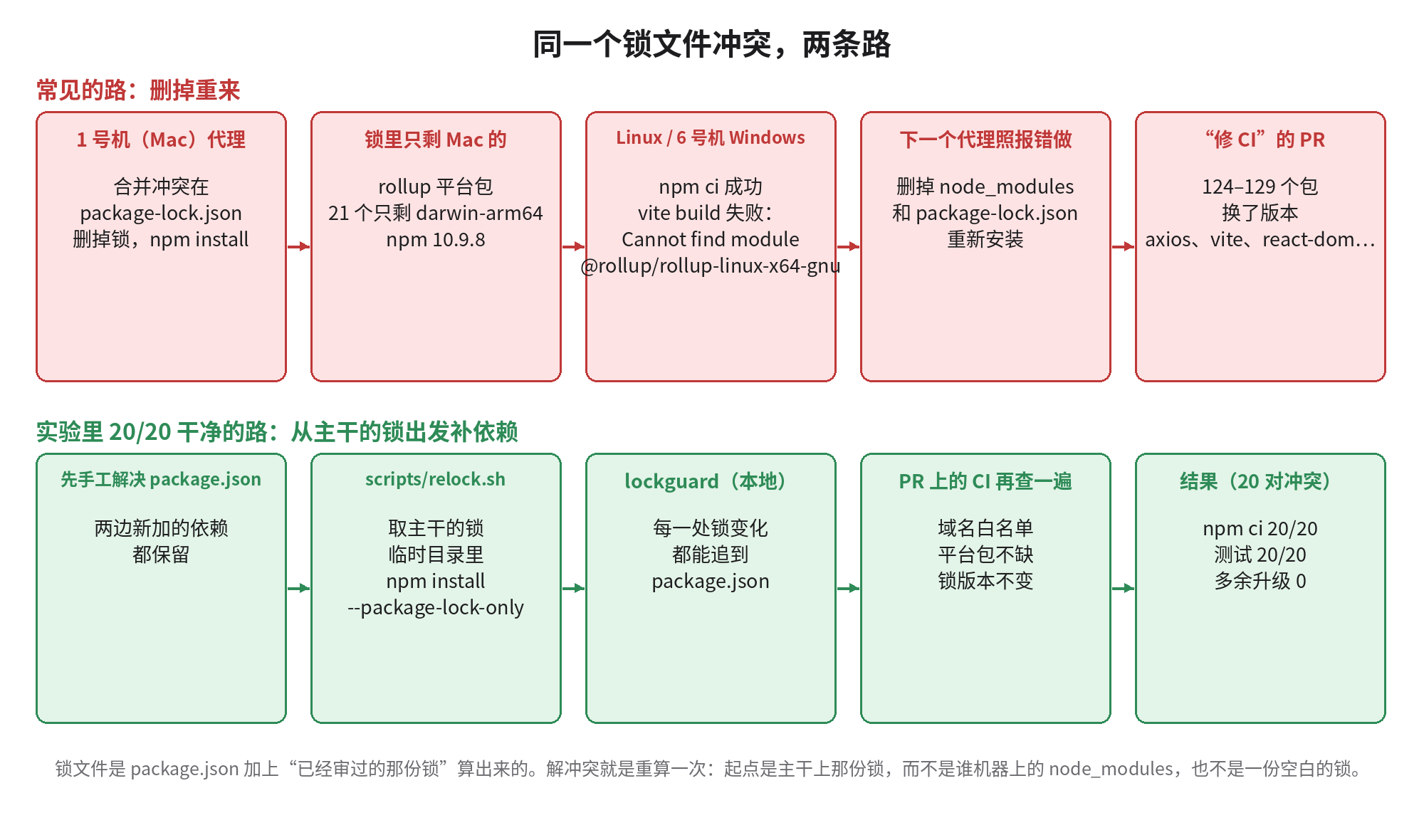
**1. scripts/relock.sh:代理遇到锁冲突时只准用这个。**它做四件事:确认 package.json 已经是合法 JSON;把锁换成目标分支(默认 origin/main)上的那份;把 package.json、锁、项目 .npmrc 复制到临时目录里跑 npm install --package-lock-only --ignore-scripts,在临时目录里跑是为了连本机的 node_modules 都看不到,旧版 npm 也不会照着它裁掉平台包;最后跑一遍守卫,再 git add。我在 20 对冲突上逐对实测:20/20 守卫通过,删掉 node_modules 后 npm ci 和测试全部通过。
**2. scripts/lockguard.py:CI 上证明锁的每处变化都有来由。**它比较基线和当前的 package.json 与锁,找出版本变了、新增、删除的条目,再从“package.json 里变了的直接依赖”出发沿依赖图走一遍。走得到的算可解释,走不到的就失败。另外四条直接失败:resolved 的域名不在白名单;lockfileVersion 变了;某个包声明的 optionalDependencies 在锁里找不到(这就是 #4828 的特征);package.json 和锁的根节点对不上。
它在实验里的表现:46 对干净合并全部通过;7 种解法里每一个坏结果都被拦下,包括 npm ci 和测试都是绿的那三种;2 号机带镜像地址的分支也被拦下。第一版有误报:nanoid 在一个分支里被提升到顶层,在另一个分支里留在 postcss/node_modules 下面,版本相同、只是挪了位置。我加了“同一个 name@version 在另一边存在就算移动”的规则,误报消失。
CI 配置只有几行,要点是 fetch-depth: 0,以及基线用 merge-base 而不是 main 的最新提交,否则 main 上别人刚加的依赖会被算到你头上:
on:
  pull_request:
    paths: ["package.json", "package-lock.json", ".npmrc"]
permissions:
  contents: read
jobs:
  lockguard:
    if: ${{ !contains(github.event.pull_request.labels.*.name, 'deps-upgrade') }}
    runs-on: ubuntu-latest
    steps:
      - uses: actions/checkout@v4
        with: { fetch-depth: 0 }
      - run: python3 scripts/lockguard.py --git "$(git merge-base origin/${{ github.base_ref }} HEAD)" .
**3. 锁死 npm 版本。**package.json 里写 "engines": { "npm": ">=11.3.0" },项目 .npmrc 里写 engine-strict=true。我实测过:npm 9 和 npm 10 都会直接拒绝安装。新一点的 devEngines 字段 npm 10 认,npm 9 会无视,所以七台机器上 npm 版本不齐的时候用 engines。CI 上注意 Node 22 自带的是 npm 10,要么用 Node 24,要么先 npm i -g npm@11。
4. 写进 AGENTS.md 的几条规矩:
- package-lock.json 是生成物:不准删,不准手改,冲突不准用 ours/theirs/union 解。
- 锁冲突:先手工解 package.json(两边新加的依赖都留),然后只跑
  scripts/relock.sh origin/main。它失败就停下,把报错写进 PR,不要自己想办法。
- 就算报错信息让你删 node_modules 和 package-lock.json,也不要两个一起删。
  先 relock,再 rm -rf node_modules && npm ci。
- 功能 PR 里不准 npm update、npm audit fix、改已有依赖的版本。
- 依赖变化单独一个提交,只含 package.json 和 package-lock.json。
**5. 升级交给 7 号机,单独开 PR。**依赖总得升,我们的安排是 7 号机每周一开一个 deps-upgrade 标签的 PR,守卫对这个标签放行,审查机只看这一个 PR 的变更说明和测试结果。升级照样做,只是做在大家看得见的地方。
反方意见
**“删掉重来能让依赖保持新,安全补丁也跟着进来,你这是在锁旧版本。”**这是最有分量的反对。确实,我的基础锁一年多没动,删掉重来一次就把 axios 从 1.11 拉到了 1.21,中间说不定有安全修复。可这件事的问题出在时机:它发生在一个解冲突的 PR 里,标题跟升级无关,审查不会细看,出了回归也很难二分到它。升级要定期做,第 5 条就是为这个准备的。另外,npm audit 报出的问题可以单开 PR 修,守卫只要求标签说明这是有意为之。
**“换成 pnpm 或 yarn 就没这些事了。”**部分对。pnpm 文档说 pnpm install 能自动解决锁文件冲突。这一点我没有实测,不下结论。对已经用 npm、七台机器都装好环境的团队,换包管理器的成本比加两个脚本高;换了以后,“删锁重来会顺手升级”这件事照样存在,守卫的思路仍然适用,只是要换一个解析器。
**“库不该提交锁文件。”**对发布到 npm 的库,是否提交锁一直有争论,不提交也就谈不上锁冲突。这篇针对的是应用:你部署出去的就是锁里写的那棵树。
**不适用的情况:**monorepo 用了 workspaces 时,relock.sh 要把每个 workspace 的 package.json 都复制进临时目录,我这版没做;守卫只认 npm 的 lockfileVersion 2/3;用私有源要加 --allow-host;还有一种情况是你确实想在这个 PR 里升级,那就打上 deps-upgrade 标签,让它走升级 PR 的审查。
我写错的地方
- 我一开始以为最大的问题是 npm 版本不同导致锁格式来回变,围绕这个设计了第一轮实验,结果 npm 9/10/11 之间没有格式抖动。真正的问题全在“冲突之后怎么解”。
- 守卫第一版在干净的合并上误报了 nanoid 的位置移动,要是直接上 CI,第一天就会被所有人关掉。
- 我原本以为“留着冲突标记让 npm 自修”是官方推荐的办法,可以直接写进 AGENTS.md。实测 10/20 静默丢锁之后,我把它从推荐里拿掉了。
可以直接拿走的
- 锁冲突的唯一解法:手工解 package.json,从目标分支的锁出发,在临时目录里
npm install --package-lock-only。 - CI 不能只跑
npm ci和测试。我测到的三种坏法都是全绿,要加一个检查,证明锁的每处变化都能追到 package.json。 - 不管报错信息怎么说,不要同时删
node_modules和锁。那样等于把整个项目的依赖按今天重新选一遍。 - 用
engines加engine-strict把 npm 锁在 11.3 以上;devEngines拦不住 npm 9。 - 守卫只允许官方源域名,个人镜像留在个人的全局配置里,别写进锁。
- 升级单独开 PR,由一台固定的机器负责。
脚本、AGENTS.md 片段、CI 配置都在这里:lockfile-relock-kit.tar.gz。把 scripts/ 和 .github/ 复制进仓库,在 package.json 里加上 engines,先在本地跑一次 python3 scripts/lockguard.py --git origin/main .,看看你现在的分支能不能通过。
Wednesday afternoon. The agent on machine 1 is adding zustand to the frontend; the agent on machine 2 has just merged its PR adding zod into main. Machine 1's agent pulls main to rebase and stops on package-lock.json: a few conflict hunks, a few dozen lines. It does what the most common answer online says: delete the lockfile, npm install, regenerate, tests pass, push.
Machine 1 is a Mac. Once the PR is pushed, both Linux CI and the Windows check on machine 6 fail in vite build. The CI error:
Error: Cannot find module @rollup/rollup-linux-x64-gnu. npm has a bug related to optional
dependencies (https://github.com/npm/cli/issues/4828). Please try `npm i` again after
removing both package-lock.json and node_modules directory.
(On machine 6 the missing one is @rollup/rollup-win32-x64-msvc.) The next agent does what the error says: delete node_modules and package-lock.json, reinstall, all green. Review lands on machine 4, which sees a PR titled "Fix CI build" with more than 1,200 lockfile lines changed and new versions of axios, vite, react-dom, esbuild and rollup. Nobody reads that diff line by line; the review agent will most likely write "lockfile regenerated, expected changes" and move on.
We are three people with seven computers, and agents open a dozen-plus PRs a day. Adding a dependency is one of the most ordinary kinds. What I care about: when two branches each add a dependency and the lockfile conflicts, how should the agent resolve it, and how does CI notice when it gets it wrong?
My position: don't treat the lockfile as code to be "merged". It is computed from package.json plus the already-reviewed lock on main. Resolving a conflict means computing it again from main's lock, adding only what package.json now asks for; then CI proves every change in the lock traces back to some change in package.json. I measured deleting the lock, deleting node_modules too, picking ours/theirs, taking the union of both sides, and letting npm fix it automatically. Each breaks in its own way, and two of them break quietly.
Lab: 66 pairs of branches, 20 conflicts
Toy repo shop-web: React 19, Vite 7, Vitest 3, ESLint 9, axios. The lock was produced with npm install --before=2025-09-01: 251 packages, 3,490 lines, like a real project whose dependencies haven't moved much in over a year. Twelve common small dependencies (zod, date-fns, @tanstack/react-query, clsx, dayjs, react-router-dom, uuid, nanoid, zustand, immer, and dev deps msw, @testing-library/react), one branch each, added with today's npm.
First, a guess of mine that was wrong. I expected different npm versions on different machines (9, 10, 11) to flip the lockfile format back and forth, so that a single PR would carry large unrelated diffs. They didn't: npm 9 adding react-query was 31 lines, npm 10 adding zod was 12, npm 11 adding date-fns was 11 added lines, lockfileVersion was 3 throughout, and the three branches merged in git without conflicts. One agent adding one dependency on its own produces a clean lock diff.
The trouble starts when two branches arrive together. Twelve branches give 66 pairs, each simulating "main already has A, agent branch B merges main":
- 46 pairs merged automatically in git, and all 46 passed
npm ci. - 20 pairs conflicted (about 30%): 16 in both package.json and the lock, 4 in the lock only. Nearly all conflicts sit in the same places: two dependencies that are alphabetical neighbours inserted into
dependencies, and both new package entries appended to the end ofpackages.
If two or three PRs a day add dependencies, that rate is enough to hit this several times a week.
Seven ways to resolve it, and how each breaks
For these 20 conflicts the agent's workspace already had node_modules installed (as it would in real life), npm 10.9.8, and package.json was first resolved the same way every time ("keep both sides' new deps"). Then the lockfile was handled in seven different ways:
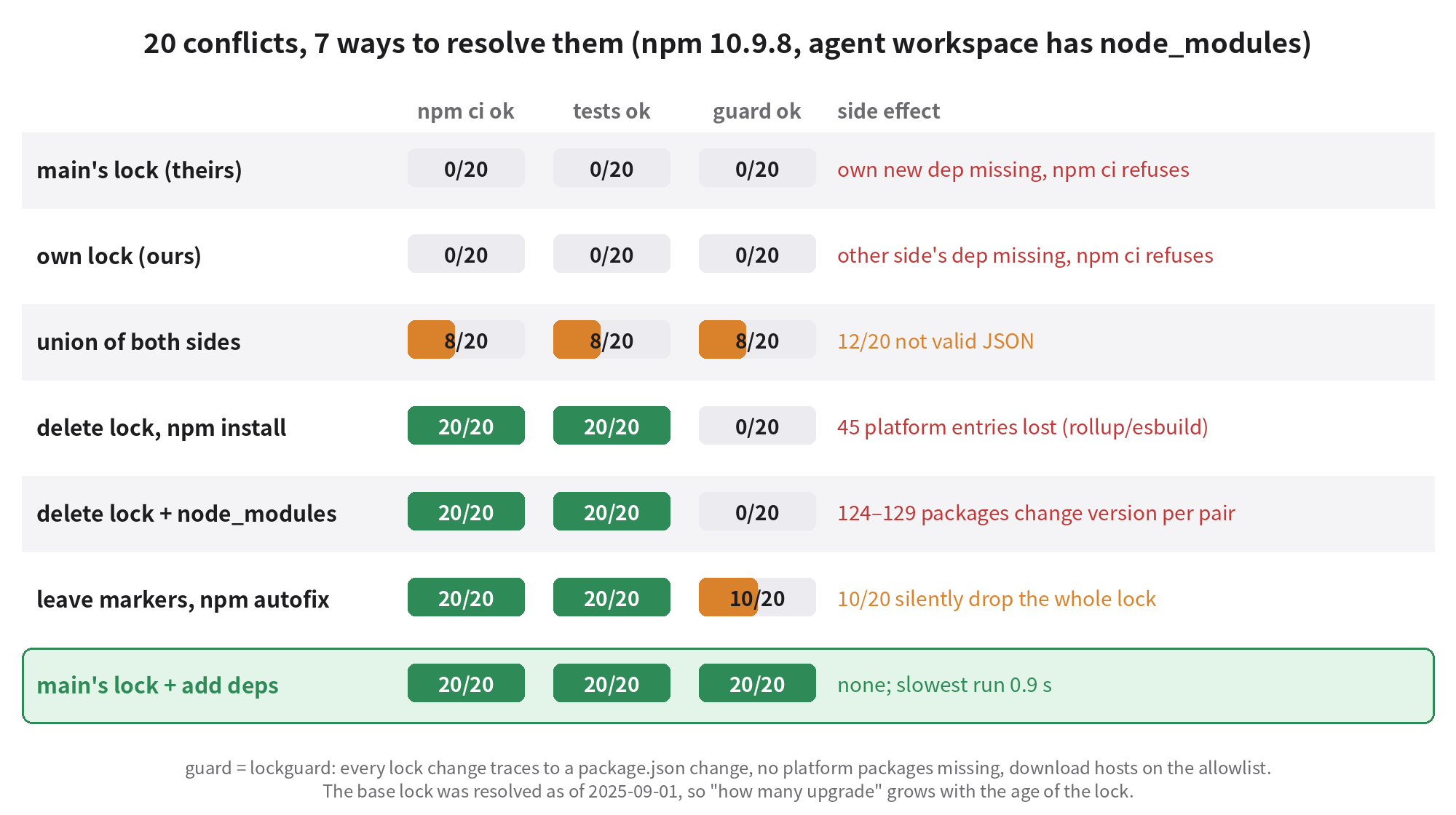
The "guard" is lockguard.py, which I describe below. The thing to notice first: the middle three rows are 20/20 green on npm ci and tests. A CI that only installs and tests stops none of them.
Pick a side (ours / theirs): 0/20. The lock lacks the other side's dependency and npm ci fails with EUSAGE, saying package.json and the lock are out of sync. This is the best way to fail, because it fails on the spot.
Union (git merge-file --union, or an agent keeping both sides by hand): 12/20 were not valid JSON, with commas and braces that don't line up; 8/20 happened to be valid, and correct. It looks usable, but it depends on where the conflict hunks happen to be cut. That's luck.
Delete the lock and reinstall (keeping node_modules): 20/20 pass, but every pair lost 45 platform package entries. Rollup and esbuild ship their native binaries as twenty-odd optional dependencies split by platform, and a healthy lock lists them all (21 for rollup, 26 for esbuild). When npm 10 regenerates a lock with node_modules present, it writes what is actually installed on this machine, so only Linux x64 remains. That's npm/cli#4828, fixed in npm 11.3.0.
I walked this chain across two "machines": install a Mac node_modules with --os=darwin --cpu=arm64, delete the lock, npm install again. The lock's rollup platform packages shrink to a single rollup-darwin-arm64. Take that lock to Linux and npm ci: exit code 0, looks fine. vite build: exit code 1 with the error at the top of this post, and vitest fails too. Delete the lock on Linux and simulate machine 6 with --os=win32 --cpu=x64: the Windows rollup and esbuild binaries are both missing. The same experiment with npm 11.21.1 keeps all 21 rollup entries, and build and tests pass.
Delete the lock and node_modules together: the fix the error message itself recommends. 20/20 pass, the platform packages are back, and the price is that the whole tree is resolved again as of today: in every pair 124 to 129 packages changed version, 11 more were added and 3 removed. axios 1.11.0→1.21.0, react-dom 19.1.1→19.3.1, vite 7.1.3→7.3.7, esbuild 0.25.9→0.28.2, rollup 4.50.0→4.65.1, eslint 9.34.0→9.39.5, and axios's dependency proxy-from-env went 1.1.0→2.1.0, a major version. That count is conservative: react and a few others happen to sit in the new dependencies' closure, so my guard counts them as "explained". How many packages move depends on how old the lock is. Mine stopped at 2025-09-01; if you update weekly it will be far fewer, but not zero.
These upgrades are probably fine, and the tests all pass. The problem is that they ride inside a PR about adding zustand, nobody reviewed them, and if something breaks nobody will find them from the title.
Leave the markers and let npm fix it: npm's docs say that npm install resolves a lockfile that contains conflict markers. For 10 of the 20 pairs it did so nicely; the other 10 lost the 45 platform entries just like deleting the lock. Rerunning a failing pair with --loglevel silly shows why:
npm verbose shrinkwrap failed to load package-lock.json Expected double-quoted property
name in JSON ... near "...m\": \"^19.1.1\",      },      \"devDependen..."
When npm rebuilds the two sides from the conflicted file, one side ends up with a trailing comma and fails to parse. npm doesn't error. It leaves one line in the verbose log, treats the project as having no lockfile, and regenerates from node_modules. At the default log level you see nothing. I then ran 4 conflicts under npm 10/11, with and without node_modules. The two that parse were fine in all four configurations. For the two that don't: npm 10 with node_modules loses the platform packages, npm 11 with node_modules is clean, and without node_modules both npm 10 and 11 re-resolve the whole tree, changing 142 to 143 packages. So moving to npm 11 doesn't make "let npm fix it" safe; it only fixes one of the cases.
Start from main's lock and add the deps: git show origin/main:package-lock.json > package-lock.json, then npm install --package-lock-only. 20/20 pass, both dependencies present, no stray upgrades at all, slowest run 0.9 seconds. The idea is simple: main's lock has been reviewed and has no conflict in it; package.json has been resolved by hand; npm only has to add the missing dependency, and --package-lock-only doesn't touch node_modules, so it doesn't write the lock from whatever happens to be installed locally.
A fourth trap: mirror URLs travel with the lock
Machines in China often set npmmirror in their global .npmrc. My machine-2 branch added date-fns that way, and that entry's resolved points at registry.npmmirror.com. On another machine with no mirror configured and an empty cache, npm ci downloaded 205 packages from registry.npmjs.org and 1 from cdn.npmmirror.com. One machine's personal config ends up in every machine's install path. On a CI outside China that's just a little slower; on the day the mirror's sync breaks, or on a network that only allows the official registry, it becomes a very hard failure to track down.
npm has an omit-lockfile-registry-resolved option that leaves download URLs out of the lock. I tried it: the first run produces a 260-line diff (every resolved removed), and after that it's clean. It only works if all seven machines switch on the same day; otherwise the lock flips between "with URLs" and "without". I went with something simpler: the guard only allows the official registry host.
What to do: one script, one guard, two lines of config
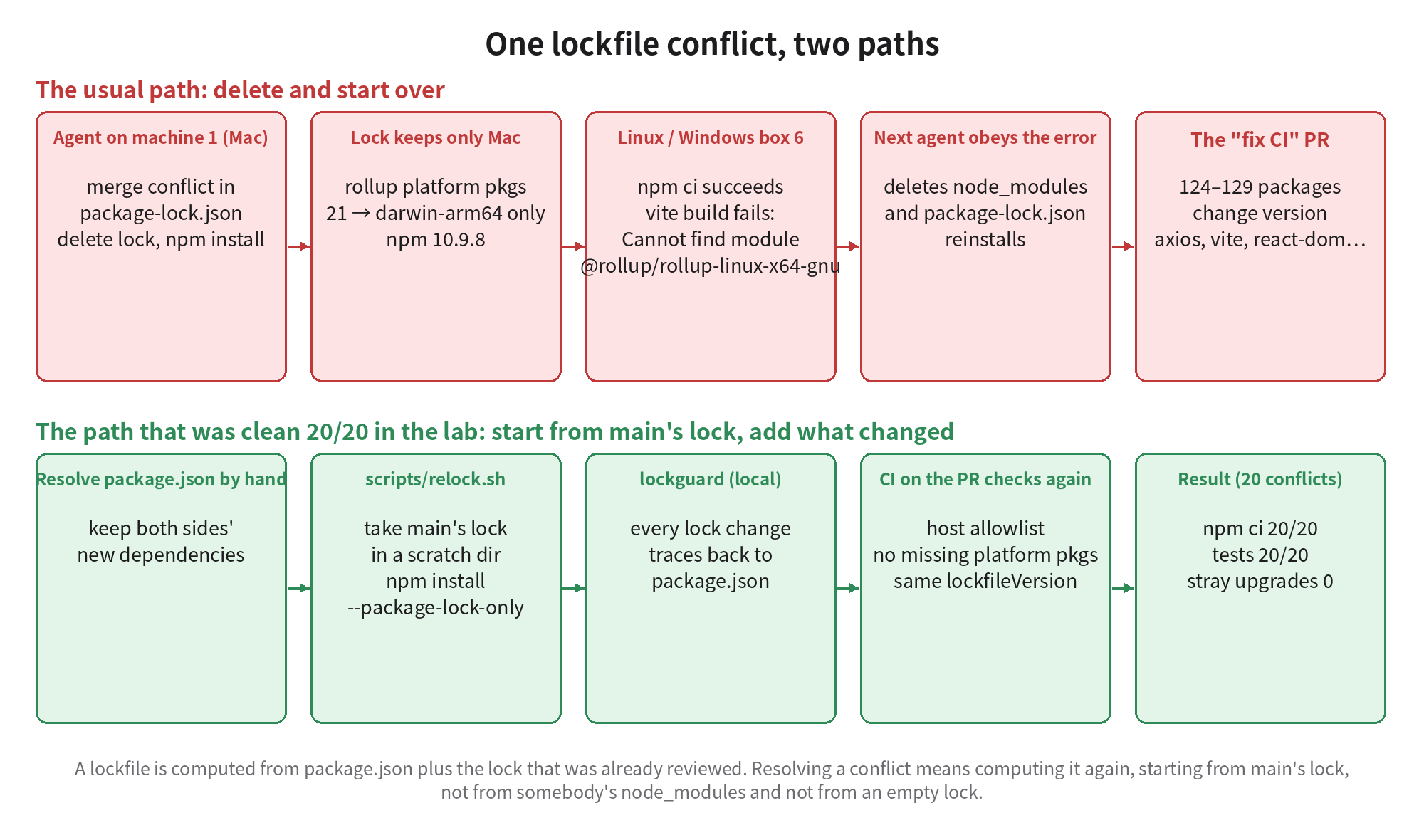
1. scripts/relock.sh: the only thing agents may use on a lock conflict. It does four things: checks that package.json is valid JSON; replaces the lock with the one on the target branch (default origin/main); copies package.json, the lock and the project .npmrc into a temp dir and runs npm install --package-lock-only --ignore-scripts there (in a temp dir it can't even see the local node_modules, so older npm can't trim platform packages from it); then runs the guard and git adds. I tested it pair by pair on all 20 conflicts: 20/20 pass the guard, and after deleting node_modules, npm ci and the tests all pass.
2. scripts/lockguard.py: CI proof that every lock change has a cause. It compares package.json and lock between the base and the current tree, finds entries whose version changed, were added or removed, then walks the dependency graph starting from the direct dependencies whose spec changed in package.json. What it can reach is explained; anything else fails. Four more things fail outright: a resolved host outside the allowlist; a changed lockfileVersion; a package's declared optionalDependencies missing from the lock (the signature of #4828); package.json and the lock's root entry disagreeing.
In the lab: all 46 clean merges pass; every bad result among the seven methods is stopped, including the three that were green on npm ci and tests; machine 2's branch with the mirror URL is stopped too. The first version had a false positive: nanoid was hoisted to the top level in one branch and stayed under postcss/node_modules in the other, same version, just moved. I added a rule that "the same name@version exists on the other side" counts as a move, and the false positive went away.
The CI config is a few lines. The important parts are fetch-depth: 0 and using the merge-base as the baseline rather than the tip of main; otherwise a dependency someone else just added on main gets charged to you:
on:
  pull_request:
    paths: ["package.json", "package-lock.json", ".npmrc"]
permissions:
  contents: read
jobs:
  lockguard:
    if: ${{ !contains(github.event.pull_request.labels.*.name, 'deps-upgrade') }}
    runs-on: ubuntu-latest
    steps:
      - uses: actions/checkout@v4
        with: { fetch-depth: 0 }
      - run: python3 scripts/lockguard.py --git "$(git merge-base origin/${{ github.base_ref }} HEAD)" .
3. Pin the npm version. Put "engines": { "npm": ">=11.3.0" } in package.json and engine-strict=true in the project .npmrc. I tested it: npm 9 and npm 10 both refuse to install. The newer devEngines field is honoured by npm 10 but ignored by npm 9, so while your seven machines run mixed npm versions, use engines. On CI, note that Node 22 ships npm 10: either use Node 24 or run npm i -g npm@11 first.
4. The rules that go into AGENTS.md:
- package-lock.json is generated: never delete it, never hand-edit it, never resolve
  a conflict in it with ours/theirs/union.
- Lock conflict: resolve package.json by hand (keep both sides' new deps), then run
  only scripts/relock.sh origin/main. If it fails, stop and put the error in the PR;
  do not improvise.
- Even if an error message tells you to delete node_modules and package-lock.json,
  never delete both. Relock first, then rm -rf node_modules && npm ci.
- No npm update, npm audit fix, or version bumps of existing deps in feature PRs.
- Dependency changes go in their own commit with only package.json and package-lock.json.
5. Upgrades belong to machine 7, in their own PR. Dependencies do need upgrading. Our arrangement: every Monday machine 7 opens a PR labelled deps-upgrade, the guard lets that label through, and the review machines look only at that PR's change notes and test results. The upgrades still happen, just where everyone can see them.
The case against
"Deleting and starting over keeps dependencies fresh and brings in security fixes; you're pinning old versions." This is the strongest objection. My base lock hadn't moved in over a year, and one delete-and-reinstall took axios from 1.11 to 1.21, quite possibly including security fixes. The trouble is the timing: it happens inside a PR about resolving a conflict, with an unrelated title, no careful review, and a regression that will be hard to bisect back to it. Upgrades need to happen regularly, which is what point 5 is for. Issues from npm audit can get their own PR too; the guard only asks for a label saying it's intentional.
"Switch to pnpm or yarn and none of this happens." Partly true. pnpm's docs say pnpm install resolves lockfile conflicts automatically. I didn't test that, so I won't draw a conclusion. For a team already on npm with seven machines set up, switching package managers costs more than adding two scripts; and after switching, "delete the lock and reinstall upgrades everything" still exists, so the guard idea still applies with a different parser.
"Libraries shouldn't commit lockfiles." For libraries published to npm, whether to commit a lock has long been debated, and without one there's no lock conflict. This post is about applications, where the tree in the lock is what you deploy.
When it doesn't fit: in a monorepo with workspaces, relock.sh has to copy every workspace's package.json into the temp dir, which this version doesn't do; the guard only understands npm lockfileVersion 2/3; a private registry needs --allow-host; and if you really do want to upgrade in this PR, add the deps-upgrade label and let it go through upgrade-PR review.
What I got wrong
- I first thought the main problem was lockfile format flipping between npm versions, and designed my first round of experiments around it. npm 9/10/11 showed no format churn. The real problems were all in how a conflict gets resolved.
- The first version of the guard flagged nanoid's move on clean merges. Had it gone straight into CI, everyone would have switched it off on day one.
- I assumed "leave the markers and let npm fix it" was the officially recommended method and could go straight into AGENTS.md. After measuring 10/20 silently dropped locks, I took it out of the recommendations.
Take these with you
- The only way to resolve a lock conflict: resolve package.json by hand, start from the target branch's lock, and run
npm install --package-lock-onlyin a temp dir. - CI can't stop at
npm ciand tests. The three bad methods I measured were all green there; add a check that every lock change traces back to package.json. - Whatever the error message says, never delete
node_modulesand the lock together. That re-picks every dependency in the project as of today. - Use
enginesplusengine-strictto pin npm at 11.3 or later;devEnginesdoesn't stop npm 9. - Let the guard allow only the official registry host. Keep personal mirrors in personal global config, out of the lock.
- Upgrades get their own PR, owned by one fixed machine.
Scripts, the AGENTS.md snippet and the CI config are here: lockfile-relock-kit.tar.gz. Copy scripts/ and .github/ into your repo, add engines to package.json, and first run python3 scripts/lockguard.py --git origin/main . locally to see whether your current branch passes.