周四下午四点,4 号机的人在 PR #42 上点了 Approve。优惠券改成逐行打折,line_discount 里有一段 pct = max(0, min(100, pct)),审查意见写的是「clamp 留着」。6 号机的 Windows 验证也在同一个 SHA 上给了 win-verify: success。7 号机准备合并。
四点十二分,2 号机上的代理又推了一次:它说「修了个 lint,amend 了一下」。分支还是 feat/coupon-v2,GitHub 上那个绿色的 Approve 还挂着,CI 很快又绿了。七点机一看「审查过了、检查过了」,点了 Merge。
合进去的那一版,clamp 没了。代理在整理测试的时候把 test_line_clamp 也顺手删了。百分之一百五的折扣进了生产,财务第二天来问。
群里第一句是「不是已经 Approve 了吗」。第二句才是关键问题:Approve 绑定的是哪一个 SHA?合进去的又是哪一个?
下面是我在自己机器上搭的玩具仓库和一套本地模拟的 GitHub 审查/状态行为。git 提交和 amend 是真的;审查、commit status、isOutdated、分支保护开关是按文档行为模拟的,不是 live GitHub API。win-verify 是假的状态名,没有在 Windows 上跑过。数字都来自这一次实验,文末单独列哪些是真跑的。
场景:Approve A,force-push B
玩具仓库 shop:主干上有整单打折的 pricing.py。功能分支 feat/coupon-v2 的第一版(commit A)加上逐行打折、VIP15,以及那段被点名留下的 clamp。模拟 4 号机在 A 上 Approve,6 号机在 A 上写 win-verify: success,然后 2 号机 git commit --amend 成 commit B——删掉 clamp,测试里那条边界用例也没了——再 force-push。
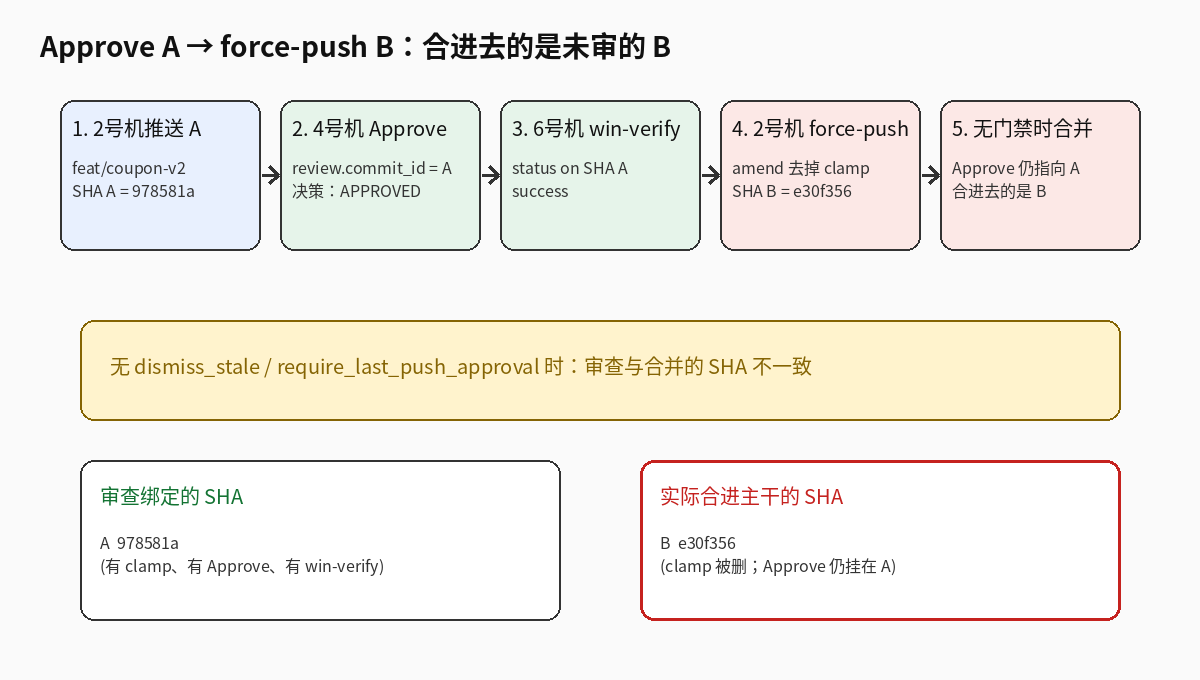
这一轮跑出来的短 SHA(每次重建仓库会变,关系不变):
| 角色 | SHA | 内容 |
|---|---|---|
| A(被 Approve、被 win-verify) | 978581a |
有 clamp,有边界测试 |
| B(force-push 后的 HEAD) | e30f356 |
clamp 被删,边界测试被删 |
不开门禁时:审查决策仍是 APPROVED,合进去的是 B
我先按「很多仓库的默认」来:dismiss_stale_reviews_on_push = false,require_last_push_approval = false,也没有「Approve 之后禁止强推」。
结果很干:
- force-push 被允许
review_decision仍是APPROVED- 那条 Approve 的
commit_id还停在 A(978581a),HEAD 已经是 B(e30f356) - 朴素合并门禁(「有 Approve 就算、状态检查在任意 SHA 上成功就算」)→
mergeable_naive = true,会把未审的 B 合进去
更狠的一版(场景 1e):我让 CI 和 win-verify 都在 B 上重新变绿,Approve 仍然挂在 A。朴素合并照样放行;严格状态检查也认为 HEAD 上的检查齐了——因为它们确实齐了。唯一还指着旧 SHA 的,是那条 Approve。 也就是说,单靠「required status checks must be on HEAD」挡不住「审查还在旧版」;你得显式要求「最近一次可审 push 也要有 Approve」,或者自己写一道 headShaMustMatchApproved。
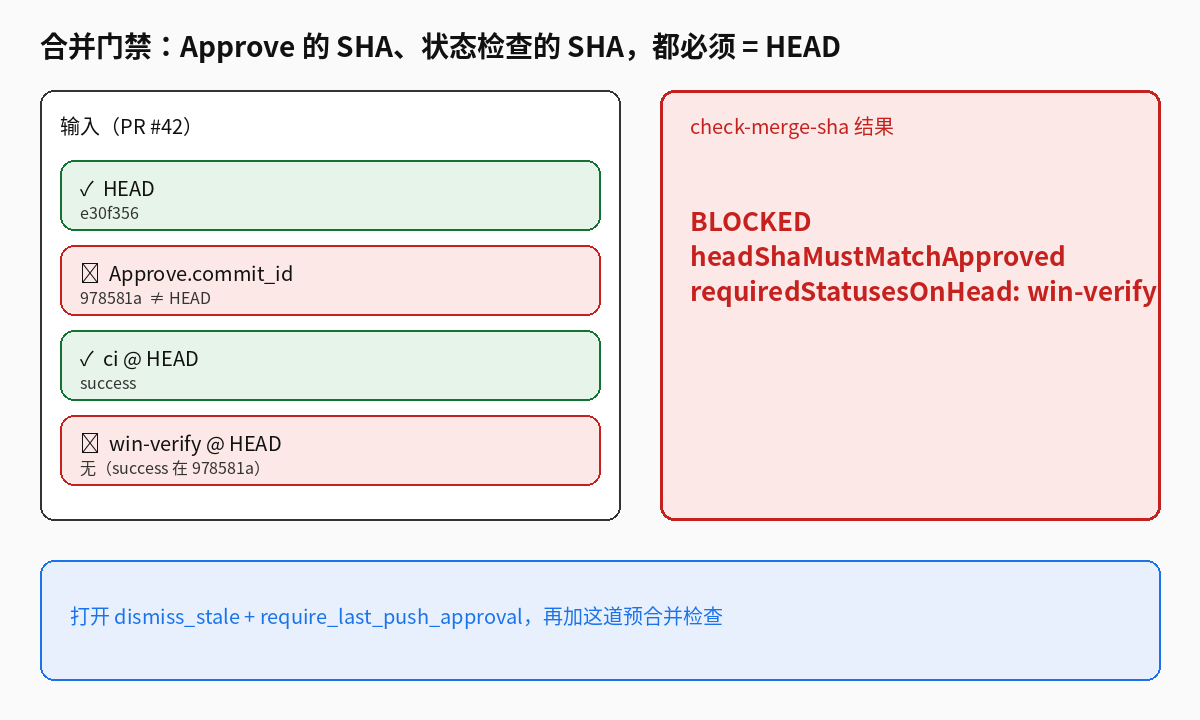
状态检查的 SHA 偏了:win-verify 还在 A
更常见的中间态是:Linux CI 快,Windows 慢。B 推上去之后 ci 在 B 上 success 了,win-verify 还停留在 A。
场景 2 的结果:
- HEAD =
e30f356 win-verify的 success 只出现在978581a- 就算 4 号机又在 B 上点了一次 Approve,严格门禁仍拒绝合并
- 我写的
check_merge_sha.py输出:
BLOCKED for HEAD e30f356:
  - requiredStatusesOnHead: win-verify not success on HEAD e30f356; seen ['978581a:success']
朴素合并在这里是 true(「反正 win-verify 曾经绿过」)。这就是 6 号机和 7 号机之间的裂缝:Windows 验证的是旧产物,合并的是新产物。
行内评论:哪些过期、重锚能救什么
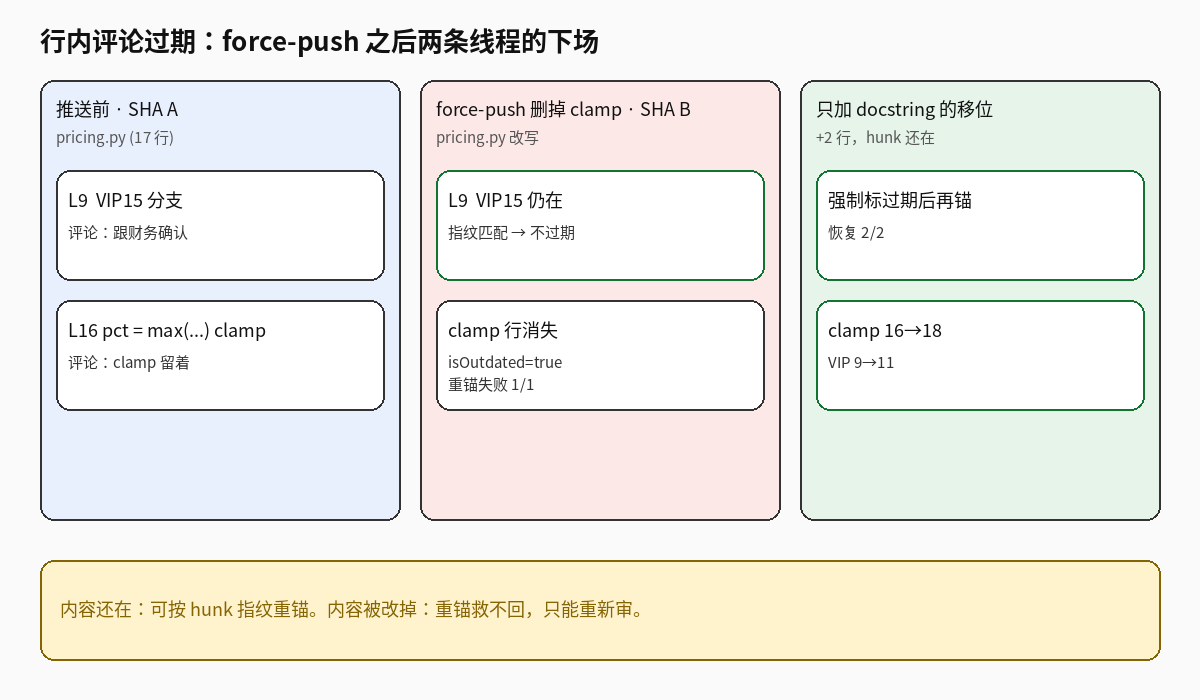
Approve 之前,4 号机在 A 上留了两条行内评论:VIP15 那一行(L9)和 clamp 那一行(L16)。然后 force-push。
两次实验:
3a —— amend 删掉 clamp。 2 条线程里 1 条被标过期(clamp 那条);VIP15 的 hunk 指纹还在,没过期。按内容指纹做本地重锚:恢复 0,失败 1。评论里写着「clamp 留着」,代码里已经没有 clamp——重锚救不回被删掉的意图,只能重新审。
3b —— 只在文件头加 docstring(+2 行),clamp 原样保留。 模拟 GitHub 因 diff 位置变了先全部标过期,再按 hunk 指纹重锚:2/2 恢复(clamp 16→18,VIP 9→11)。内容还在,行号可以迁;内容没了,迁了也没用。
所以「过期评论」本身不是 bug,是信号。危险的是:过期之后没人再读,7 号机却以为审查意见都还有效。
五种策略,同一条 Approve→force-push
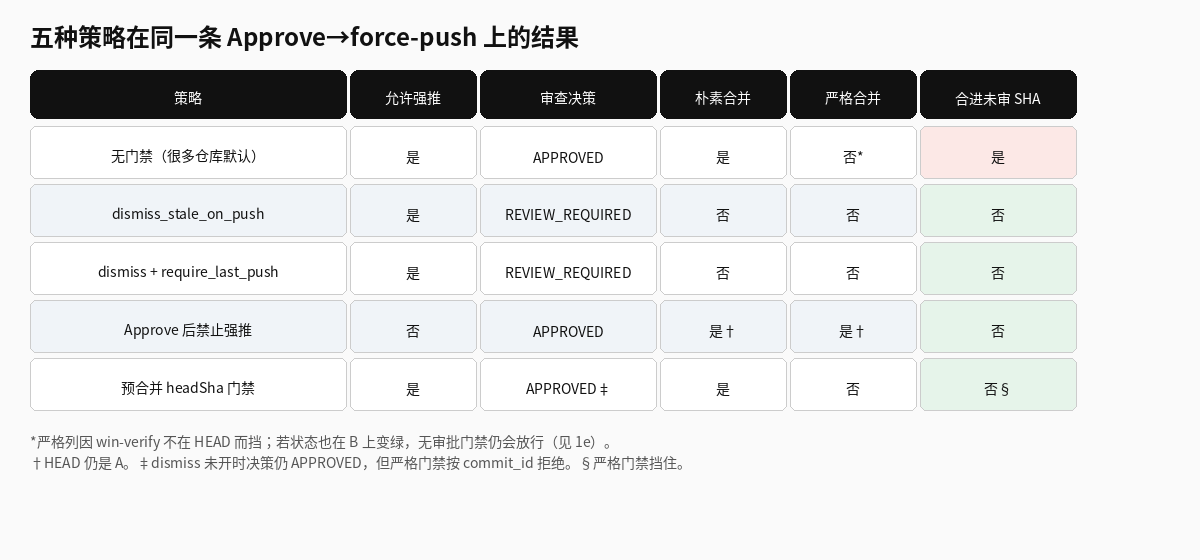
我在同一个玩具 PR 上依次打开五种做法,看强推是否被允许、审查决策变成什么、朴素/严格合并会不会放行:
| 策略 | 允许强推 | 审查决策 | 朴素合并 | 严格合并 | 合进未审 SHA(按朴素) |
|---|---|---|---|---|---|
| 无门禁(很多仓库默认) | 是 | APPROVED | 是 | 否* | 是 |
dismiss_stale_reviews_on_push |
是 | REVIEW_REQUIRED | 否 | 否 | 否 |
dismiss + require_last_push_approval |
是 | REVIEW_REQUIRED | 否 | 否 | 否 |
| Approve 之后禁止强推 | 否 | APPROVED | 是† | 是† | 否 |
预合并 headShaMustMatchApproved + requiredStatusesOnHead |
是 | APPROVED‡ | 是 | 否 | 否§ |
*严格列在「无门禁」那一行被挡,是因为 win-verify 不在 HEAD;若像 1e 那样状态也在 B 上变绿,没有审批门禁仍会放行。
†HEAD 仍停在 A,所以合的是审过的版本。
‡未开 dismiss 时 GitHub 式决策仍显示 APPROVED,但严格门禁按 commit_id 拒绝。
§严格门禁挡住;朴素合并会放行——所以这道检查必须进 required checks,不能只靠人眼。
取舍很清楚:
- 只开 dismiss_stale:强推后 Approve 作废,必须重审。代理仍可强推,评论仍会过期,但合不进去。
- 再开 require_last_push_approval:重审必须落在当前 HEAD上,不能拿旧 Approve 充数。这是 GitHub 原生就能开的,成本最低。
- Approve 后禁止强推(ruleset / 机器人):最硬,HEAD 不会漂。代价是代理没法「顺手 rebase 一下」;冲突修复要另开约定(先评论再强推,再
/ready)。 - 预合并脚本:在原生开关之外再核一次「Approve 的 SHA == HEAD」且「每个 required context 的 success 都在 HEAD」。适合原生开关一时改不了、或要兼容多种状态系统的团队。它不替代 dismiss;dismiss 关着时 UI 仍可能显示 APPROVED,靠脚本把合并按钮背后的检查判红。
机制:为什么会钻到这个空里
GitHub 的 pull request review 带着 commit_id。分支保护如果不 dismiss stale、也不要求最近一次 push 的批准,合并条件里的「有足够 Approve」只看「有没有未 dismiss 的 Approve」,不看那条 Approve 是不是 HEAD。Commit status / check run 倒是按 SHA 存的;UI 上「全绿」有时是「这些 context 最近一次成功」,要小心是不是把旧 SHA 的绿当成了当前 HEAD 的绿——尤其自建的 Windows 机、用 repository_dispatch 回写 status 的时候。
这是典型的 TOCTOU:4 号机检查的是 A,7 号机合并的是 B,中间 2 号机改了引用。代理特别容易踩,因为它们习惯在「CI 红了 / 和主干冲突了 / 我想 squash 得干净一点」时 amend + force-push,而且不会主动说「这会作废刚才的 Approve」。
什么时候这套不划算
- 从不为已 Approve 的 PR 强推。 那你遇到的是别的问题;这篇文章的门禁是多余摩擦。
- 整仓禁止 force-push。 已经比「Approve 后禁止」更严,不用叠机器人。
- 只用 merge commit、禁止 rebase 工作流。 风险小很多,但代理若仍能 push 新 commit,审查是否覆盖最新 commit 仍要靠 dismiss / require_last_push。
- 外部系统的验证不能按 SHA 检索。 比如某台 Windows 机只按分支名覆盖写「通过」,没有 SHA——那
requiredStatusesOnHead也查不到真相,得先改上报方式。 - 重锚过期评论当银弹。 实验里内容一改就失败。它只适合「行号漂了、逻辑没变」;不能代替重新 Approve。
我怎么确认「朴素合并」真的会放行
有人会怀疑:真实的 GitHub 合并按钮会不会比我的模拟更严?我没把这个实验接到 live 仓库上做破坏性验证(不想在别人的保护规则上试刀),所以必须把「模拟在模仿什么」说清楚。
GitHub 文档里,dismiss_stale_reviews_on_push 和 require_last_push_approval 是可选的分支保护字段,默认都是关的。关掉时,合并资格里的审查条件是「未 dismiss 的 Approve 数量 ≥ 要求」——审查对象上的 commit_id 不参与这个计数。我的 github_sim.py 按这个语义实现:require_last_push_approval=False 时,只要存在未 dismiss 的 APPROVED,review_decision 就是 APPROVED,哪怕 commit_id 是上一任 HEAD。
状态检查那边,GitHub 原生的 required status checks 本来就要求在当前 HEAD 的 SHA 上成功。所以如果团队只用原生 checks,场景 2(win-verify 停在 A)在真实 GitHub 上也会被挡。危险在于两类自建路径:
- 合并前用脚本或机器人自己判断「绿不绿」,只看 context 名、不看 SHA(我的
mergeable_naive); - Windows 机用分支名覆盖写 status,读的人以为是 HEAD。
场景 1e 是专门留给「原生 status 都在 B 上绿了、Approve 还在 A」的:这时真实 GitHub 在未开那两个审查开关时,也会允许合并。这不是模拟器夸张,是默认配置的语义。
本地复现:解压 kit 后执行 python3 build_repo.py && python3 run_lab.py && ./check-merge-sha.sh --state sample-blocked-state.json。results.json 里的 SHA 每次重建都会变;看布尔值:ships_unreviewed_sha、push_allowed、outdated_after_push、reanchor_*。
代理为什么特别爱踩这个坑
人审完之后再改,通常会在群里说一声,或者直接 @ 审查的人。代理不会。它们的默认循环更接近:看到 CI 红了就改、看到主干超前了就 rebase、看到 commit 信息不够「干净」就 amend,然后 push --force-with-lease。对代理来说这是在「完成任务」;对审查系统来说,每一次都是一次 SHA 替换。
我在场景里用的那次 amend 很典型:名义上是 lint,实际动到了审查点名留下的 clamp,还把对应测试删了。审查 UI 不会弹窗说「你 Approve 过的那一行没了」。过期的是行内评论;Approve 决策在未开 dismiss 时连过期都不算,只是 commit_id 悄悄指着旧的。
三点放大了风险:
- 审查机和开发机是分开的。 4 号机点完 Approve 就去看下一个 PR;2 号机上的代理还在「收尾」。两边没有共享的「已 Approve,勿改写」锁,除非你在分支保护或机器人里显式加上。
- Windows 验证更慢。 6 号机按分支名排队时,很容易出现「验证的是 A、合并的是 B」。如果上报 status 时没带 SHA,或合并门禁不核 SHA,裂缝会一直在。
- 合并按钮的绿是汇总色。 「审查通过」和「检查通过」在 UI 上并排,心理上被当成同一时刻的快照。它们不是。一个绑在旧 review 上,一个绑在(但愿是)当前 status 上。
所以这不是「代理比人坏」,是「代理把本来偶发的 TOCTOU 变成了高频路径」。门禁要按高频路径设计,不能按「人会打招呼」设计。
和「审查意见过期」不是同一件事
有人会说:force-push 之后评论变 outdated,审查的人自己会再看一遍。实验不支持这个乐观假设。
- 评论过期是 diff 锚点 的事;Approve 是否仍有效是 分支保护策略 的事。两条链路独立。未开 dismiss 时,评论可以全灰,Approve 照样绿。
- 重锚只能处理「行号漂了」。场景 3b 里 +2 行 docstring,重锚 2/2;场景 3a 里逻辑被改,重锚 0/1。把「自动重锚」当成合并条件,等于假设代理只会挪行不会改意——这正好和代理的行为相反。
- 真正要挡的是合并,不是评论区的小灰字。灰字可以留着当考古;合并键必须在 SHA 对齐之前是红的。
落地顺序(按摩擦从小到大)
如果你只能改一样东西:先开 dismiss stale + require last push approval。场景 1b/1c 显示,光这两项就足以让强推后的决策从 APPROVED 变回 REVIEW_REQUIRED,并要求新的 Approve 落在 B 上。不写代码,不改代理。
第二步:把 Windows(以及任何慢的、按机器触发的检查)改成 按 SHA 写 status/check run,并加入 required checks。场景 2 是专门打这个点的:Approve 已在 B 上,win-verify 仍在 A,严格门禁拒绝。
第三步:给代理加 AGENTS.md 约束,并在 Approve 之后由 ruleset/机器人拒绝强推。这是摩擦最大的一步,适合「代理已经多次在 Approve 后改写」的仓库;对偶尔 rebase 的人,保留「评论说明 → 强推 → /ready」出口。
第四步:预合并脚本进 required checks,作为原生开关的双保险,也方便在 UI 还显示 APPROVED 时把检查跑红(dismiss 未开的过渡期)。
不要倒过来:先写一堆重锚评论的机器人、却不开 dismiss——评论区会好看一点,合进去的仍可能是未审的 B。
可以抄走的部分
1. 分支保护(Settings → Rules / Branch protection)开这两项:
- Dismiss stale pull request approvals when new commits are pushed
- Require approval of the most recent reviewable push
并把 ci、win-verify(或你的 Windows 任务名)、以及下面的 gate job 设为 required checks。
2. 预合并工作流(kit 里的 merge-sha-gate.yml)调用 check_merge_sha.py:任一 Approve 的 commit_id ≠ HEAD,或任一 required context 的 success 不在 HEAD,job 失败。
3. 写进 1–3 号机的 AGENTS.md:
- Approve 之后禁止 force-push / amend / rebase,除非 4/5 号机明确要求改
- 必须改写历史时:先在 PR 评论说明,推完之后发
/ready <newsha>,等 4 号机重审、6 号机按新 SHA重跑 Windows - 审查进行中优先追加 commit,不要 amend
4. 7 号机合并前看一眼: Approve 的 commit 和 HEAD 是不是同一个;win-verify 的 SHA 是不是 HEAD。两秒能看出来的事,不要交给直觉。
哪些是真跑的,哪些不是
真跑:玩具仓库上的 git commit / amend;本地模拟的 Approve → force-push 五条策略;状态 SHA 偏移时 check_merge_sha.py 拒绝合并;两条行内评论在「删 clamp」和「加 docstring」下的过期与重锚(1/2 过期且重锚失败;移位 +2 行后重锚 2/2)。
没跑:不是 live GitHub API;没有真实的 GraphQL isOutdated 查询;没有在 Windows 上跑验证(win-verify 是假状态名);没有七台机器联调;workflow YAML 只在本地按脚本验证,没有在 Actions 里跑过。
全部放在:approve-force-push-kit.tar.gz——check_merge_sha.py、merge-sha-gate.yml、AGENTS.md 片段、模拟器、实验结果 JSON/MD。
今天就能做的最小一步:打开 dismiss_stale_reviews_on_push 和 require_last_push_approval,然后对一个刚 Approve 又被强推过的 PR 跑一次 python3 check_merge_sha.py --github <owner> <repo> <pr>。若它报 BLOCKED,你就知道刚才差点合进去的是哪一版。
Thursday 4:00 p.m. Someone on machine 4 hits Approve on PR #42. Coupons are moving to per-line discounts. line_discount has pct = max(0, min(100, pct)); the review comment says "keep the clamp." Machine 6's Windows job wrote win-verify: success on the same SHA. Machine 7 is ready to merge.
At 4:12 the agent on machine 2 pushes again: "fixed a lint, amended." Same branch feat/coupon-v2. The green Approve is still there. CI goes green again. Machine 7 sees "reviewed + checks green" and merges.
The merged tree has no clamp. While tidying tests the agent also dropped test_line_clamp. A 150% discount ships. Finance asks the next morning.
First message in the chat: "Didn't we already Approve?" Second message is the real question: which SHA did Approve bind to, and which SHA actually merged?
I built a toy repo and a local simulation of GitHub review/status behavior. The git commits and amends are real. Reviews, commit statuses, isOutdated, and branch-protection knobs are simulated from documented behavior — not the live GitHub API. win-verify is a fake context name; nothing was run on Windows. Numbers below are from this run; the last section lists what was and wasn't live.
Scene: Approve A, force-push B
Toy repo shop: main has whole-order discounts in pricing.py. Feature branch feat/coupon-v2 commit A adds per-line discounts, VIP15, and the clamp the reviewer asked to keep. Simulate machine 4 Approving A, machine 6 writing win-verify: success on A, then machine 2 git commit --amend to commit B — clamp gone, edge-case test gone — and force-push.
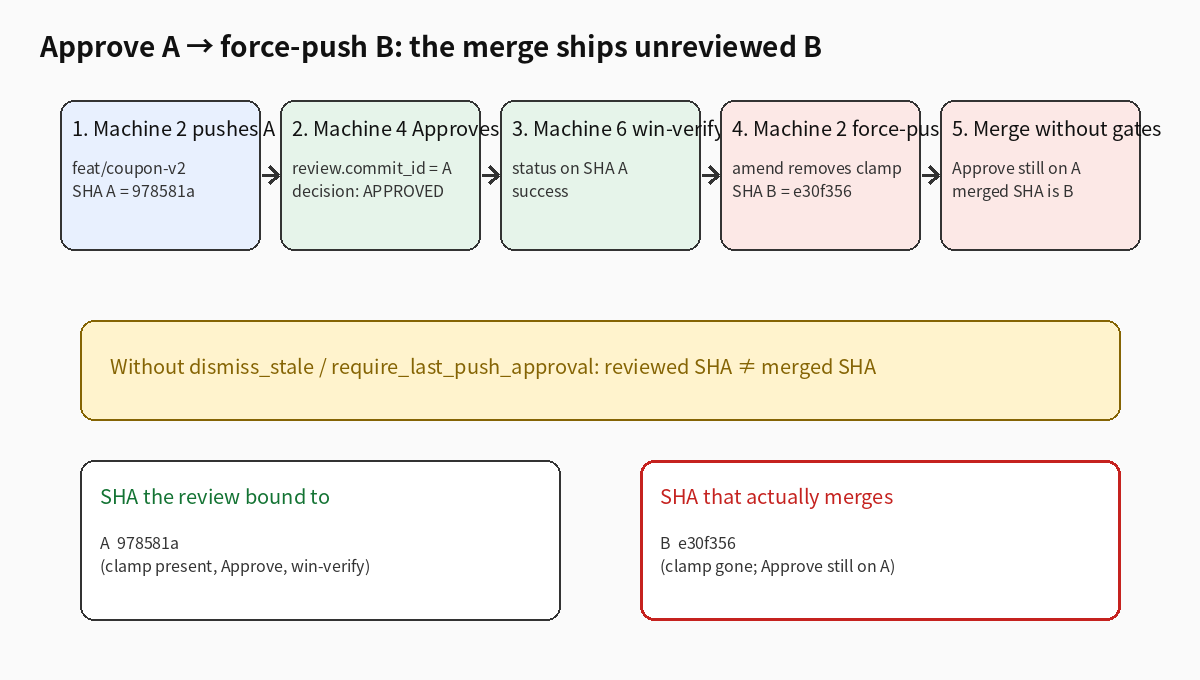
Short SHAs from this run (rebuilds change them; the relationship does not):
| Role | SHA | Content |
|---|---|---|
| A (Approved, win-verified) | 978581a |
clamp + edge test |
| B (HEAD after force-push) | e30f356 |
clamp deleted, edge test deleted |
Without gates: review_decision stays APPROVED, merge ships B
Default of many repos: dismiss_stale_reviews_on_push = false, require_last_push_approval = false, no "block force-push after Approve".
Results:
- force-push allowed
review_decisionstillAPPROVED- that Approve's
commit_idstill on A (978581a); HEAD is B (e30f356) - naive merge gate ("any Approve counts; any SHA success for a context counts") →
mergeable_naive = true, ships unreviewed B
Harsher variant (scenario 1e): CI and win-verify both go green on B, Approve still on A. Naive merge still ships. A "statuses must be on HEAD" check also passes — they are on HEAD. The only pointer still on the old SHA is the Approve. So required status checks alone do not catch "review is stale"; you need "approval of the most recent reviewable push" or a custom headShaMustMatchApproved.
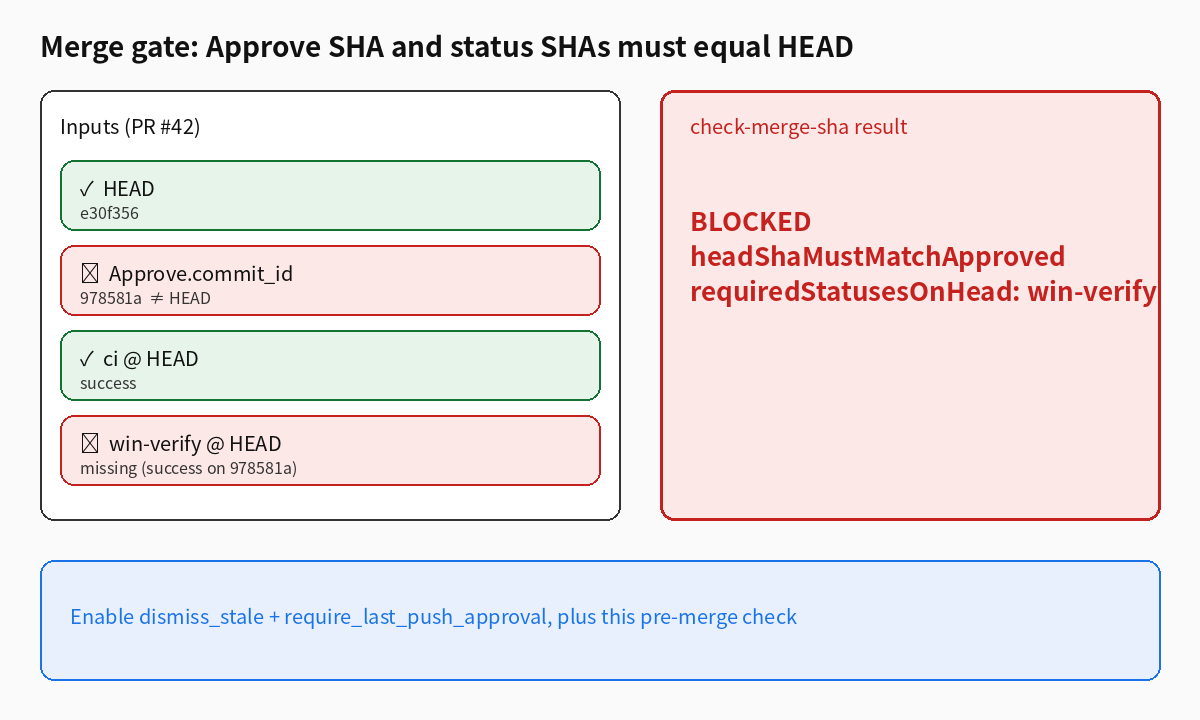
Status SHA skew: win-verify still on A
Common middle state: Linux CI is fast, Windows is slow. After B is pushed, ci is success on B; win-verify still only on A.
Scenario 2:
- HEAD =
e30f356 win-verifysuccess only on978581a- even if machine 4 Approves B again, the strict gate still refuses
check_merge_sha.pyprints:
BLOCKED for HEAD e30f356:
  - requiredStatusesOnHead: win-verify not success on HEAD e30f356; seen ['978581a:success']
Naive merge is true here ("win-verify was green once"). That is the crack between machines 6 and 7: Windows verified the old artifact; merge ships the new one.
Inline comments: what goes outdated, what re-anchor can save
Before Approve, machine 4 left two threads on A: VIP15 (L9) and the clamp (L16). Then force-push.
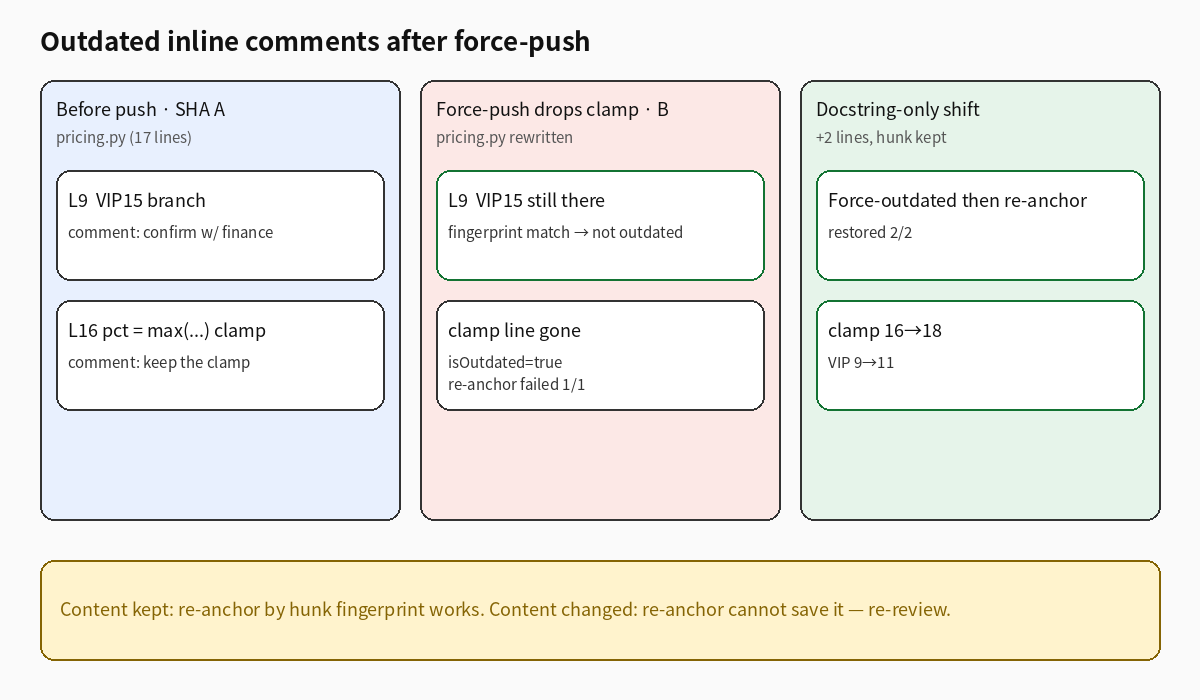
Two runs:
3a — amend removes the clamp. Of 2 threads, 1 goes outdated (the clamp). VIP15's hunk fingerprint still matches. Local re-anchor by fingerprint: restored 0, failed 1. The comment says "keep the clamp"; the code no longer has it — re-anchor cannot restore deleted intent. Re-review.
3b — docstring-only prepend (+2 lines), clamp kept. Simulate GitHub marking both outdated when diff positions move, then re-anchor by hunk fingerprint: 2/2 restored (clamp 16→18, VIP 9→11). Content kept → line numbers can move. Content gone → moving them is pointless.
Outdated markers are a signal, not a bug. The danger is merging while everyone pretends the old threads still describe HEAD.
Five strategies on the same Approve → force-push
Same toy PR, five configurations:
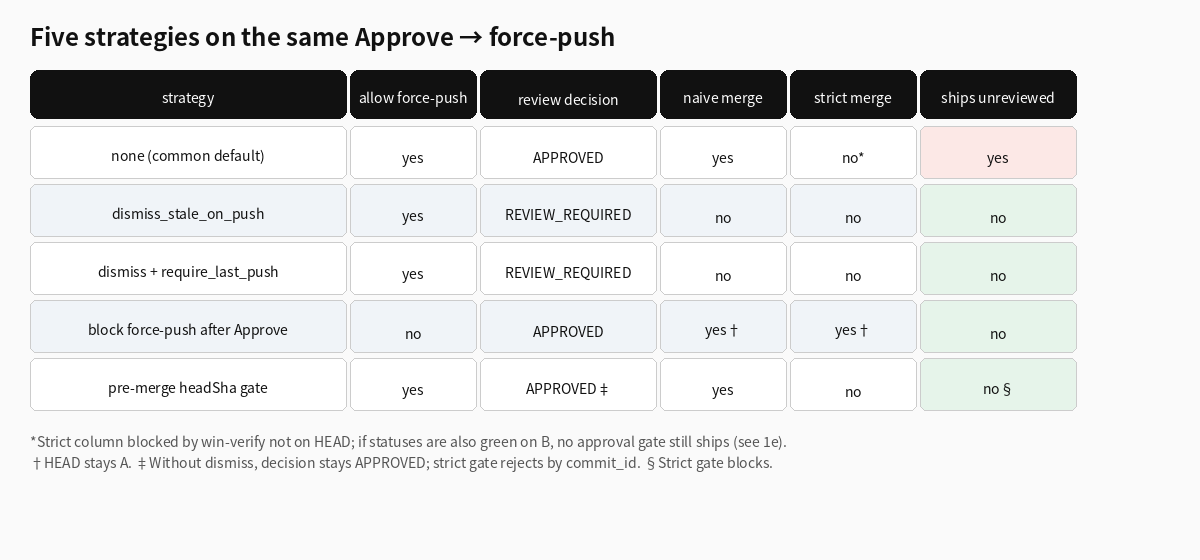
| strategy | allow force-push | review decision | naive merge | strict merge | ships unreviewed (naive) |
|---|---|---|---|---|---|
| none (common default) | yes | APPROVED | yes | no* | yes |
dismiss_stale_reviews_on_push |
yes | REVIEW_REQUIRED | no | no | no |
dismiss + require_last_push_approval |
yes | REVIEW_REQUIRED | no | no | no |
| block force-push after Approve | no | APPROVED | yes† | yes† | no |
pre-merge headShaMustMatchApproved + requiredStatusesOnHead |
yes | APPROVED‡ | yes | no | no§ |
*The "none" strict column is blocked because win-verify is not on HEAD; if statuses are also green on B (scenario 1e), no approval gate still ships.
†HEAD stays on A, so the reviewed SHA would merge.
‡Without dismiss, GitHub-style decision still shows APPROVED; the strict gate rejects by commit_id.
§Strict gate blocks; naive would ship — so this check must be a required check, not a human glance.
Trade-offs:
- dismiss_stale alone: force-push voids Approve; must re-review. Agents can still force-push; threads still go outdated; merge will not ship.
- plus require_last_push_approval: the new Approve must land on current HEAD. Native GitHub, cheapest fix.
- block force-push after Approve (ruleset / bot): hardest; HEAD cannot drift. Cost: agents cannot "just rebase"; conflict fixes need a ritual (comment, then force-push, then
/ready). - pre-merge script: also checks Approve SHA == HEAD and every required context success on HEAD. Useful when native knobs cannot change yet. It does not replace dismiss; with dismiss off the UI may still say APPROVED while the script fails the required check.
Mechanism: why the hole exists
A GitHub pull request review carries commit_id. If branch protection does not dismiss stale reviews and does not require approval of the most recent push, the merge rule "enough Approvals" only asks whether a non-dismissed Approve exists — not whether it points at HEAD. Commit statuses / check runs are stored per SHA; a UI that looks "all green" may be showing the latest success per context without insisting that success is on HEAD — especially home-grown Windows runners that write statuses via repository_dispatch.
Classic TOCTOU: machine 4 inspected A, machine 7 merges B, machine 2 changed the pointer in between. Agents hit this constantly because they amend + force-push when CI fails, when main moves, or when they want a cleaner squash — and they do not announce "this voids the Approve."
When this does not fit
- You never force-push after Approve. Different problem; these gates are friction.
- Force-push is already banned repo-wide. Stricter than "after Approve"; no need for the bot.
- Merge commits only, no rebase workflow. Lower risk; new commits still need dismiss / require_last_push so review covers HEAD.
- External verifiers cannot be queried by SHA. A Windows box that overwrites "passed" by branch name gives
requiredStatusesOnHeadnothing true to read — fix reporting first. - Re-anchoring outdated comments as a silver bullet. In the lab, content edits make it fail. It helps when lines drift and logic did not change; it does not replace a new Approve.
How I know "naive merge" would really ship
Skepticism is fair: is the real Merge button stricter than the simulator? I did not run a destructive test against a live protected repo, so the honesty bound matters.
In GitHub's docs, dismiss_stale_reviews_on_push and require_last_push_approval are optional branch-protection fields, both off by default. When off, the review half of mergeability is "non-dismissed Approve count ≥ required" — the review's commit_id does not enter that count. github_sim.py follows that: with require_last_push_approval=False, any non-dismissed APPROVED yields review_decision=APPROVED, even if commit_id is the previous HEAD.
On the status side, GitHub's native required status checks already demand success on the current HEAD SHA. So scenario 2 (win-verify stuck on A) would also block on real GitHub if you only use native checks. The danger is two home-grown paths:
- a script or bot that decides "green" by context name and ignores SHA (my
mergeable_naive); - a Windows machine that overwrites status by branch name while readers assume it is HEAD.
Scenario 1e is the case where native statuses are already green on B and Approve is still on A: real GitHub, with those two review knobs off, will allow the merge. That is not the simulator being dramatic; it is the default configuration.
Reproduce locally: unpack the kit, then python3 build_repo.py && python3 run_lab.py && ./check-merge-sha.sh --state sample-blocked-state.json. SHAs in results.json change every rebuild; trust the booleans: ships_unreviewed_sha, push_allowed, outdated_after_push, reanchor_*.
Why agents hit this constantly
A human who changes code after Approve usually says so in chat or pings the reviewer. Agents do not. Their default loop is closer to: CI red → fix; main moved → rebase; commit message untidy → amend; then push --force-with-lease. To the agent that is "finishing the task." To the review system every one of those is a SHA swap.
The amend in the lab is typical: billed as lint, it removed the clamp the reviewer named, and dropped the matching test. The review UI does not pop up "the line you Approved is gone." Inline threads may go outdated; without dismiss, the Approve decision does not even go outdated — its commit_id just keeps pointing at the old SHA.
Three amplifiers:
- Review machine ≠ dev machine. Machine 4 Approves and moves on; the agent on machine 2 is still "wrapping up." There is no shared "Approved — do not rewrite" lock unless branch protection or a bot adds one.
- Windows is slower. When machine 6 queues by branch name, "verified A, merged B" is the default failure mode. If the status write omits the SHA, or the merge gate ignores SHA, the crack stays open.
- The merge button's green is a collage. "Review passed" and "checks passed" sit side by side and feel like one snapshot. They are not. One is bound to an old review; the other (hopefully) to current statuses.
This is not "agents are worse people." It is "agents turn a rare TOCTOU into a hot path." Gates have to be designed for the hot path, not for "humans will announce."
Outdated comments are not the same bug
People say: after a force-push the comments go outdated, so the reviewer will look again. The lab does not support that optimism.
- Outdated threads are about diff anchors; whether Approve still counts is about branch-protection policy. Separate pipes. With dismiss off, every comment can be gray while Approve stays green.
- Re-anchor only helps when line numbers drift. Scenario 3b (+2-line docstring) restored 2/2; scenario 3a (logic removed) restored 0/1. Making "auto re-anchor" a merge condition assumes agents only move lines, never change meaning — the opposite of how they behave.
- What you must block is the merge, not the gray text in the thread list. Gray text can stay for archaeology; the merge key must stay red until SHAs align.
Rollout order (least friction first)
If you can change only one thing: enable dismiss stale + require last push approval. Scenarios 1b/1c show those two alone flip the decision from APPROVED back to REVIEW_REQUIRED and demand a new Approve on B. No code, no agent edits.
Second: make Windows (and any slow, machine-triggered check) write status/check runs by SHA, and mark them required. Scenario 2 is exactly this: Approve already on B, win-verify still on A, strict gate refuses.
Third: AGENTS.md rules plus a ruleset/bot that rejects force-push after Approve. Highest friction; fits repos where agents already rewrite after Approve. Keep an escape hatch for humans: comment → force-push → /ready.
Fourth: put the pre-merge script in required checks as a belt-and-suspenders on the native knobs, and to fail the check while the UI still says APPROVED during a transition with dismiss off.
Do not invert this: ship a re-anchor bot and leave dismiss off — the thread list looks tidier, and the merge can still ship unreviewed B.
What you can copy
1. Branch protection — turn on:
- Dismiss stale pull request approvals when new commits are pushed
- Require approval of the most recent reviewable push
Make ci, win-verify (or your Windows job), and the gate job below required.
2. Pre-merge workflow (merge-sha-gate.yml in the kit) runs check_merge_sha.py: fail if any Approve commit_id ≠ HEAD, or any required context's success is not on HEAD.
3. AGENTS.md on machines 1–3:
- No force-push / amend / rebase after Approve unless machine 4/5 asked
- If history must be rewritten: comment on the PR first, then push, then
/ready <newsha>so machine 4 re-reviews and machine 6 re-runs Windows on that SHA - Prefer additional commits over amend while review is open
4. Machine 7 before Merge: Approve commit == HEAD? win-verify SHA == HEAD? Two seconds; do not trust the green badge alone.
What was actually run
Run: real git commit/amend on the toy repo; five simulated strategies for Approve → force-push; check_merge_sha.py blocking on status SHA skew; two inline threads under "delete clamp" and "add docstring" (1/2 outdated and re-anchor failed; +2-line shift restored 2/2).
Not run: not live GitHub API; no real GraphQL isOutdated; no Windows execution (win-verify is a fake context); no seven-machine integration; workflow YAML validated via the script locally, not in Actions.
Kit: approve-force-push-kit.tar.gz — check_merge_sha.py, merge-sha-gate.yml, AGENTS.md snippet, simulator, results JSON/MD.
Smallest step today: enable dismiss_stale_reviews_on_push and require_last_push_approval, then run python3 check_merge_sha.py --github <owner> <repo> <pr> on a PR that was Approved and then force-pushed. If it says BLOCKED, you just saw which SHA almost merged.