三个人、七台电脑的团队,搭环境那天通常是这样过的:每台机器装好代理,gh auth login,浏览器里点一下授权,完事。1–3 号机写代码,4–5 号机审查,6 号机跑 Windows 验证,7 号机合并——角色分得很清楚,但七台机器手里拿的是同一把钥匙。
我先在自己这台跑代理的机器上量了一下这把钥匙到底有多大。gh api -i user 返回的 X-OAuth-Scopes 是 gist, read:org, repo, workflow,过期时间一栏是空的——不过期。它能推送的仓库有 68 个,68 个全是 admin 权限,其中 10 个是私有仓库。然后我拿它去敲了几个写接口,故意都指向不存在的对象,免得真改了什么:对一个不存在的 PR 调合并接口,返回 404 而不是 403——也就是说鉴权已经过了,只是没找到这个 PR;删一个不存在的分支,返回 422;读仓库的 Actions secrets 列表、webhook 列表、协作者列表,全是 200。scope 里那个 workflow 还意味着它能直接改 .github/workflows/ 下的 CI 定义——改了 CI,就改了“什么算通过”。
一台只该“读代码、留评论”的审查机,拿着这样一把钥匙。它每天要读的恰恰是别人(别的代理)写的代码、PR 描述、测试夹具,任何一段都可能夹着一句“顺手把这个分支合了”。审查机被说动的时候,能做的事情的上限,就是它手里 token 的上限。
再看一个更具体的事实。这个博客自己的仓库 shuizhengqi1/pages,我用一个只读脚本把 master 最近 60 个提交逐个查了“它是从哪个 PR 进来的”:32 个没有对应的 PR,是直接推到 master 上的——9 月底到 10 月初那批文章,每篇的图片和正文都是代理直接写进 master 的;最近一次是 10 月 18 日晚上 19:40(台北时间)一个“重新触发部署”的空提交。没有任何东西拦它,因为这个私有仓库根本开不了分支保护:我调分支保护和 rulesets 的接口,GitHub 返回 403,“Upgrade to GitHub Pro or make this repository public”。10 月 5 日之后,除了那个空提交,都走了 PR——那是因为约定改了,不是因为有什么东西能挡住。
所以这篇想回答的是:七台机器按角色分工以后,每台机器手里的权限怎么也按角色分,代价是多少,分到哪一步就不值得了。
先排除一个方向:问题不在“密钥散落在哪”
我第一反应是去扫“密钥都散落在哪些文件里”。用 ripgrep 预筛加 Python 正则,把这台机器 home 目录和 41 GB 的工作区扫了一遍,47 秒,13,904 个文件命中了某种“像密钥”的模式。打开一看,绝大部分是克隆下来的开源仓库里的测试夹具、文档示例、password = "..." 这类赋值。这个数字没法用,我也不打算把它当成“泄露了多少”写出来。
换个方向:从凭据那头往回找。把这台机器上真正在用的几个凭据(gh token、两个云厂商密钥)拿去全盘精确匹配,结果它们只出现在各自该在的地方——gh 的 hosts.yml(权限 600)和一个专门的密钥文件,没有被抄进任何对话记录、日志或仓库。
这说明我原来担心错了地方。凭据没有“散落”,它们老老实实待在原地;危险在于谁能用它们和用它们能做多少事。这两件事各做了一个实验。
实验一:代理跑 npm install 的时候,一个依赖能读到什么
开发机上的代理每天要装依赖、跑测试。我在这台 Linux 机器上搭了一个小实验:一个假的 HOME 目录,里面放三个凭据文件(gh 的 hosts.yml、~/.aws/credentials、一把 SSH 私钥,都是 600 权限);一个仓库,里面有 .env;环境变量里放三个凭据变量。所有值都是带 CANARY 字样的假值。然后写了个探针包 left-padx,它在 postinstall 和被 require 的时候各检查一次:环境变量里有没有 CANARY、HOME 下这三个文件读不读得到、调用方仓库的 .env 读不读得到。它不联网,只把“读到了什么”写进一个本地 JSON。
五种跑法,每种都完整跑一遍 npm install 和 npm test:
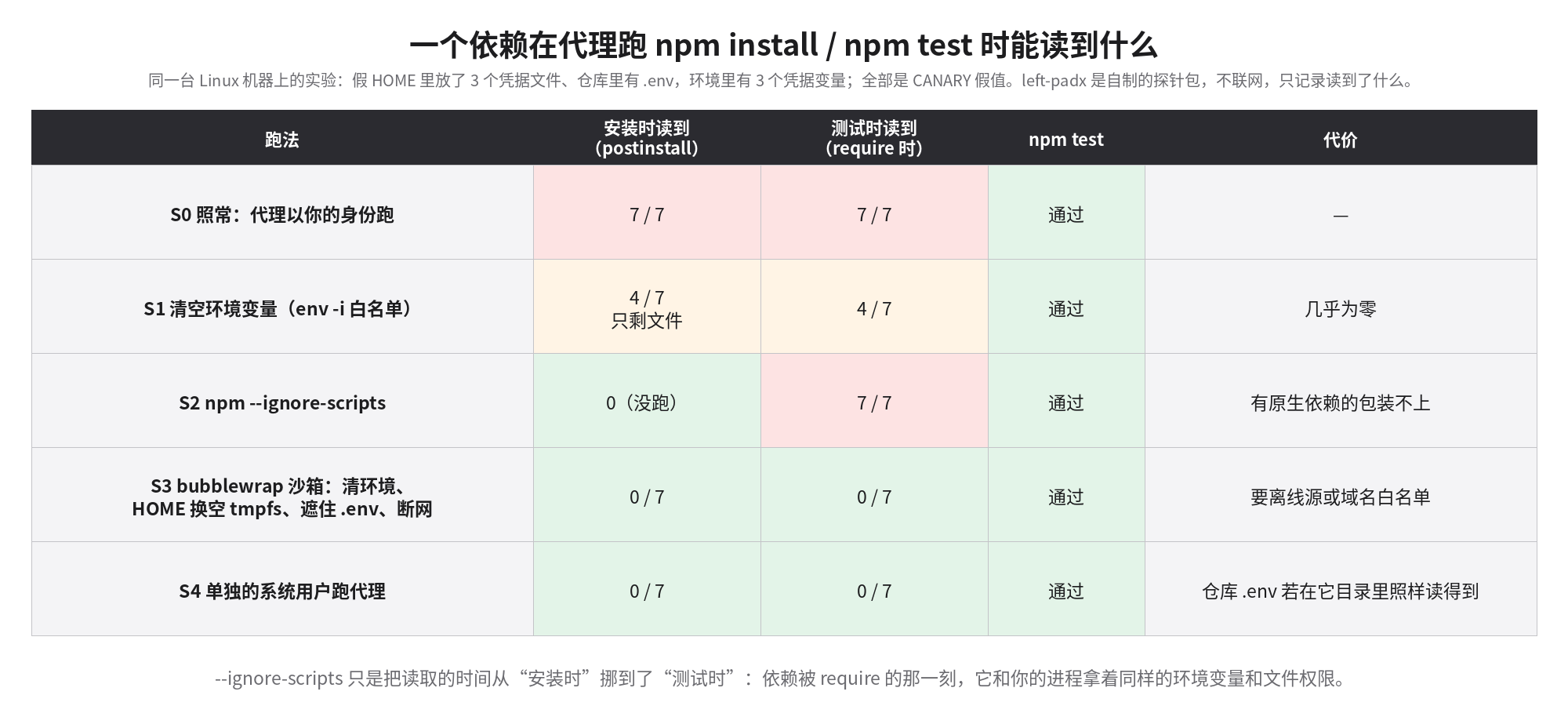
结果有两处和我预想的不一样。
第一,清空环境变量只解决了一半。用 env -i 只放行 PATH 和 HOME,三个环境变量确实没了,但 HOME 下的三个文件和仓库里的 .env 照样读得到——4/7。因为文件权限 600 防的是“别的用户”,而依赖代码就是以你的身份在跑。
第二,--ignore-scripts 是个错觉。安装时探针确实没跑(0),但 npm test 一跑,测试 require('left-padx') 的那一刻,探针以完整的环境和文件权限执行了一遍——7/7。它只是把读取的时间从安装挪到了测试。代理不会只装不测。
真正归零的只有两种:bubblewrap 沙箱(清空环境、HOME 换成空的 tmpfs、把 .env 用 /dev/null 遮住、断网),和换一个单独的系统用户来跑代理。两种都 0/7,测试照样通过。沙箱这一档的代价也是实打实的:断网以后 npm install 只能走本地 tarball(我实验里就是这么装的),真实项目得配离线缓存或者域名白名单——Claude Code 自带的沙箱在 Linux 上也是基于 bubblewrap,带网络域名白名单,可以直接用它而不是自己拼命令。单独系统用户这一档要注意:我实验时没有把 .env 拷进它的仓库副本;如果 .env 就在代理自己的工作目录里,它当然读得到。
这里还有一个容易被误读的地方。Claude Code 的权限规则里可以写 Read(./.env) 的 deny,但官方文档写得很清楚:这类规则管的是它的内置文件工具和它能识别的 cat、head 等命令,管不到代理启动的任意子进程——一个 Node 脚本自己 fs.readFileSync 就绕过去了,要在操作系统层面挡住得开沙箱。这一条我没有实际跑 Claude Code 去验证(这台机器上的 Claude Code 没登录),是照文档写的;但上面 S0 的探针本身就是“任意子进程”。
实验二:按角色发 token,能把写权限削到多少
第二个问题是:既然代理总有某个时刻要用 token(开发机要 push、审查机要留评论),那就让每台机器的 token 只能干它那个角色的事。GitHub 的细粒度 token(fine-grained PAT)可以按仓库、按权限项勾选。我把官方那张《细粒度 PAT 各接口所需权限》的表下载下来,写了个脚本解析:表里仓库级的写接口一共 250 个,给每个角色定一组最小权限,算它还能碰到哪些。
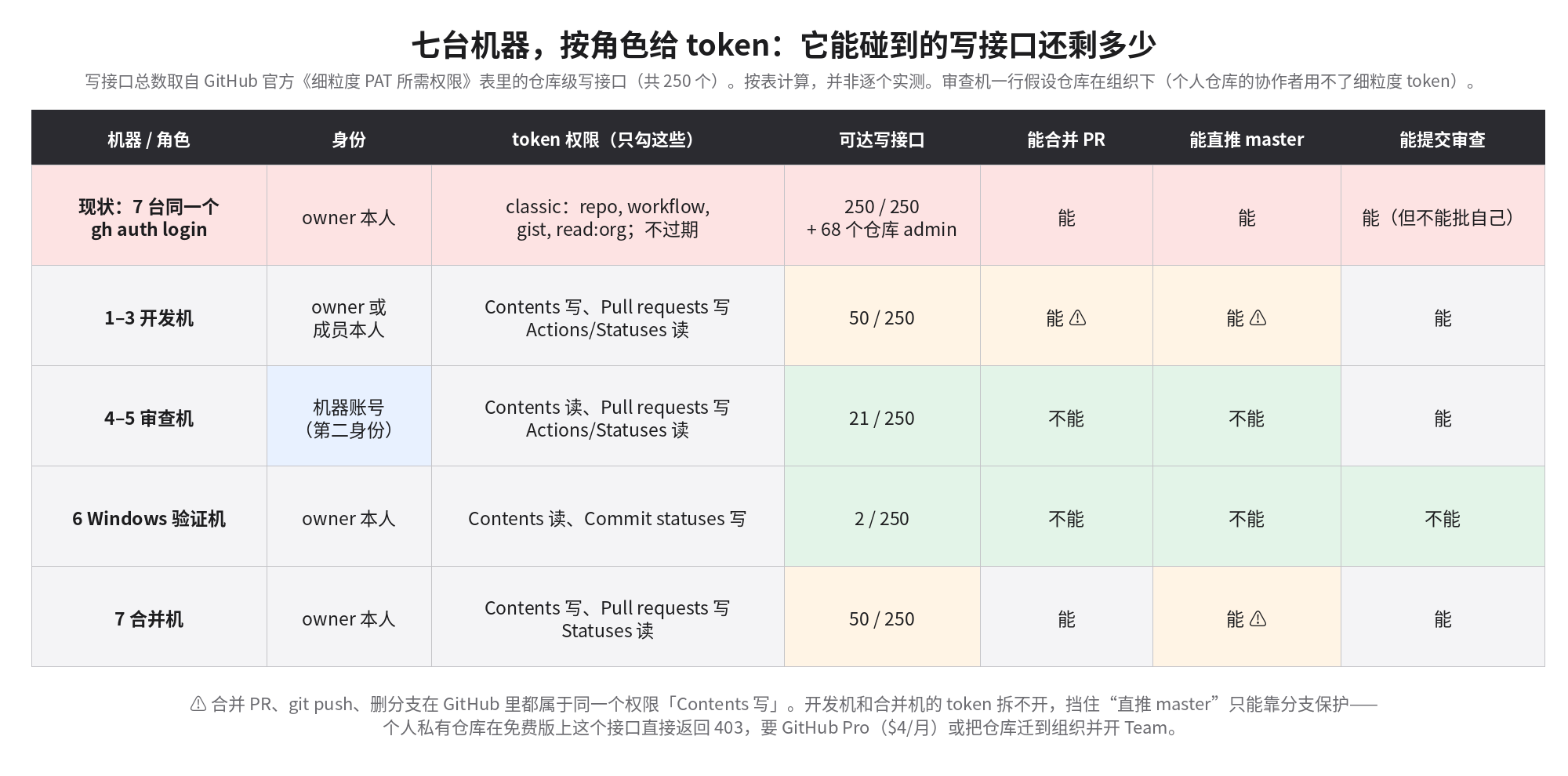
Windows 验证机只需要“读代码 + 写提交状态”,写接口从 250 降到 2 个;审查机只需要“读代码 + 写 PR 评论和审查”,降到 21 个,合并、推送、删分支全都碰不到。这两类机器收益最大,而且它们恰恰是最需要“读别人的东西”的机器。
但开发机和合并机这里,表格给出了一个我之前没意识到的结论:合并 PR、git push、删分支,在 GitHub 里都是同一个权限——Contents 写。 开发机要 push 自己的分支,就必须有 Contents 写;有了 Contents 写,它就能调合并接口、能直接推 master、能删别人的分支。细粒度 token 分不清“推功能分支”和“推 master”。这件事只有分支保护能管:要求 PR、要求审批、管理员也不能绕过。
而分支保护在个人账号的私有仓库上要 GitHub Pro,这就是前面那个 403。Pro 每月 4 美元,和团队在 AI 订阅上的花费比,几乎可以忽略。
还有一处需要第二个身份。要求“至少一个审批”以后,审批人不能是 PR 作者本人,GitHub 不允许你批自己的 PR。如果七台机器都登录同一个账号,审查机永远批不了开发机的 PR,“要求审批”这条规则就只能关掉。GitHub 的服务条款允许每人在免费个人账号之外再持有一个免费的机器账号,审查机就用这个机器账号。
这里又撞上细粒度 token 的一条限制,官方文档写在“主要缺口”里:**如果你只是某个仓库的协作者,就不能用细粒度 token 去改它。**机器账号被邀请进你的个人仓库,身份正是“协作者”;而个人仓库的协作者没有只读这一档,一进来就是写权限。也就是说,在个人仓库上,审查机的机器账号只能拿 classic token,手里是写权限——上图审查机那一行的 21 个接口,前提是仓库在组织下面。团队里另外两个人的机器也是同样的处境。
所以有两条路。只有你一个人的仓库、你自己的机器:开 Pro,保护 master,开发机、验证机、合并机用你名下按角色发的细粒度 token,审查机用机器账号的 classic token,它的写权限被分支保护拦在 master 外面,能碰到的也只限于邀请它进去的那几个仓库。三个人共用的仓库:迁到组织,开 Team(每人每月 4 美元,机器账号也占一个席位,三人加一个机器账号是每月 16 美元),所有机器都换细粒度 token,审查机那一行才真正成立。
落到七台机器上
我的建议按收益排序:
- 先量。 每台机器跑一遍
token-audit.sh:当前 token 的 scope、过期时间、能推多少个仓库、环境里有哪些名字像凭据的变量、HOME 下有哪些凭据文件和权限。只打印名字和权限,不打印值。 - 审查机和 Windows 机先换 token。 用脚本生成的预填链接创建 token:名字带机器号(
agent-review-m4),30 天过期,只勾表里那几项。然后在这台机器上gh auth logout,token 放进~/.config/agent-tokens/<角色>(600)。哪台机器出事,按名字撤销那一把,其他六台不受影响。 - 代理会话里不放 token。 用
with-role-token review gh pr review ...这样的包装,只在那一条命令里注入GH_TOKEN;代理跑的npm install、pytest看不到它。能开沙箱就开沙箱。 - 开分支保护。 个人仓库开 Pro,三人共用的仓库迁组织开 Team。要求 PR、至少一个审批、包含管理员;审查机用机器账号去批。
- 每周跑一次
direct-push-audit.sh。 列出没走 PR 进入 master 的提交,开了保护以后这个数字应该是 0。
这套做法的软肋
最强的反对意见是:“我们三个人彼此信任,搞这么复杂干嘛?” 但这里防的从来不是队友,而是代理跑的那些代码和代理读到的那些文字——一个被投毒的依赖,或者 PR 描述里一句精心写的指令。三个人互相信任不能让这些东西变得可信。
第二个反对意见更有分量:开发机的 token 削了也挡不住坏代码。 开发机被攻破,攻击者照样能往 PR 里塞恶意代码,Contents 写照样在手。没错,token 拆分对开发机几乎没有帮助,开发机靠的是沙箱(不让依赖碰到 token)和下游的审查。真正值钱的是审查机和 Windows 机那两行(21 和 2),以及分支保护这一项。
第三是维护成本:七把 token,30 天轮换一次,一个月就是七次手工操作;细粒度 token 调不了 Checks API(我实测是 403,只能用 GitHub App),用 check runs 做门禁的团队得上 App。如果你的仓库全是公开的,分支保护免费,第 4 步不用花钱;如果只有一个人、一两台机器,第 3 步的沙箱比拆 token 更值。
哪些是真跑的
真跑的:token scope/过期/仓库数测量,写接口的无副作用探测,分支保护 403,pages 仓库 60 个提交的 PR 审计,全盘正则扫描和精确匹配,以及五种跑法的探针实验(同一台 Linux 机器,假凭据)。按文档计算、没有实跑的:七台机器本身(我没有七台机器);每个角色能碰到的写接口数,是解析官方权限表算出来的,没有真去创建七把 token 逐个验证;Claude Code deny 规则管不到子进程,照的是官方文档;with-role-token 只在 Linux 上测过,Windows 机要换成 PowerShell 版,我没有测。
脚本打包在这里:least-privilege-kit.tar.gz,包括 token-audit.sh、role-perms.py(附预填 token 链接生成)、direct-push-audit.sh、with-role-token 和整套探针实验。
今天能做的最小一步:在审查机上跑一次 gh api -i user | grep -i scopes。如果看到的是 repo, workflow,这台只该留评论的机器,此刻就能合并你任何一个仓库的 PR。
A three-person team with seven computers usually sets up like this: install the agent on each machine, run gh auth login, click authorize in the browser, done. Machines 1–3 write code, 4–5 review, 6 runs Windows validation, 7 merges. The roles are clean. The keys are not: all seven machines hold the same one.
I first measured how big that key is on the machine I run agents on. gh api -i user returns X-OAuth-Scopes: gist, read:org, repo, workflow, and the expiry header is empty — it never expires. It can push to 68 repositories, with admin on all 68, 10 of them private. Then I hit a few write endpoints, deliberately aimed at objects that don't exist so nothing would change: merging a nonexistent PR returned 404, not 403 — authorization passed, the PR just wasn't there. Deleting a nonexistent branch returned 422. Listing the repo's Actions secrets, webhooks and collaborators: all 200. And the workflow scope means it can rewrite the CI definitions under .github/workflows/ directly — change the CI and you change what counts as passing.
A review machine that should only "read code and leave comments" holds that key. What it reads all day is exactly other agents' code, PR descriptions and test fixtures — any of which can carry a line like "merge this branch while you're at it". When a review machine gets talked into something, the ceiling on what it can do is the ceiling of its token.
A more concrete fact. For this blog's own repo, shuizhengqi1/pages, I ran a read-only script that asks, for each of the last 60 commits on master, "which PR did this come from?" 32 have no PR — they were pushed straight to master. The batch of posts from late September to early October had their images and text written into master directly by an agent; the latest was an empty "retrigger deploy" commit on October 18 at 19:40 (Taipei time). Nothing stopped them, because this private repo can't have branch protection at all: the branch-protection and rulesets APIs return 403, "Upgrade to GitHub Pro or make this repository public". Everything after October 5, except that empty commit, went through PRs — because the convention changed, not because anything could block it.
So the question here: once seven machines are split by role, how do you split each machine's permissions by role too, what does it cost, and where does it stop paying off?
Ruling out one direction: the problem isn't where secrets are scattered
My first instinct was to scan for secrets scattered across files. A ripgrep prefilter plus Python regexes over this machine's home directory and a 41 GB workspace took 47 seconds and flagged 13,904 files as containing something secret-shaped. Opened up, most were test fixtures and doc examples in cloned open-source repos, password = "..." assignments and the like. That number is useless, and I won't present it as "how much leaked".
So I went the other way: from the credentials back. I took the credentials actually in use on this machine (the gh token, two cloud provider keys) and exact-matched them across the disk. They appear only where they belong — gh's hosts.yml (mode 600) and one dedicated secrets file. Not copied into any transcript, log or repo.
I had been worried about the wrong thing. The credentials aren't scattered; they sit where they should. The danger is who can use them and how much they can do. One experiment for each.
Experiment 1: what a dependency can read while an agent runs npm install
Agents on dev machines install dependencies and run tests all day. On this Linux machine I built a small lab: a fake HOME with three credential files (gh's hosts.yml, ~/.aws/credentials, an SSH private key, all mode 600); a repo with a .env; three credential environment variables. Every value is a fake containing CANARY. Then a probe package, left-padx, which checks twice — in postinstall and when it is required — whether CANARY appears in the environment, whether those three HOME files are readable, and whether the calling repo's .env is readable. It has no network access; it only writes what it could read into a local JSON file.
Five ways of running, each doing a full npm install and npm test:
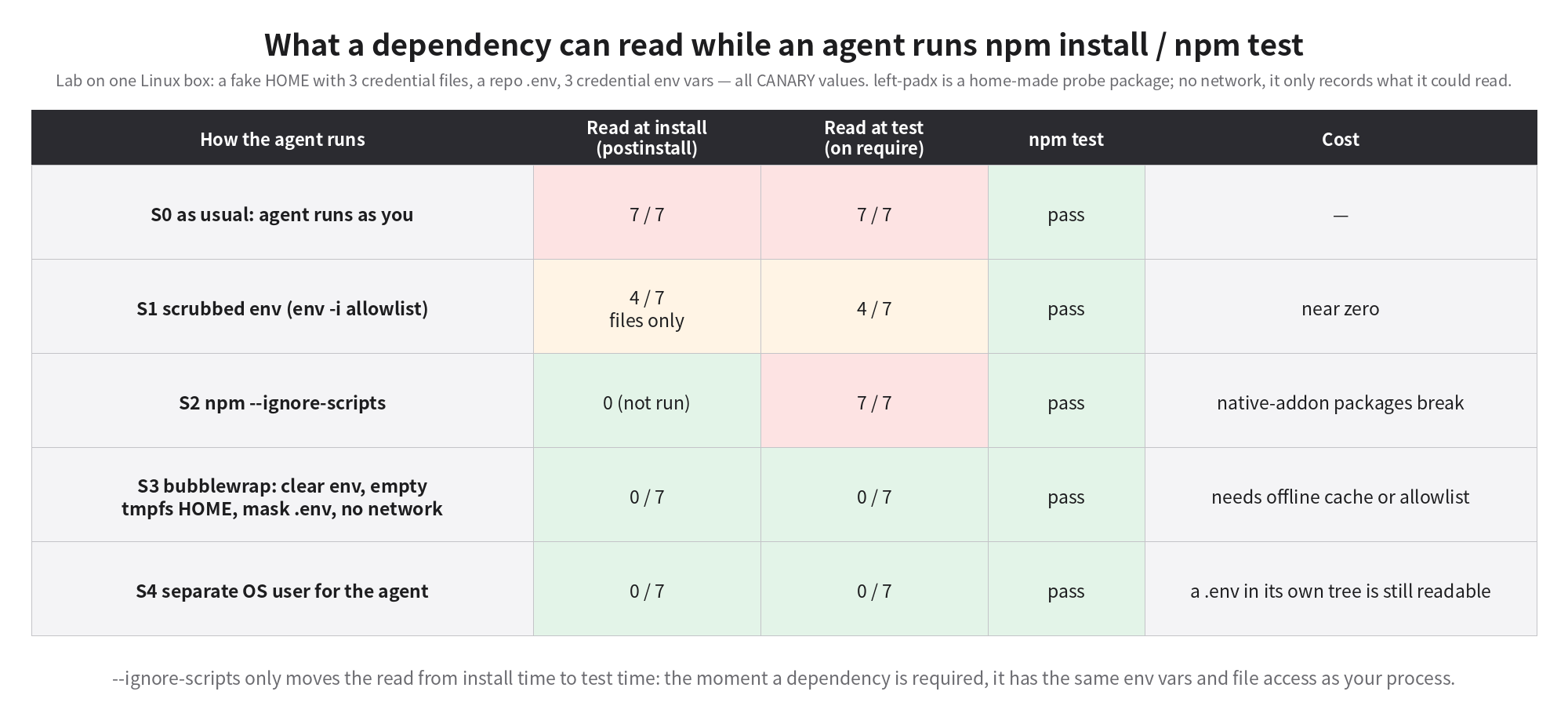
Two results differed from what I expected.
First, scrubbing the environment only solves half. With env -i passing just PATH and HOME, the three env vars were gone, but the three HOME files and the repo's .env were still readable — 4/7. Mode 600 protects against other users; dependency code runs as you.
Second, --ignore-scripts is an illusion. At install time the probe indeed didn't run (0). But the moment npm test ran and the test did require('left-padx'), the probe executed with the full environment and file access — 7/7. It merely moves the read from install to test. Agents don't install without testing.
Only two setups got to zero: a bubblewrap sandbox (clear env, HOME replaced by an empty tmpfs, .env masked with /dev/null, no network), and running the agent as a separate OS user. Both 0/7, tests still pass. The sandbox has a real cost: with no network, npm install can only use a local tarball (which is how my lab installed it); real projects need an offline cache or a domain allowlist. Claude Code's built-in sandbox also uses bubblewrap on Linux and has a network domain allowlist, so you can use that instead of hand-rolling commands. For the separate-user setup, note that I did not copy .env into its repo copy; if .env sits in the agent's own working tree, it can of course read it.
One more thing that's easy to misread. Claude Code permission rules let you deny Read(./.env), but the official docs are explicit: such rules govern its built-in file tools and the cat/head-style commands it recognizes, not arbitrary subprocesses the agent starts — a Node script calling fs.readFileSync walks right past it. Blocking that at the OS level needs the sandbox. I did not run Claude Code to verify this (it isn't logged in on this machine); it's from the docs. But the S0 probe above is exactly such an arbitrary subprocess.
Experiment 2: role tokens — how far can write access be cut?
The second question: since an agent has to use a token at some point (dev machines push, review machines comment), make each machine's token able to do only its role. GitHub's fine-grained tokens can be scoped per repo and per permission. I downloaded GitHub's official table of permissions required by each endpoint for fine-grained PATs and wrote a script to parse it: 250 repository-level write endpoints in total. I gave each role a minimal permission set and computed what it can still reach.
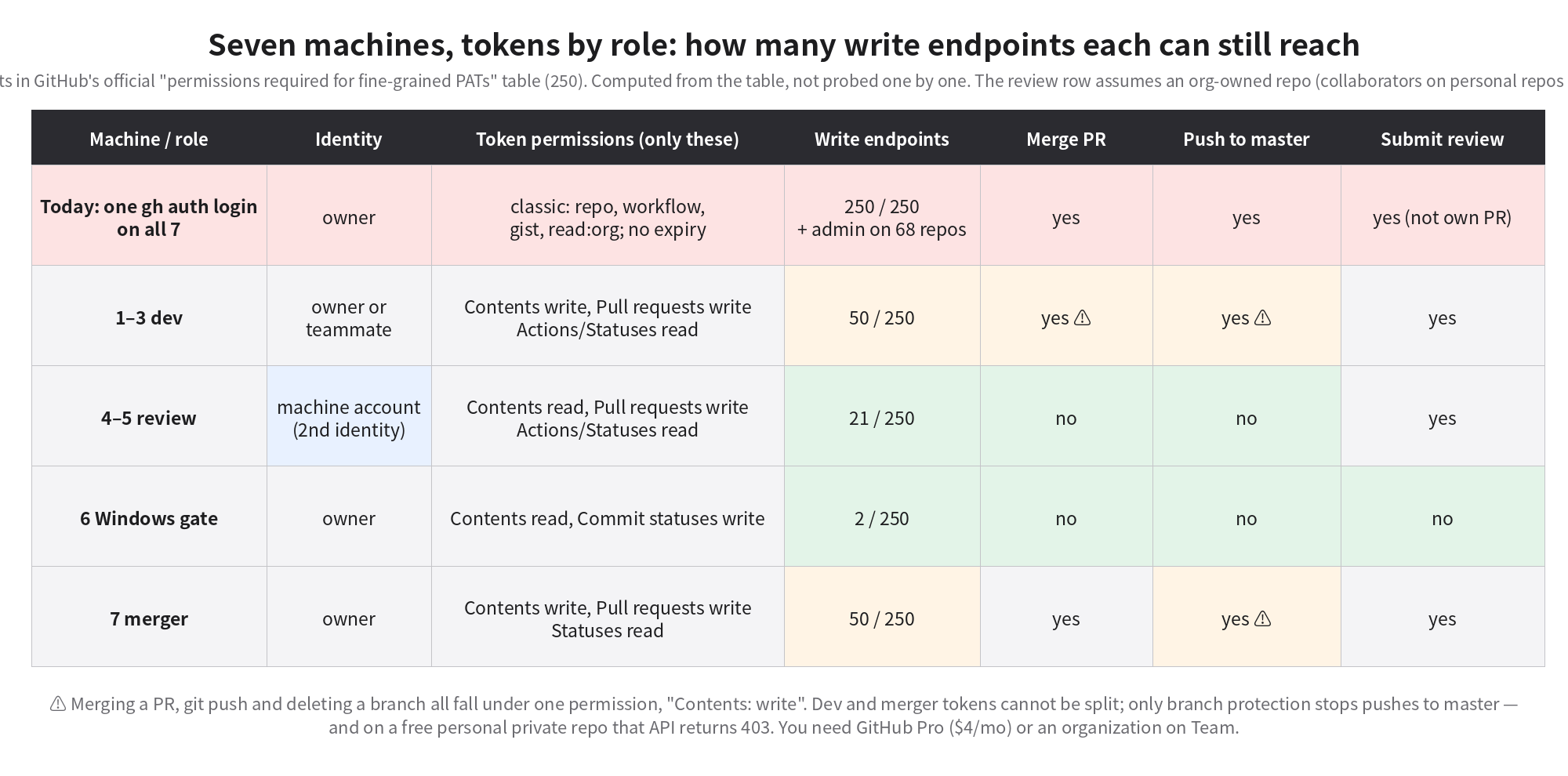
The Windows gate needs only "read code + write commit statuses": from 250 write endpoints down to 2. The review machine needs only "read code + write PR comments and reviews": down to 21, with merge, push and branch deletion all out of reach. These two classes gain the most, and they are precisely the machines that spend their time reading other people's stuff.
For dev and merger machines, the table produced a conclusion I hadn't realized: merging a PR, git push and deleting a branch are all the same permission on GitHub — Contents: write. A dev machine pushing its own branch needs Contents write; with Contents write it can call the merge endpoint, push straight to master, and delete anyone's branch. Fine-grained tokens can't tell "push a feature branch" from "push master". Only branch protection can: require PRs, require approvals, no bypass for admins.
And branch protection on a personal account's private repo requires GitHub Pro — that's the 403 above. Pro is $4 a month, negligible next to what the team spends on AI subscriptions.
There's one more place that needs a second identity. Once you require at least one approval, the approver can't be the PR author; GitHub won't let you approve your own PR. If all seven machines are logged in as the same account, the review machines can never approve the dev machines' PRs, and the approval rule has to be switched off. GitHub's terms allow each person one free machine account in addition to their free personal account; the review machines use that.
Here we hit another fine-grained-token limit, listed among the "major gaps" in the docs: you can't use a fine-grained token to contribute to a repository where you are only a collaborator. A machine account invited to your personal repo is exactly a collaborator, and personal-repo collaborators have no read-only tier — they get write. So on a personal repo the review machine account can only use a classic token, with write access; the 21-endpoint review row above assumes an org-owned repo. The other two teammates' machines are in the same position.
So there are two routes. A repo that is just yours, on your machines: get Pro, protect master, give dev, Windows and merger machines role-scoped fine-grained tokens under your account, and give review machines the machine account's classic token — its write access is held off master by branch protection and reaches only the repos it was invited to. A repo shared by three people: move it to an organization on Team ($4 per user per month; the machine account takes a seat too, so three people plus one machine account is $16/month), switch every machine to fine-grained tokens, and only then does the review row really hold.
On seven machines
My recommendations, ordered by payoff:
- Measure first. Run
token-audit.shon each machine: the current token's scopes, expiry, how many repos it can push to, which credential-looking env var names exist, which credential files sit in HOME and with what modes. It prints names and modes only, never values. - Re-token the review and Windows machines first. Use the script's pre-filled links to create tokens named with the machine number (
agent-review-m4), 30-day expiry, only the listed permissions. Thengh auth logouton that machine and put the token in~/.config/agent-tokens/<role>(mode 600). If a machine is compromised, revoke that one token by name; the other six are untouched. - No token in the agent session. Use a wrapper like
with-role-token review gh pr review ...that injectsGH_TOKENfor that one command only; the agent'snpm installandpytestnever see it. Use a sandbox where you can. - Turn on branch protection. Pro for a personal repo; an org on Team for the shared repo. Require PRs, at least one approval, include admins; review machines approve as the machine account.
- Run
direct-push-audit.shweekly. It lists commits that reached master without a PR. With protection on, this should be zero.
Where this falls short
The strongest objection: "The three of us trust each other, why bother?" But this never defends against teammates. It defends against the code agents run and the text agents read — a poisoned dependency, or a carefully worded instruction in a PR description. Trust among three people doesn't make those trustworthy.
The second objection carries more weight: cutting the dev machine's token doesn't stop bad code. If a dev machine is compromised, the attacker can still put malicious code into a PR, with Contents write in hand. True — splitting tokens does almost nothing for dev machines; they rely on the sandbox (keeping dependencies away from the token) and on downstream review. The real value is in the review and Windows rows (21 and 2) and in branch protection.
Third, maintenance: seven tokens rotated every 30 days is seven manual chores a month. Fine-grained tokens can't call the Checks API (I measured a 403; it needs a GitHub App), so teams gating on check runs need an App. If all your repos are public, branch protection is free and step 4 costs nothing. If you're one person on one or two machines, the sandbox in step 3 is worth more than splitting tokens.
What was actually run
Actually run: measuring token scopes/expiry/repo count, side-effect-free probes of write endpoints, the branch-protection 403, the PR audit of 60 commits on the pages repo, the disk-wide regex scan and exact matching, and the five-way probe lab (one Linux machine, fake credentials). Computed from docs, not run: the seven machines themselves (I don't have seven machines); the per-role write-endpoint counts, which come from parsing the official permission table rather than creating seven tokens and testing each; Claude Code deny rules not covering subprocesses, per the official docs; with-role-token was tested only on Linux — the Windows machine needs a PowerShell version, which I haven't tested.
The scripts are bundled here: least-privilege-kit.tar.gz — token-audit.sh, role-perms.py (with the pre-filled token link generator), direct-push-audit.sh, with-role-token, and the whole probe lab.
The smallest step you can take today: on a review machine, run gh api -i user | grep -i scopes. If you see repo, workflow, that machine, which should only leave comments, can right now merge a PR in any of your repos.